Avamar: Unable to edit DD in the AUI if the 'Use certificate authentication for REST communication' is selected
Sommaire: If the 'Use certificate authentication for REST communication' checkbox is selected, a Data Domain cannot be edited from the Avamar AUI.
Cet article s’applique à
Cet article ne s’applique pas à
Cet article n’est lié à aucun produit spécifique.
Toutes les versions de produits ne sont pas identifiées dans cet article.
Symptômes
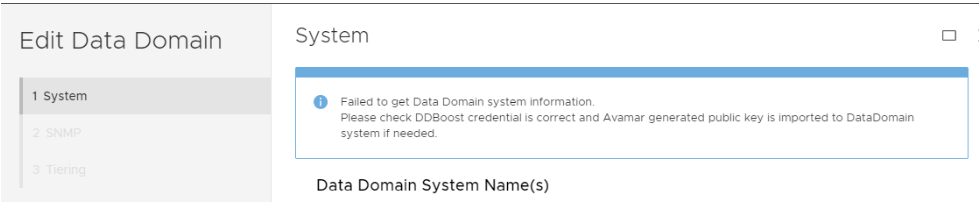
While attempting to "Validate" when editing a Data Domain within the Avamar Web User Interface (AUI), the following error occurs:
Failed to get Data Domain system information.
Please check DDBoost credential is correct and Avamar generated public key is imported to DataDomain system if needed.
For example:
Note: This issue is only seen in the AUI, not the Java UI.
Cause
This occurs if Avamar Security Session is disabled and the checkbox next to "Use certificate authentication for REST communication" (shown below) is selected:
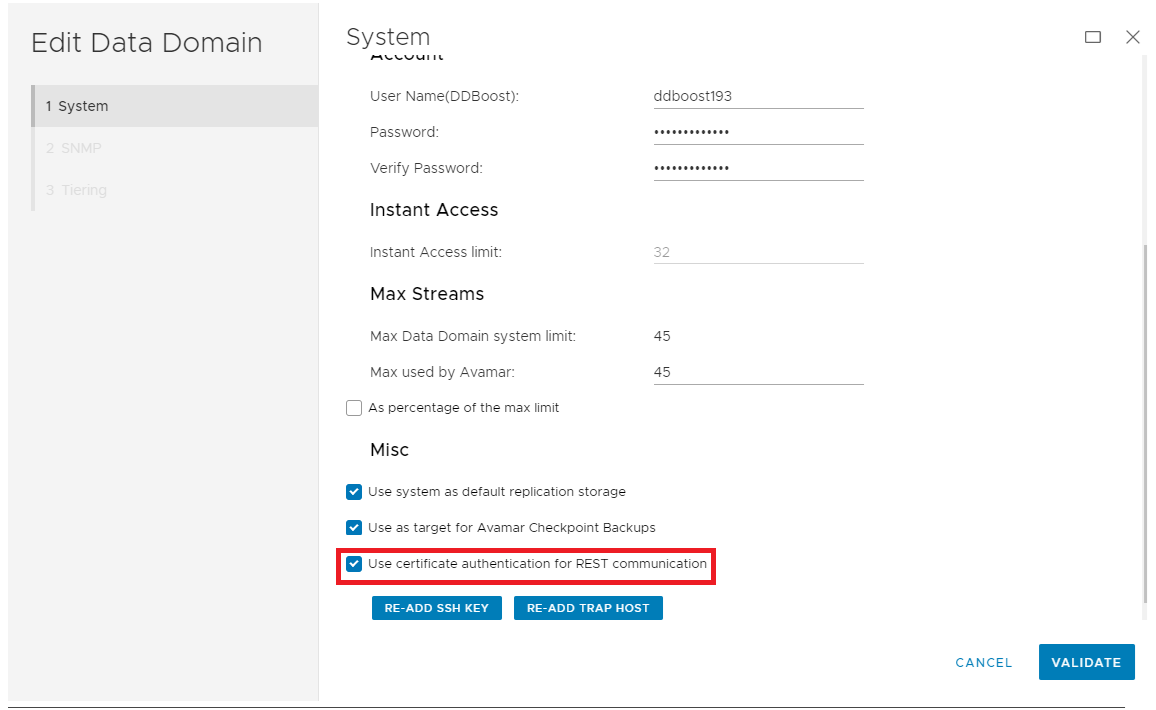
This feature is only supported when Avamar Session Security features are enabled.
If Avamar Session Security is disabled, the error is received.
Résolution
1.Verify the current Session Security Session settings:
a. Log in to the Avamar Utility Node as admin.
b. Elevate to root privilege.
c. Run the following command:
enable_secure_config.sh --showconfig
If Session Security is disabled, the output is similar to the following:
Current Session Security Settings
----------------------------------
"encrypt_server_authenticate"                           ="false"
"secure_agent_feature_on"                               ="false"
"session_ticket_feature_on"                             ="false"
"secure_agents_mode"                                    ="unsecure_only"
"secure_st_mode"                                        ="unsecure_only"
"secure_dd_feature_on"                                  ="false"
"verifypeer"                                            ="no"

Client and Server Communication set to Default (Workflow Re-Run) mode with No Authentication.
Client Agent and Management Server Communication set to unsecure_only mode.
Secure Data Domain Feature is Disabled.
If Session Security is enabled, the output is similar to the following:
Current Session Security Settings
----------------------------------
"encrypt_server_authenticate"                           ="true"
"secure_agent_feature_on"                               ="true"
"session_ticket_feature_on"                             ="true"
"secure_agents_mode"                                    ="mixed"
"secure_st_mode"                                        ="mixed"
"secure_dd_feature_on"                                  ="true"
"verifypeer"                                            ="no"
2. If Session Security is disabled, clear the 'Use certificate authentication for REST communication' checkbox in the AUI and retry the required activity.
If Session Security is already enabled, the error should not be received.
Produits touchés
Avamar, Data DomainPropriétés de l’article
Numéro d’article: 000203336
Type d’article: Solution
Dernière modification: 11 déc. 2025
Version: 6
Obtenez des réponses à vos questions auprès d’autre utilisateurs de Dell
Services de soutien
Vérifiez si votre appareil est couvert par les services de soutien.