Slik finner du USB-donglen for Dell Pro-tastaturet og -musen KM5221W
Sommaire: Finn ut hvordan du finner Dell Pro-tastaturet og -musen KM5221W USB-donglen ved å følge disse trinnvise instruksjonene.
Cet article s’applique à
Cet article ne s’applique pas à
Cet article n’est lié à aucun produit spécifique.
Toutes les versions de produits ne sont pas identifiées dans cet article.
Instructions
Dell Pro-tastaturet og -musen bruker KM5221W én vanlig trådløs USB-dongle for både tastatur og mus.
Berørt tastatur:
- Dell Pro-tastatur og -mus KM5221W
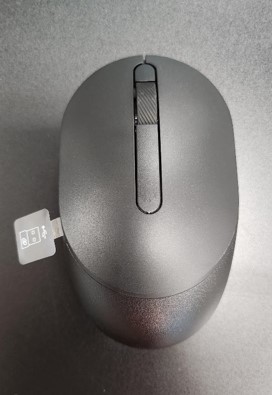
- Når du pakker ut KM5221W, må du se etter USB-dongleetiketten som stikker ut fra musen.
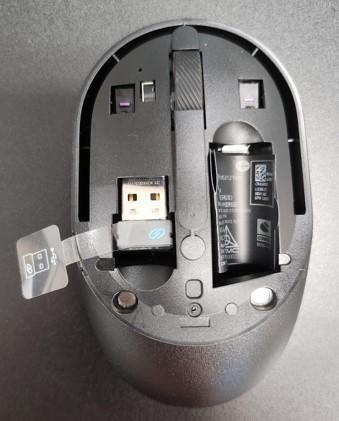
- Ta forsiktig av toppdekslet på musen, og finn deretter donglen.
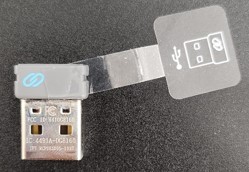
- Fjern USB-donglen fra dongleoppbevaringen i musen.
- Gå til Støtte for Dell Pro-tastatur og -mus KM5221W og se hurtiginstallasjonsveiledningen for Dell Pro-tastaturet og -musen eller hurtiginstallasjonsveiledningen for Dell Pro og -KM5221W musen eller brukerveiledningen for å fullføre oppsettet.
Produits touchés
Alienware, Dell All-in-One, Dell Pro All-in-One, Dell Pro Max Micro, Dell Pro Max Slim, Dell Pro Max Tower, Dell Pro Micro, Dell Pro Slim, Dell Pro Tower, Dell Slim, Dell Tower, Inspiron, OptiPlex, Vostro, XPS, G Series, Chromebook, G Series
, Alienware, Dell Plus, Dell Pro, Dell Pro Max, Dell Pro Plus, Dell Pro Premium, Inspiron, Latitude, Dell Pro Rugged, Vostro, XPS, Fixed Workstations, Mobile Workstations, Dell Pro Max Micro XE FCM2250, Dell Pro Keyboard and Mouse KM5221W
...
Propriétés de l’article
Numéro d’article: 000214907
Type d’article: How To
Dernière modification: 07 mai 2025
Version: 5
Obtenez des réponses à vos questions auprès d’autre utilisateurs de Dell
Services de soutien
Vérifiez si votre appareil est couvert par les services de soutien.