NVIDIA RTX Desktop Manager holder skrivebordet åbent
Sommaire: Denne artikel indeholder oplysninger om det nyoprettede skrivebordsproblem for NVIDIA RTX Desktop Manager kan ikke lukkes.
Cet article s’applique à
Cet article ne s’applique pas à
Cet article n’est lié à aucun produit spécifique.
Toutes les versions de produits ne sont pas identifiées dans cet article.
Symptômes
Dell-computere med dedikeret NVIDIA GPU kan opleve, at NVIDIA RTX Desktop Manager ikke kan lukke den nyoprettede stationære pc.
- Åbn NVIDIA RTX Desktop Manager, og klik på ENABLE RTX DESKTOP MANAGER™, mens programmet opretter Desktop 1 som standard.
- Klik på knappen nyt skrivebord for at oprette et andet skrivebord.
- Klik på X-ikonet i øverste højre hjørne af Desktop 2 , men find ud af, at det ikke kan lukkes.
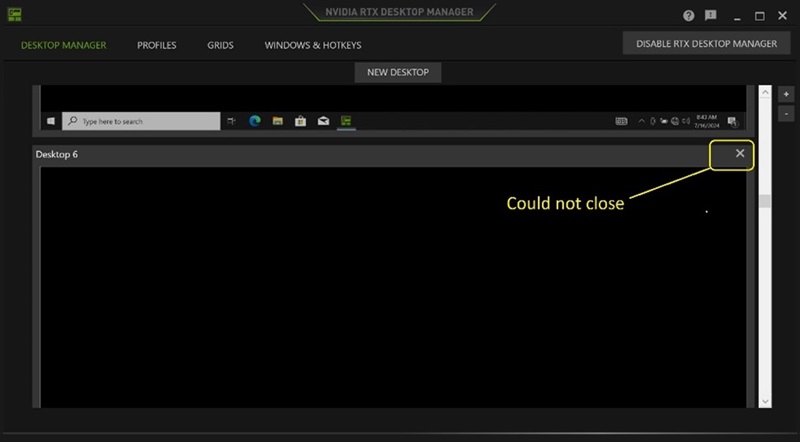
(Figur 1 - NVIDIA RTX Desktop Manager)
Berørte platforme:
- Precision 7780
- Precision 7680
- Precision 7770
- Precision 7670
- Precision 7560
- Precision 7760
- Precision 7550
- Precision 7750
- Precision 7540
- Precision 7740
- Precision 7530
- Precision 7730
- Precision 7520
- Precision 7720
- Precision 5480
- Precision 5490
- Latitude 3490
- Latitude 3480
- Latitude 3470
- Latitude 3550
- Latitude 3530
- Latitude 3520
Cause
Ikke tilgængelig
Résolution
Opdatering af NVIDIA Graphic Driver til version 552.84 eller nyere på computeren løser problemet. For at downloade og installere driveren henvises til Sådan downloades og installeres Dell-drivere.
Produits touchés
Dell Latitude 3480/3488, Latitude 3490, Latitude 3520, Latitude 3530, Latitude 3550, Latitude 3470, Precision 5480, Precision 5490, Precision 7520, Precision 7530, Precision 7540, Precision 7550, Precision 7560, Precision 7670, Precision 7680
, Precision 7720, Precision 7730, Precision 7740, Precision 7750, Precision 7760, Precision 7770, Precision 7780
...
Propriétés de l’article
Numéro d’article: 000227614
Type d’article: Solution
Dernière modification: 24 avr. 2025
Version: 2
Obtenez des réponses à vos questions auprès d’autre utilisateurs de Dell
Services de soutien
Vérifiez si votre appareil est couvert par les services de soutien.