Comment confirmer l’installation d’une version corrigée de ControlVault3 répertoriée dans DSA-2025-053
Sommaire: Cet article fournit des informations sur la confirmation de l’installation d’une version corrigée de ControlVault3 répertoriée dans DSA-2025-053.
Cet article s’applique à
Cet article ne s’applique pas à
Cet article n’est lié à aucun produit spécifique.
Toutes les versions de produits ne sont pas identifiées dans cet article.
Instructions
Sommaire
- Confirmation de la version de ControlVault3 à l’aide du Gestionnaire de périphériques
- Confirmation de la version de ControlVault3 à l’aide d’un script PowerShell
Confirmation de la version de ControlVault3 à l’aide du Gestionnaire de périphériques
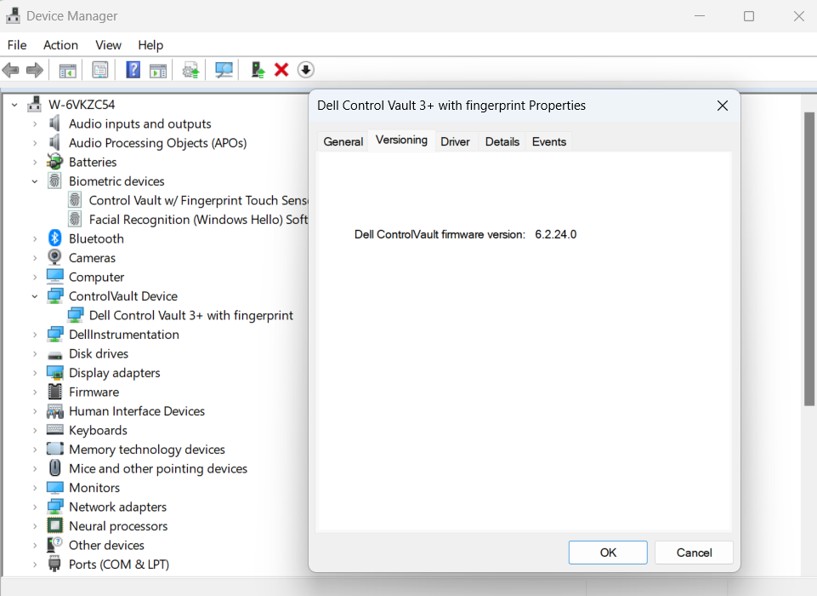
La meilleure façon de rechercher la version de votre package de pilote ControlVault consiste à rechercher la version de ControlVault dans le Gestionnaire de périphériques.
- Saisissez
devmgmt.mscdans la barre de recherche ou d’exécution et appuyez sur Entrée - Recherchez et développez ControlVault Device, cliquez avec le bouton droit de la souris sur Dell ControlVault, sélectionnez Propriétés, puis accédez à l’onglet Gestion des versions
Remarque : L’appareil peut avoir ControlVault répertorié sans capteur tactile d’empreintes digitales
- Assurez-vous que la version de votre firmware est 5.15.7.0 pour ControlVault3 ou 6.2.24.0 pour ControlVault3+

Confirmation de la version de ControlVault3 à l’aide d’un script PowerShell
Ces instructions sont destinées à être exécutées directement sur l’ordinateur testé à l’aide du script PowerShell ci-dessous.
- À l’aide du script au bas de cet article, créez un fichier nommé :
Verify_ControlVault_dsa-2025-053_Standalone_V1.ps1- Ce script :
- Vérifie si le pilote Dell Control Vault est installé sur l’ordinateur et renvoie le résultat à
$ControlVaultDriver - Si le pilote Control Vault est trouvé, tirez la dernière ligne de
CVFirmwareUpgradeLog.txtet comparez la révision du firmware (FW) à la révision requise du firmware de DSA pour CV3 et CV3+. Si le firmware requis est respecté, sortie vers la console
- Vérifie si le pilote Dell Control Vault est installé sur l’ordinateur et renvoie le résultat à
- Ce script :
- Ouvrir PowerShell
- Appuyez sur les touches Windows + R, saisissez
PowerShellet appuyez sur Entrée
ou, - Recherchez PowerShell dans le menu Démarrer et sélectionnez-le
- Appuyez sur les touches Windows + R, saisissez
- PowerShell peut bloquer des scripts en fonction de la stratégie de votre ordinateur. Vous devez modifier temporairement cette restriction en copiant et en collant ce script dans PowerShell, puis en appuyant sur Entrée :
Set-ExecutionPolicy -Scope Process -ExecutionPolicy Bypass
- Utilisez cd pour remplacer le répertoire par lequel votre script est enregistré, par exemple :
cd “C:\Users\UserName\Documents\Scripts"
- Copiez et collez les éléments suivants dans PowerShell, puis appuyez sur Entrée pour exécuter le script :
.\Verify_ControlVault_dsa-2025-053_Standalone_V1.ps1
- L’un des résultats suivants est renvoyé :
- Le firmware ControlVault doit être mis à jour.
- La mise à jour du firmware ControlVault inclut des atténuations pour DSA-2025-053
- Votre ordinateur ne dispose pas de ControlVault
- Votre ordinateur doit être redémarré
- Erreur si le script ne parvient pas à interpréter la version du firmware
<#PSScriptInfo
.VERSION V1.0 - 8/14/2025
#>

<#
.DESCRIPTION
	This script is intended to verify a Dell system against the vulnerabilities disclosed here https://www.dell.com/support/kbdoc/000276106/dsa-2025-053
	and is not intended to be supported/updated
	It is not intended to be used for keeping ControlVault firmware or drivers up-to-date
	Checks if Dell Control Vault Driver is installed on System and returns result to $ControlVaultDriver
	If Control Vault Driver is found, pull the last line from CVFirmwareUpgradeLog.txt and compare the FW revision to the
	required FW revision from DSA for CV3 and CV3+.  If required firmware meet, output to console

.USEAGE
	This script, Verify_ControlVault_dsa-2025-053_Standalone_V1.ps1 is intended to be run directly on the system intended for testing.
	Verify_ControlVault_dsa-2025-053_inTune_XX.ps1 still in development intended to be run for multiple device compliance reporting through Intune

	RETURNS: ControlVault firmware should be updated.
	RETURNS: Verification Success: ControlVault firmware includes mitigations for DSA-2025-053
	RETURNS: Verification Success: Your computer does not have ControlVault
	RETRUNS: ControlVault maybe updated but needs to complete firmware update validation, Please reboot computer
	RETRUNS: There appears to be an issue parsing the CVFirmwareUpgradeLog.txt; this is likely caused by the last entry of this log not containing the expected data
#>

# Static variables with firmware versions with remediation for ControlVault3 and ControlVault3+
$cv3_required_FWver = [Version]"5.15.7.0"
$cv3plus_required_FWver = [Version]"6.2.24.0"

# Static variables for messaging
$DSA_URL = "https://www.dell.com/support/kbdoc/000276106/dsa-2025-053"
$checkmark = [char]0x2705
$xmark = [char]0x2612
$CVoutofdate = "$xmark ControlVault firmware should be updated. Please refer to $DSA_URL"
$CVcompliant = "$checkmark Verification Success: ControlVault firmware includes mitigations for DSA-2025-053"
$CVnotfound = "Verification Success: Your computer does not have ControlVault"
$CVerror = "There appears to be an issue parsing the CVFirmwareUpgradeLog.txt; this is likely caused by the last entry of this log not containing the expected data"
$CVreboot = "ControlVault maybe updated but needs to complete firmware update validation, Please reboot computer"

# Checks if Dell Control Vault Driver is installed on System and returns result to $ControlVaultDriver
$controlVaultDriver = Get-WmiObject Win32_PnPSignedDriver | Where-Object { $_.DeviceName -like "*Control Vault*" }
$resultstatus = 3

# Find the last entry of the firmwareupgrade log and determine if the firmware version is greater than the firmware version required
if ($ControlVaultDriver){
	$matchingLines = Get-Content "c:\Windows\System32\CVFirmwareUpgradeLog.txt" | Where-Object { $_ -match "Will not update ControlVault firmware from" -or $_ -match "Updating ControlVault firmware from" }
	$lastLine = $matchingLines | Select-Object -Last 1

	if ($lastLine -match "Updating ControlVault firmware from") {
		$resultstatus = 5
		Write-Host "$CVreboot"
	}
	else{
		if ($lastLine -match "Will not update ControlVault firmware from\s+(\d+\.\d+\.\d+\.\d+)") {
			$versionStr = $matches[1]
			$version = [Version]$versionStr

			if (($version.Major -eq 5 -and $version -ge $cv3_required_FWver) -or
				($version.Major -eq 6 -and $version -ge $cv3plus_required_FWver)) {
				$resultstatus = 4
				Write-Host "$CVcompliant"
			}
			else{
				$resultstatus = 2
				Write-Host "$CVoutofdate"
			}
		}
		else{
			$resultstatus = 3
			Write-Host "$CVerror"
		}
	}
}
else{
	$resultstatus = 1
	Write-Host "$CVnotfound"
}


# Create result object
$result = [PSCustomObject]@{
    ComputerName = $env:COMPUTERNAME
    Timestamp = Get-Date -Format "yyyy-MM-dd HH:mm:ss"
    ControlVaultInstalled = $null -ne $controlVaultDriver
	Resultstatus = $resultstatus
    DriverDetails = if ($controlVaultDriver) {

		$controlVaultDriver | Select-Object DeviceName
    } else {
        $null
    }
}

# Return as JSON
$result | ConvertTo-Json -Depth 3
Renseignements supplémentaires
Un autre script est en cours de développement pour être exécuté pour la conformité de plusieurs appareils via InTune. Cet article est mis à jour avec ces détails une fois disponibles.
Consultez la section DSA-2025-053 pour plus d’informations.
Produits touchés
Dell Pro Max 14 MC14250, Dell Pro Max 16 MC16250, Dell Pro 13 Plus PB13250, Dell Pro 14 Plus PB14250, Dell Pro 16 Plus PB16250, Dell Pro Rugged 13 RA13250, Dell Pro Rugged 14 RB14250, Latitude 7030 Rugged Extreme Tablet, Latitude 7200 2-in-1
, Latitude 7210 2-in-1, Latitude 7220EX Rugged Extreme Tablet, Latitude 7220 Rugged Extreme Tablet, Latitude 7230 Rugged Extreme Tablet, Latitude 5300 2-in-1, Latitude 5300, Latitude 5310 2-in-1, Latitude 5310, Latitude 5320, Latitude 5330, Latitude 5340, Latitude 5350, Latitude 7300, Latitude 7310, Latitude 7320, Latitude 7320 Detachable, Latitude 7330, Latitude 7330 Rugged Extreme, Latitude 7340, Latitude 7350, Latitude 7350 Detachable, Latitude 9330, Latitude 5400, Latitude 5401, Latitude 5410, Latitude 5411, Latitude 5421, Latitude 5430 Rugged, Latitude 5431, Latitude 5440, Latitude 5450, Latitude 7400 2-in-1, Latitude 7400, Latitude 7410, Latitude 7420, Latitude 7430, Latitude 7440, Latitude 7450, Latitude 9410, Latitude 9420, Latitude 9430, Latitude 9440 2-in-1, Latitude 9450 2-in-1, Latitude 5500, Latitude 5501, Latitude 5510, Latitude 5511, Latitude 5520, Latitude 5521, Latitude 5530, Latitude 5531, Latitude 5540, Latitude 5550, Latitude 7520, Latitude 7530, Latitude 9510, Latitude 9520, Latitude 7640, Latitude 7650, Latitude 5420, Latitude 5430, Precision 3470, Precision 3480, Precision 3490, Precision 5470, Precision 5480, Precision 5490, Precision 3540, Precision 3541, Precision 3550, Precision 3551, Precision 3560, Precision 3561, Precision 3570, Precision 3571, Precision 3580, Precision 3581, Precision 3590, Mobile Precision 3591, Precision 7540, Precision 7550, Precision 7560, Precision 5680, Mobile Precision 5690, Precision 7670, Precision 7680, Precision 7740, Precision 7750, Precision 7760, Precision 7770, Precision 7780
...
Propriétés de l’article
Numéro d’article: 000353975
Type d’article: How To
Dernière modification: 20 oct. 2025
Version: 5
Obtenez des réponses à vos questions auprès d’autre utilisateurs de Dell
Services de soutien
Vérifiez si votre appareil est couvert par les services de soutien.