Avamar: Windows File system Plugin missing from the backup or restore tab
Riepilogo: Avamar Client: Windows File system Plugin missing from the backup/restore tab
Questo articolo si applica a
Questo articolo non si applica a
Questo articolo non è legato a un prodotto specifico.
Non tutte le versioni del prodotto sono identificate in questo articolo.
Sintomi
Under the backup and restore tab of Avamar administrator, we see that the Filesystem plug-in is missing and we are able to view only the VSS. Review of "C:\Program Files\avs\var\avagent.log shows a warning message that appears to be plug-in (avtar) and agent are different versions and only VSS plug-in being registered.
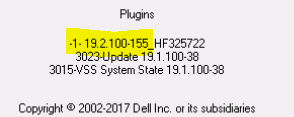
Also, the client icon from system tray indicates a different plug-in
avagent Info : Reading pin file C:\Program Files\avs\bin\windows.pin
avagent Info : Finished READING xml file - starting parse avagent Info : Checking version of plug-in 'Windows', executable name 'avtar' (mode:ctl)
avagent Info : Plug-in version 19.2.100-155_HF325722 found for Windows plug-in
avagent Warning : Plug-in (avtar) and agent are different versions (19.2.100-155_HF325722 and 19.1.100-38).

****** Current MCS name 'avamarserver.com' ******
avagent Info : Registration of client /clients/test.dell.com with MCS avamarserver,com:28001 successful.
avagent Info : Registration of plugin 3015 VSS successful.
avagent Info : Registration of plugin 3023 update successful.
avagent Info : Registration of plugin 3015 VSS successful.
avagent Info : Registration of plugin 3023 update successful.
avagent Info : Registration of client and plugins complete.
Also, the client icon from system tray indicates a different plug-in
Causa
NOTE: This can happen in any version if the uninstallation of the previous plugins is done incorrectly.
In this case customer had previously installed 19.2 with HF325722 (avtar.exe) and decided to downgrade back to 19.1.
When the 19.1 plugin was reinstalled the hotfix binary was not removed due to which only the VSS plugin was visible on the Avamar.
Risoluzione
1. Before you decide to upgrade or downgrade from the existing plugins, please make sure you uninstall it completely .
2. Navigate to control panel, select the application (EMC Avamar for Windows) and click uninstall.
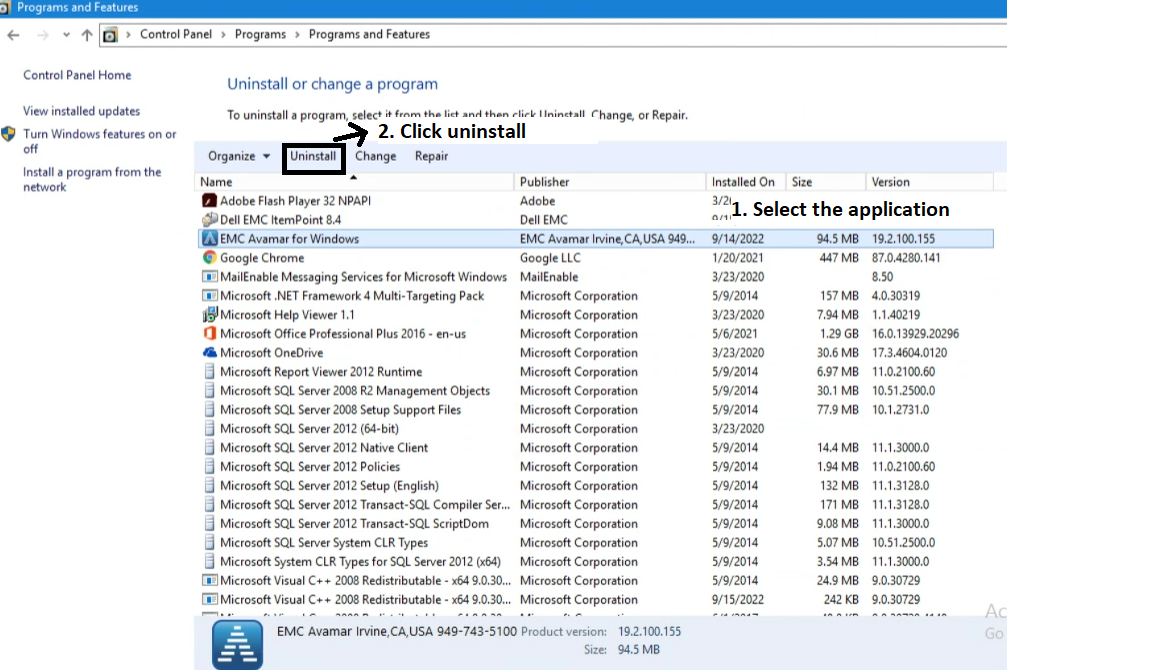
3. Once the plugin is uninstalled you can install the new plugin.
Prodotti interessati
Avamar Client, Microsoft Windows 2012 ServerProprietà dell'articolo
Numero articolo: 000201404
Tipo di articolo: Solution
Ultima modifica: 26 mag 2026
Versione: 4
Trova risposta alle tue domande dagli altri utenti Dell
Support Services
Verifica che il dispositivo sia coperto dai Servizi di supporto.