Avamar:备份或恢复选项卡中缺少 Windows 文件系统插件
Riepilogo: Avamar Client:备份/恢复选项卡中缺少 Windows 文件系统插件
Questo articolo si applica a
Questo articolo non si applica a
Questo articolo non è legato a un prodotto specifico.
Non tutte le versioni del prodotto sono identificate in questo articolo.
Sintomi
在 Avamar Administrator 的 备份和恢复 选项卡下,我们看到缺少文件系统插件,我们只能查看 VSS。对“C:\Program Files\avs\var\avagent.log”的审查显示一条警告消息,该消息似乎是插件 (avtar),并且代理的版本不同,并且仅注册了 VSS 插件。
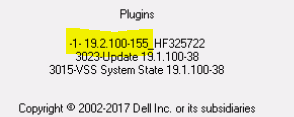
此外,系统托盘中的客户端图标指示不同的插件
avagent Info : Reading pin file C:\Program Files\avs\bin\windows.pin
avagent Info : Finished READING xml file - starting parse avagent Info : Checking version of plug-in 'Windows', executable name 'avtar' (mode:ctl)
avagent Info : Plug-in version 19.2.100-155_HF325722 found for Windows plug-in
avagent Warning : Plug-in (avtar) and agent are different versions (19.2.100-155_HF325722 and 19.1.100-38).

****** Current MCS name 'avamarserver.com' ******
avagent Info : Registration of client /clients/test.dell.com with MCS avamarserver,com:28001 successful.
avagent Info : Registration of plugin 3015 VSS successful.
avagent Info : Registration of plugin 3023 update successful.
avagent Info : Registration of plugin 3015 VSS successful.
avagent Info : Registration of plugin 3023 update successful.
avagent Info : Registration of client and plugins complete.
此外,系统托盘中的客户端图标指示不同的插件
Causa
提醒:如果先前插件的卸载不正确,则在任何版本中都可能发生这种情况。
在这种情况下,客户之前安装了 19.2 和 HF325722 (avtar.exe),并决定降级回 19.1。
重新安装 19.1 插件时,未删除热修复程序二进制文件,因为只有 VSS 插件在 Avamar 上可见。
Risoluzione
1.在决定从现有插件升级或降级之前,请确保完全卸载它。
2.导航到控制面板,选择应用程序(EMC Avamar for Windows),然后单击 卸载 。
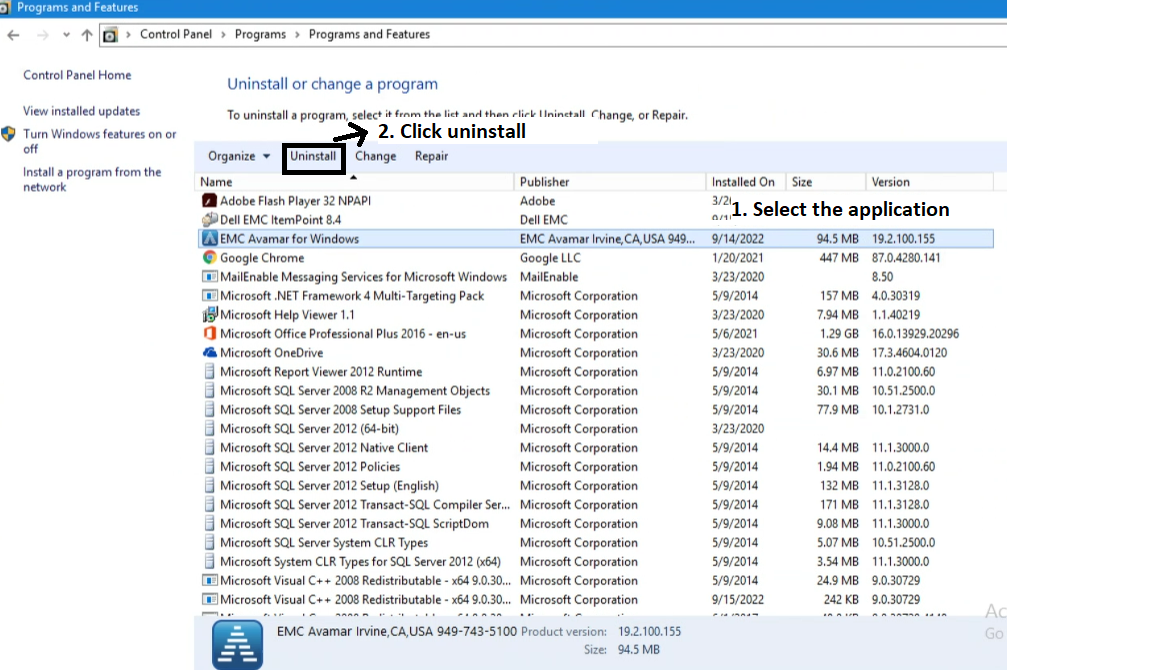
3.卸载插件后,您可以安装新插件。
Prodotti interessati
Avamar Client, Microsoft Windows 2012 ServerProprietà dell'articolo
Numero articolo: 000201404
Tipo di articolo: Solution
Ultima modifica: 26 mag 2026
Versione: 4
Trova risposta alle tue domande dagli altri utenti Dell
Support Services
Verifica che il dispositivo sia coperto dai Servizi di supporto.