NetWorker Family: DD Boost device is Marked as suspect
概要: DD Boost device is Marked as suspect, which result in backups not progressing. And Mounting and Unmounting operation for the device fails.
この記事は次に適用されます:
この記事は次には適用されません:
この記事は、特定の製品に関連付けられていません。
すべての製品パージョンがこの記事に記載されているわけではありません。
現象
- NetWorker DD Boost devices are marked as Suspect impacting data protection operations
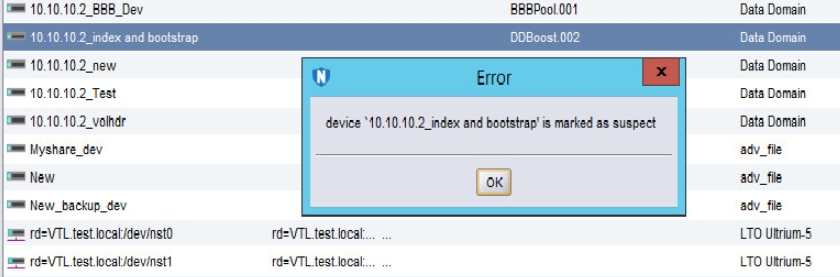
- Any activity on the device such as a "Mount and Unmount" operation fails, stating the following error:
"Device name is Marked as Suspect."
原因
There are multiple causes for the device to be marked as suspect. The Most likely reasons are as follows:
- The NetWorker Server/Storage node losses connection to the DD and conversely.
- The Username/password has changed and the same is not being updated in the "Device Properties."
- The Password for the user has expired.
- The account for the User has been locked from the DD end.
解決方法
1. Has the ddboost user password been changed recently?
a. If the ddboost user password was changed recently, open the Device properties in NetWorker.
b. Go to the Configuration tab and update the ddboost user password:
b. Go to the Configuration tab and update the ddboost user password:
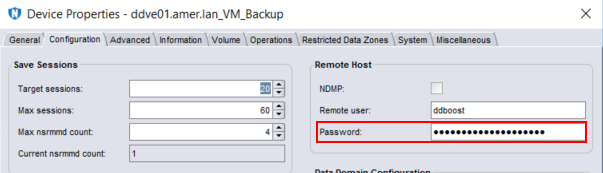
c. Once the password has been updated, click Ok.
NOTE: This process must be repeated for any ddboost device configured using the same ddboost user account.
d. Right-click the device and select disable.
e. Right-click the device and select enable.
f. Mount the device.
2. If the ddboost user password was not changed, ensure that it is not expired or locked.
a. Data Domain: DD Boost user shows locked status.
b. Disable and enable the device from NetWorker.
c. Perform a Mount operation.
b. Disable and enable the device from NetWorker.
c. Perform a Mount operation.
3. Check communication between the NetWorker Server or Storage node:
対象製品
NetWorker製品
NetWorker Family, Data Domain文書のプロパティ
文書番号: 000050014
文書の種類: Solution
最終更新: 17 4月 2026
バージョン: 6
質問に対する他のDellユーザーからの回答を見つける
サポート サービス
お使いのデバイスがサポート サービスの対象かどうかを確認してください。