Connectrix B-Series: The Web Browsers Report "Cipher Mismatch, No Matching Ciphers" When Accessing WebTools UI Using HTTPS
概要: AES256-SHA256 (0x3d) and AES128-SHA256 (0x3c) is blocked for TLS.
この記事は次に適用されます:
この記事は次には適用されません:
この記事は、特定の製品に関連付けられていません。
すべての製品パージョンがこの記事に記載されているわけではありません。
現象
The web browsers (Chrome, New Edge, or Firefox) refused to open the WebTools using HTTPS.
The error message contains "Cipher Mismatch" or "No Matching Ciphers."
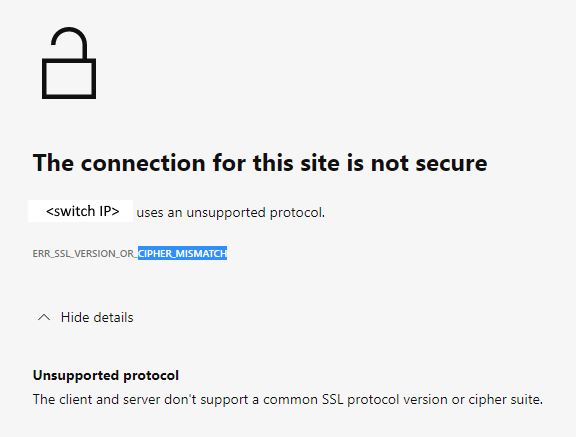
Figure 1: Screenshot of Error Message Showing Connection Not Secure, Unsupported Protocol
The switch is running in FOS 8.1 or 8.2 firmware.
The error message contains "Cipher Mismatch" or "No Matching Ciphers."
Figure 1: Screenshot of Error Message Showing Connection Not Secure, Unsupported Protocol
The switch is running in FOS 8.1 or 8.2 firmware.
原因
The switch HTTPS cipher setting only allows AES256-SHA256 and AES128-SHA256 for TLS 1.2 (the "default_generic" or "default_strong templates" of FOS 8.1 or 8.2).
The Wireshark dump shows that the client does not accept AES256-SHA256 (0x3d) or AES128-SHA256 (0x3c), hence the TLS handshake fails.

Figure 2: Screenshot of Wireshark Dump Showing Handshake Failure
<switchname>:root> seccryptocfg --show | grep HTTPS
HTTPS                    : !ECDH:!DH:HIGH:-MD5:!CAMELLIA:!SRP:!PSK:!AESGCM:!SSLv3
HTTPS                    : TLSv1.2

<switchname:root> openssl ciphers -v '!ECDH:!DH:HIGH:-MD5:!CAMELLIA:!SRP:!PSK:!AESGCM:!SSLv3'
AES256-SHA256           TLSv1.2 Kx=RSA      Au=RSA  Enc=AES(256)  Mac=SHA256
AES128-SHA256           TLSv1.2 Kx=RSA      Au=RSA  Enc=AES(128)  Mac=SHA256
The Wireshark dump shows that the client does not accept AES256-SHA256 (0x3d) or AES128-SHA256 (0x3c), hence the TLS handshake fails.
Figure 2: Screenshot of Wireshark Dump Showing Handshake Failure
解決方法
Modify the switch HTTPS cipher setting to cover the client.
Example:
In this example, the current HTTPS cipher setting is "!ECDH:!DH:HIGH:-MD5:!CAMELLIA:!SRP:!PSK:!AESGCM:!SSLv3"
To enable AES256-GCM-SHA384 (0x9d) and AES128-GCM-SHA256 (0x9c), remove "!AESGCM" from the setting with the command:
Example:
In this example, the current HTTPS cipher setting is "!ECDH:!DH:HIGH:-MD5:!CAMELLIA:!SRP:!PSK:!AESGCM:!SSLv3"
To enable AES256-GCM-SHA384 (0x9d) and AES128-GCM-SHA256 (0x9c), remove "!AESGCM" from the setting with the command:
seccryptocfg --replace -type https -cipher '!ECDH:!DH:HIGH:-MD5:!CAMELLIA:!SRP:!PSK:!SSLv3'
その他の情報
Map OpenSSL cipher names (displayed in the OpenSSL command) with IANA cipher names (displayed in Wireshark dump) using the Mozilla document, Security/Cipher Suites - MozillaWiki

対象製品
Connectrix B-Series文書のプロパティ
文書番号: 000213633
文書の種類: Solution
最終更新: 25 8月 2023
バージョン: 5
質問に対する他のDellユーザーからの回答を見つける
サポート サービス
お使いのデバイスがサポート サービスの対象かどうかを確認してください。