PowerFlex: System Board NVDIMM Battery Unknown
Summary: User has one node in the system where the NVDIMM battery status reports as 'Unknown' but that is not one of the three options listed for the status.
Acest articol se aplică pentru
Acest articol nu se aplică pentru
Acest articol nu este legat de un produs specific.
Acest articol nu acoperă toate versiunile de produs existente.
Symptoms
User has one node in the system where the NVDIMM battery status reports as 'Unknown' but that is not one of the three options listed in the Dell NVDIMM-N Persistent Memory User Guide for the NVDIMM battery status. The three options for the status are:
- Present-Ready
- Present-Offline
- Not-Present

Figure 1: Screenshot of NVDIMM battery status in system
Cause
The following logs were requested and reviewed to investigate the NVDIMM battery issue:
- TSR report with the 'Debug Logs' option selected. (For instructions on getting the report, see Dell article 126308, Export a SupportAssist Collection Using an iDRAC9)
- VMsupport bundle (if applicable) of affected node
- SOS Report (if possible to install and use)
After initial troubleshooting was performed (clear SEL, reset iDRAC, reboot, and so forth), a log showed in the TSR report advising of failed BIOS update jobs.

Figure 2: Screenshot of failed BIOS update job
The node was running BIOS 2.9.4 whereas all the other nodes were running BIOS 2.16.1.
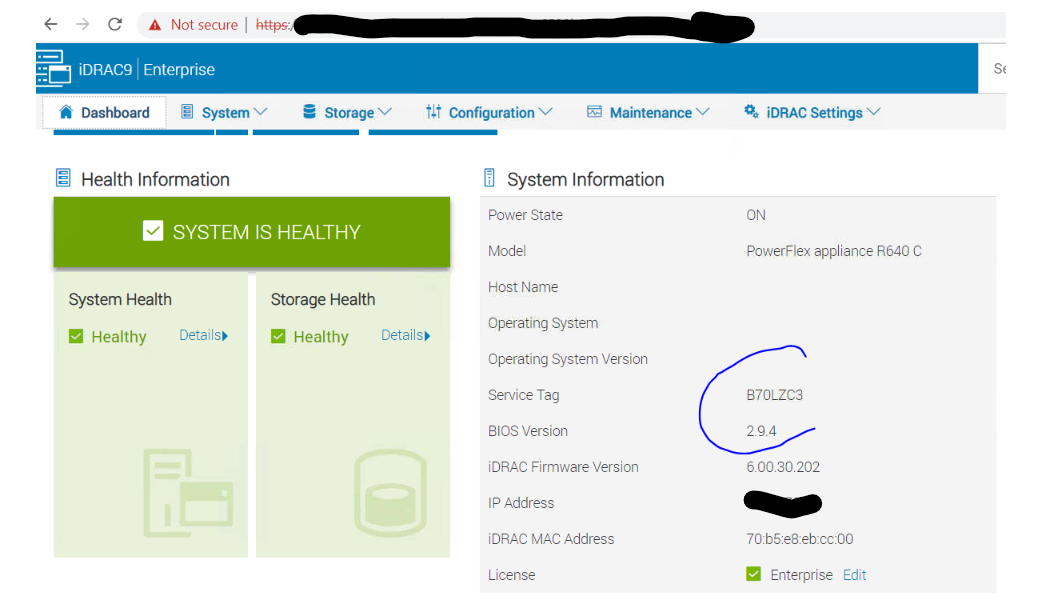
Figure 3: Screenshot showing BIOS version
Resolution
To address the issue, the user was asked to update the BIOS of the node to the same version as the other nodes, update the BIOS from 2.9.x to 2.16.1:
- Clear Job Queue using iDRAC UI (Maintenance > Job Queue > Delete All)
- Update BIOS to version 2.16.1
Produse afectate
Converged Infrastructure, Converged Systems, Solutions, PowerFlex Appliance, PowerFlex custom nodeProduse
VxFlex Ready NodesProprietăți articol
Article Number: 000218873
Article Type: Solution
Ultima modificare: 19 mai 2026
Version: 4
Găsiți răspunsuri la întrebările dvs. de la alți utilizatori Dell
Servicii de asistență
Verificați dacă dispozitivul dvs. este acoperit de serviciile de asistență.