Secure Connect Gateway: Unable to modify Policy Manager settings due to account being locked
摘要: This article describes a situation when Policy Manager settings on the user interface cannot be modified after a password change on Policy Manager. Also Secure Connect Gateway Lockbox reset. ...
本文适用于
本文不适用于
本文并非针对某种特定的产品。
本文并非包含所有产品版本。
症状
The secure Connect Gateway user interface prompts Unknown Error when attempting to modify or disable Policy Manager and cannot save:

The policy Manager user interface is Locked:
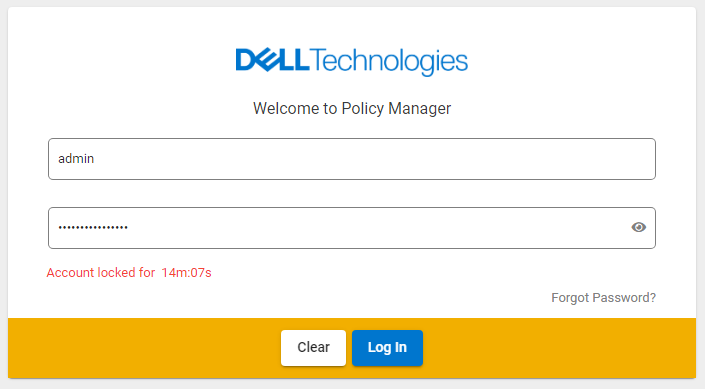
From /var/lib/docker/volumes/esrslog/_data/var/log/esrs/policymanager.log (Error code 423, text "User account is locked"):
ERROR com.dellemc.iot.platform.pmc.service.pm.PolicyManagerInteractionService [http-nio-7778-exec-9, 559af94c-d8ae-48ee-8c49-c7ad28c81564, ] Got exception from server error code is 423, and error text is User account is locked.
ERROR com.dellemc.iot.platform.pmc.controller.advise.PolicyManagerControllerAdvice [http-nio-7778-exec-9, 559af94c-d8ae-48ee-8c49-c7ad28c81564, ] Error for {}
com.dellemc.iot.platform.pmc.exception.PolicyManagerClientException: Something went wrong at Backend. Please try after sometime.
The policy Manager user interface is Locked:
原因
- The policy Manager password is changed without disabling SCG-PM connection first.
- Secure Connect Gateway Lockbox is reset during upgrade or troubleshooting
解决方案
1, Log in to Secure Connect Gateway using SSH, issue the following command:
2, Verify from the Secure Connect Gateway user interface the Policy Manager setting is cleared,
3, Wait for Policy Manager user interface Lock time to expire, and confirm that the Policy Manager Login is working,
4, Reconfigure the Policy Manager setting on Secure Connect Gateway.
Pre 5.16: # docker exec -u postgres esrsde-app psql -U postgres -d vapp -c 'delete from policy_manager_config'

Post 5.16: # docker exec esrsde-app psql -U postgres -d vapp -c 'delete from policy_manager_config'
2, Verify from the Secure Connect Gateway user interface the Policy Manager setting is cleared,
3, Wait for Policy Manager user interface Lock time to expire, and confirm that the Policy Manager Login is working,
4, Reconfigure the Policy Manager setting on Secure Connect Gateway.
其他信息
If the following error is encountered, use the Post 5.16 command.
# docker exec -u postgres esrsde-app psql -U postgres -d vapp -c 'select * from policy_manager_config'
psql: error: connection to server on socket "/var/run/postgresql/.s.PGSQL.5432" failed: FATAL:  Peer authentication failed for user "postgres"
受影响的产品
Secure Connect Gateway - Virtual Edition文章属性
文章编号: 000205944
文章类型: Solution
上次修改时间: 17 7月 2024
版本: 3
从其他戴尔用户那里查找问题的答案
支持服务
检查您的设备是否在支持服务涵盖的范围内。