NVP vProxy: FLR or Instant Access Restore Fails with "Unable to create datastore. Unable to complete Sysinfo operation"
摘要: Virtual Machine (VM) File Level Restore (FLR) or Instant Access restore (IA) performed through the NetWorker VMware Protection (NVP) vProxy appliance fails with "Operation failed, diagnostics report: Mount failed: Unable to complete Sysinfo operation. See the VMkernel log file for more details: Unable to query remote mount point's attributes" when NFSv4 is the default-export-version defined in the DD operating system. ...
本文适用于
本文不适用于
本文并非针对某种特定的产品。
本文并非包含所有产品版本。
症状
VMware VMs are protected with the NetWorker VMware Protection (NVP) vProxy appliance.
VM Image Restore process succeeds; however File Level Restore (FLR) or Instant Access (IA) restore fails.
The recovery returns the following error:
- The FLR logs are found on the vProxy under:
/opt/emc/vproxy/runtime/logs/recycle/vflrd
- If the restore session was saved from NMC, the logs are found on the NetWorker server under:
- Linux:
/nsr/logs/recover/ - Windows:
C:\Program Files\EMC NetWorker\nsr\logs\recover\
- Linux:
nsrvproxy_flr: vProxy Log: YYYY-MM-DDTHH:mm:SS ERROR: [@(#) Build number: ##] Unable to create datastore 'EMC-FLR-VPROXY_NAME-########' using 'DATA_DOMAIN_ADDRESS:/data/col1/NETWORKER_MTREE/FLR--SESSION_ID': ServerFaultCode: An error occurred during host configuration. Operation failed, diagnostics report: Mount failed: Unable to complete Sysinfo operation. Please see the VMkernel log file for more details.: Unable to query remote mount point's attributes
原因
The Data Domain's default-export-version is set to "4":
DD command:
sysadmin@ddve# nfs option show default-export-version

Option                   Value
----------------------   -----
default-export-version   4
----------------------   -----
Network File System (NFS) version 3 is the required default for VM FLR, and IA restores as per the NetWorker VMware Integration Guide.
NOTE: If the cause in this KB is not applicable, see the Additional Info field. Other related articles are provided. The "ServerFaultCode" suggests that the error is coming from the VMware level. The vProxy host is unable to correctly connect to the NFS service on the Data Domain.
解决方案
- Ensure that NFSv3 is enabled on the Data Domain system:
- Log in to the Data Domain web user interface:
https://DD-ADDRESS/ddem - Go to Protocols > NFS. Ensure, NFSv3 is enabled.
- Click Enable if NFSv3 shows as "currently not active."
- Log in to the Data Domain web user interface:
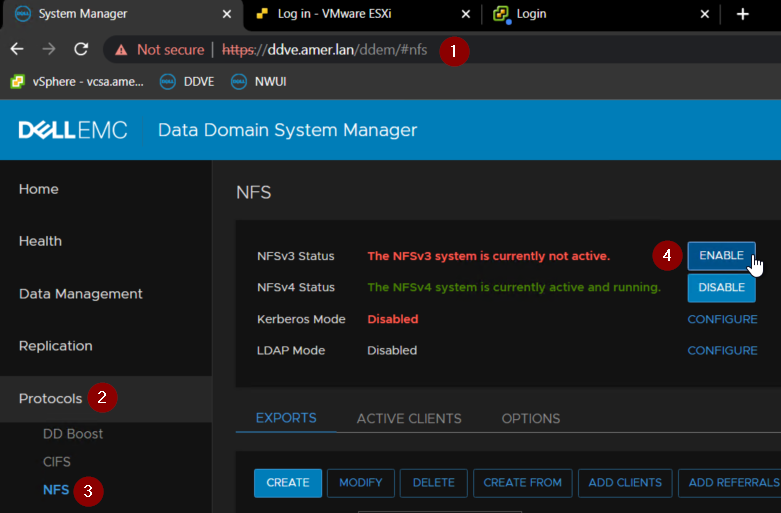
Figure 2: Change NFSv3 to Enabled in PowerProtect DD System Manager.
Or
Enable NFSv3 from DD command line with command:
Enable NFSv3 from DD command line with command:
nfs enable version 3
- Ensure that NFSv3 is set as the
default-export-version:- Log in to the Data Domain command line as sysadmin.
- Confirm that the default-export-version is set to "3" with the command:
nfs option show default-export-version- If NFSv3 is set to "4," change it to "3"
nfs option set default-export-version 3
Example:
sysadmin@ddve# nfs option set default-export-version 3
NFS option 'default-export-version' set to '3'.
sysadmin@ddve# nfs option show default-export-version
Option                   Value
----------------------   -----
default-export-version   3
----------------------   -----
- Perform VM restore.
其他信息
The "Unable to complete Sysinfo operation" message can appear due to other issues, see:
- Blocked NFS ports: vProxy: FLR is failing for all clients with the error "Unable to create datastore"
- NAT Environment: NVP-vProxy: FLR "Mount failed: Unable to complete Sysinfo operation"
The NetWorker VMware Integration Guide is available on Dell Support through:
https://www.dell.com/support/home/product-support/product/networker/docs
受影响的产品
NetWorker产品
NetWorker Family, NetWorker Series文章属性
文章编号: 000212719
文章类型: Solution
上次修改时间: 26 3月 2025
版本: 3
从其他戴尔用户那里查找问题的答案
支持服务
检查您的设备是否在支持服务涵盖的范围内。