
Dell Pro Max
LM Studio’s LM Link: Local AI Everywhere
Local AI models used to be stuck on your desk. LM Link connects them to every device you own without compromising security.
Key takeaways: LM Studio’s new LM Link feature gives users remote access to local AI models running on their own hardware, from any device, anywhere. Built in collaboration with Tailscale, the connection is end-to-end encrypted. An ideal pairing is a Dell Pro Max with GB10 on a desk running large open-source models while the user works from a laptop on the road. The feature is in preview with strong early demand.
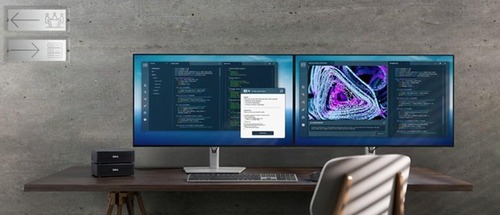
A blizzard shut down Brooklyn, but the LM Studio engineering team never lost a step. The storm became the perfect test for their newest feature, LM Link. Released just 24 hours earlier, it gave their engineers remote access to their Dell Pro Max with NVIDIA GB10 workstations sitting on desks in their office across the borough.
LM Studio is a desktop application for running open-source large language models on your own hardware so data stays on your device. With LM Studio, your chats stay private and your AI stack remains fully in your control.
Kayden Fu, product manager at LM Studio, described the gap LM Link closes. “Let’s say you have a GB10 sitting at home on your home office desk, but you’d like to travel with your laptop. You can keep your GB10 busy while on the go and maintain full privacy and control as if you were sitting in front of your desk.” A Dell Pro Max with GB10 can run 120-billion-parameter open-source models with ease. A thin laptop cannot. LM Link connects the two.
Two commands and you’re linked
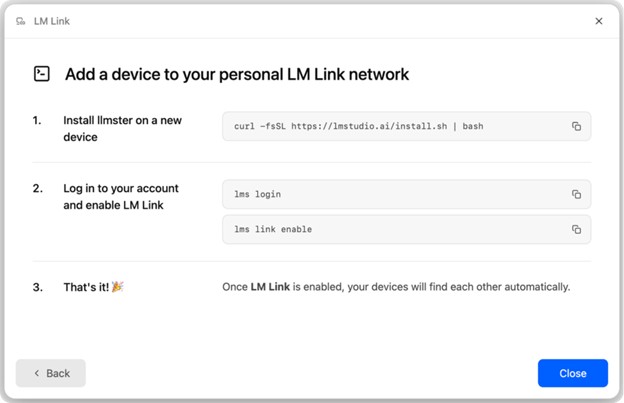
LM Studio’s 0.4 release introduced llmster, LM Studio’s headless daemon that runs full capabilities entirely in the terminal without a graphical interface. LM Link builds on that foundation and makes setup simple.
Install llmster on your workstation, run two commands in terminal, and the workstation appears in LM Studio on every other device tied to your account.
The team at LM Studio built the feature in close engineering collaboration with Tailscale, using their mesh networking primitives to achieve end-to-end encrypted connections between devices, across networks, without exposing your device to the public internet. Fu addressed the privacy question she knew users would raise. “LM Studio servers as well as Tailscale servers don’t have access to any communication, whether that’s your model list, chats, or model load configurations. We don’t see any of them. Once that connection is established between your devices, it’s end-to-end encrypted. Everything else travels through an encrypted tunnel that neither party can read.”
Stay connected with LM Link
LM Link is still in preview. Early response has been overwhelmingly positive. Fu said the sign-up volume crashed LM Studio’s servers on launch morning. Users have been connecting multiple devices within minutes of getting access. Benchmarks and multi-user concurrent workflows on LM Studio’s GB10 workstations are in development. Follow LM Studio for updates from their team.
