

Artificial Intelligence
The Best Dell Systems for OpenClaw
Discover the best Dell AI PC for OpenClaw, from cloud AI exploration to enterprise-scale agentic AI deployments.
Key takeaways 9 min read
-
- The right Dell system for OpenClaw depends on your stage: exploring cloud AI, experimenting locally, building agents or scaling across teams.
- For most professionals, 32GB RAM is the new baseline. For local models and agentic AI, start at 64GB.
- A hybrid approach with Dell Deskside Agentic AI reduces token costs, improves privacy and brings always-on performance closer to work.
One of the perks of working in AI marketing is getting a front-row seat to where the industry is headed.
Every day, I work with AI engineers, developers, product teams, customers and partners who are building the next generation of AI experiences. My job is to translate incredibly technical concepts into stories that help businesses understand not just what AI can do, but how to deploy it successfully.
Over the past year, one trend has become impossible to ignore: AI is evolving from chatbots and copilots into autonomous agents that can reason, make decisions and complete work across applications, browsers, files and enterprise systems.
I’ve also started dipping my toes into vibe coding with Claude, and it’s been fascinating to see just how quickly AI development is becoming more accessible. You no longer need to be a full-time software engineer to start building useful AI-powered applications. But one thing I’ve learned from talking with engineers — and from watching the space evolve — is that the hardware underneath matters far more than most people realize.
That’s why one of the questions I’ve been hearing more often is:
“What’s the best Dell system for running OpenClaw?”
Before I answer that, let me quickly explain what we’re talking about.
What is OpenClaw?
OpenClaw is an open-source framework for building and running generative and agentic AI experiences. The main difference between OpenClaw and your traditional generative AI chatbot is it gives AI the ability to do more than just answer questions.
Agentic AI allows AI to actually use your computer — opening applications, navigating browsers, reading documents, interacting with enterprise software and completing multi-step tasks on your behalf.
Think of it as the difference between asking a colleague a question and asking a colleague to handle a project. OpenClaw moves AI from conversational assistant to autonomous worker.
It’s free to download, evolving quickly and rapidly gaining traction among developers and organizations exploring what agentic AI can do.
If you’ve been using tools like ChatGPT or Claude and wondered, “What if AI could actually DO things instead of just telling me how?” — that’s the problem OpenClaw is designed to solve.
Where are you on the AI journey?
The answer to “what’s the best Dell system?” depends entirely on what you’re trying to accomplish — and where you are right now.
Not everyone is in the same place, and that’s perfectly fine. Here’s a simple way to think about it:
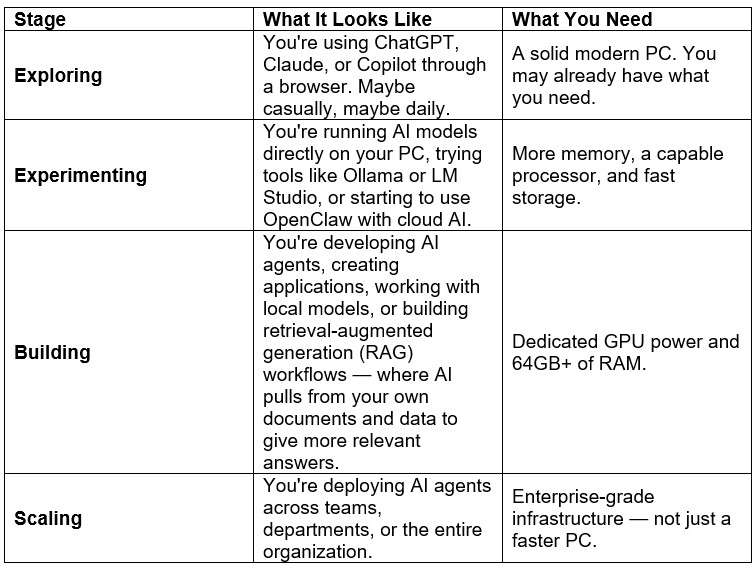
Most people reading this are somewhere in the first two stages. That’s exactly the right place to be.
The recommendations below are organized around these stages so you can find the right fit for where you are today — and understand what to reach for when you’re ready to move further.
Already have a Dell? Start here.
One of the most common questions I hear — especially from people just getting started — isn’t “what should I buy?” It’s “can I use what I already have?”
Often, the answer is yes.
If you’re in the Exploring stage — using cloud-based AI tools like ChatGPT, Claude, Copilot or OpenClaw connected to cloud services — most modern Dell systems with 16GB of RAM and a current-generation processor will handle that comfortably.
Cloud AI does the heavy reasoning on remote servers. Your PC just needs to manage the browser, applications and workflows.
If you want to check what you’re working with:
-
- On Windows, open Task Manager (Ctrl+Shift+Esc), click the Performance tab and look at your total RAM and processor.
- 16GB RAM + Intel 12th Gen or newer = you can explore cloud AI right now.
- 8GB or less = you’ll likely feel the squeeze quickly, especially with multiple AI tools running.
If your current system qualifies, my honest advice is: start using AI today with what you have. You’ll learn far more about what you actually need by doing the work than by reading spec sheets.
When you’re ready for more, the guide below will help you choose your next step.
First, let’s talk about memory
If there’s one recommendation I’d make before talking about specific systems, it’s this:
32GB of RAM is quickly becoming the new baseline for AI-ready PCs.
For years, 16GB was the sweet spot for business laptops. But AI changes the equation.
Large language models, multiple copilots, browser automation, AI-assisted applications and autonomous agents all consume memory in ways traditional productivity applications never did.
If you’re primarily using cloud AI, 32GB gives you plenty of breathing room.
If you’re planning to run local models, build AI agents or experiment with on-device AI, I’d strongly recommend starting with 64GB of RAM whenever your budget allows.
It’s one of the most future-proof investments you can make.
Best for Cloud AI – The exploring stage

If OpenClaw is primarily connecting to cloud services like OpenAI or Anthropic, most of the heavy AI inference — the actual processing that generates responses — happens in the cloud.
Your PC becomes the orchestration layer: it manages browsers, applications, workflows and user interactions while cloud models do the reasoning.
For most business professionals, this is exactly where they’ll spend the next several years. And the everyday use cases here are already impressive:
-
- Summarize a 40-page PDF in seconds
- Draft client emails that match your tone of voice
- Prep for meetings using your own notes and documents
- Get AI to research a topic and organize findings while you work on something else
- Clean up messy spreadsheets or extract insights from data
These aren’t hypothetical. People are doing this today with cloud AI and a good PC.
My recommendation: Dell Pro Premium
I’d configure it with:
-
- Intel® Core™ Ultra 7 or Ultra 9
- 32GB RAM
- 1TB SSD
Dell Pro provides a portfolio of devices tailored to different workstyles:
-
- Dell Pro 5: Ideal for everyday task workers and knowledge workers seeking dependable performance for daily productivity.
- Dell Pro 7: Designed for highly mobile professionals who need a step up in portability without compromising on performance
- Dell Pro 14 Premium: Our flagship premium device, purpose-built for executives who value superior design, mobility, and experience.
These devices are lightweight, have exceptional battery life, and deliver an outstanding experience for cloud-based AI productivity.
Best for local generative AI – The experimenting stage

If you’re running models locally — using frameworks like Ollama or LM Studio to download and run AI models directly on your computer instead of relying on cloud services — your PC starts doing much more of the heavy lifting.
Why would you want to run AI locally? A few reasons:
-
- Privacy: Your data never leaves your machine.
- Cost: No per-query API fees. Once the model is on your PC, every conversation is free.
- Speed: No internet latency. Responses come directly from your hardware.
- Offline capability: AI works even without a connection.
Local inference (the process of the AI generating responses) requires more memory, more graphics horsepower and faster storage.
My recommendation: Dell XPS 14 or 16
For customers beginning their local AI journey, I recommend the 2026 Dell XPS 14 or 2026 Dell XPS 16
-
- Intel Core Ultra Series processor
- Intel Arc integrated graphics on supported configurations
- 32GB–64GB RAM
- 1TB–2TB SSD
The 2026 Dell XPS family combines premium design, high-quality displays, Copilot+ PC experiences and select security and manageability features for business use. The XPS 16 offers the most screen space and performance, while the XPS 14 delivers a great balance of power, portability and battery life.
Across the lineup, Intel integrated graphics support smaller local AI models, AI-assisted development, research and creative tasks. Availability varies by model and region.
Best for on-device agentic AI – the building stage
This is where AI starts becoming really exciting.
Agentic AI isn’t simply answering questions.
It’s opening applications.
Reading documents.
Searching the web.
Using business software.
Making decisions.
Executing multi-step workflows.
Potentially coordinating multiple tools simultaneously.
In practical terms, imagine telling an AI agent: “Find last quarter’s sales report, compare it to this quarter’s pipeline data, draft a summary for my VP and schedule a meeting to review it.” That’s the kind of work agentic AI is moving toward — multiple steps, multiple applications, real decision-making.
Those workloads are substantially more demanding than a traditional chatbot because your system is juggling multiple processes at once.
My recommendation: Dell Precision Mobile Workstation
I’d look for:
-
- Intel Core Ultra 9
- Professional NVIDIA RTX graphics
- 64GB RAM minimum
- 2TB SSD
If you’re serious about building production-ready AI agents, I consider 64GB the practical starting point.
The additional memory gives your agents room to reason, orchestrate tools and manage larger local models without constantly competing for system resources.
Best for developers and AI enthusiasts
This is probably my favorite category because it’s where so much innovation is happening right now.
Developers, startup founders, makers and AI hobbyists are experimenting with local models, building agents, creating RAG applications (where AI retrieves and reasons over your own documents and data) and exploring what’s possible with open-source AI. For that audience, I’d recommend the Dell Pro Max with GB10.
The GB10 platform was designed for AI development and gives you a fantastic environment for:
-
- Local model experimentation
- AI application development
- Retrieval-Augmented Generation (RAG)
- Agent workflows
- AI research
- Learning modern AI engineering
I’d configure it with:
-
- NVIDIA GB10
- 128GB RAM
- 1TB–4TB SSD
If your goal is learning, prototyping or building the next generation of AI applications, this is where I’d start.
At the largest scale: Dell deskside agentic AI – the scaling stage
Once you’re moving beyond individual developers and into enterprise deployments, the conversation changes.
At this point, you’re no longer shopping for a faster PC.
You’re designing an AI platform.
That’s where Dell Deskside Agentic AI comes in.
Rather than relying exclusively on cloud AI, Dell Deskside Agentic AI brings enterprise-grade agentic AI closer to where work actually happens. Organizations can build, deploy and scale autonomous AI workflows that interact with enterprise applications, automate business processes and support teams while maintaining greater control over performance, security and cost.
This hybrid approach — running the right workload in the right place, whether that’s on the device, at the desk, or in the cloud — offers several advantages.
Organizations can keep sensitive workloads closer to their data, reduce latency, improve responsiveness and better manage cloud inference costs by running the right workloads locally and using the cloud only when it adds value. This is what the industry calls token economics — the idea that every AI query has a cost, and running inference locally can significantly reduce that cost at scale.
Depending on your needs, here’s how I’d think about the portfolio:
Dell Pro Max with GB10
Ideal for individual developers building and testing AI applications locally.
Dell Pro Max with GB300
Designed for larger reasoning models, more complex AI agents and team-based AI development.
Dell Pro Precision 9 Series Tower Workstations
Purpose-built for GPU-accelerated AI engineering, advanced model development and demanding technical workflows.
Dell Deskside Agentic AI
The complete enterprise solution for organizations looking to scale secure, production-ready agentic AI. Built on the Dell AI Factory with NVIDIA, it provides the infrastructure needed to move from experimentation to enterprise deployment while giving organizations the flexibility to balance on-device, deskside and cloud AI.
This is especially compelling for:
-
- AI Centers of Excellence
- Software Engineering teams
- Data Science organizations
- Research and Development
- Financial Services
- Healthcare
- Manufacturing
- Government agencies
As AI adoption accelerates, I believe this hybrid model is where many organizations will land — not choosing between cloud or local AI, but intelligently using both.
My recommendations
If I had to simplify it, here’s how I’d think about the Dell portfolio.
If you’re using ChatGPT, Claude, Copilot, or OpenClaw primarily in the cloud
→ Dell Pro Premium
If you’re running local language models
→ Dell XPS 16
If you’re building autonomous AI agents
→ Dell Precision 7 Series and Dell Pro Precision 9 Series
If you’re an AI developer or AI enthusiast
→ Dell Pro Max with GB10
If you’re scaling AI across teams or the enterprise
→ Dell Deskside Agentic AI with Dell Pro Max GB300 and Dell Pro Precision Towers
Final thoughts
One of the biggest shifts we’re seeing in AI isn’t just that models are getting smarter — it’s that they’re becoming more autonomous.
The PC is evolving from a productivity device into an AI execution platform.
That changes how we should think about buying hardware.
It’s no longer just about processor speed, battery life or storage. It’s about choosing a platform that can support the AI experiences you’ll be using over the next several years.
For most professionals, 32GB of RAM is the new baseline.
If you’re planning to build or run local AI agents, 64GB is where I’d start.
And if you’re thinking about enterprise-scale AI, I’d look beyond individual devices and start thinking about a hybrid architecture powered by Dell Deskside Agentic AI.
The organizations that get this right won’t simply deploy better hardware.
They’ll build AI workforces that are faster, more secure, more cost-effective and ready for the next generation of intelligent work.
Ready to get started?
Shop Dell AI PCs
Take your AI pilot from proof of concept to production.
Learn how Dell Deskside Agentic AI can help.
👉 www.dell.com/desksideagenticai
Whether you’re exploring OpenClaw, building AI agents, experimenting with local models or deploying enterprise-scale automation, Dell has a platform designed to help you accelerate your AI journey.
