NetWorker: AUTHC connections fail with HTTP 400/403 Errors
Summary: Connections to the NetWorker Authentication service (AUTHC) fail. The errors reported are HTTP 400 (Bad request) or HTTP 403 (Forbidden)
This article applies to
This article does not apply to
This article is not tied to any specific product.
Not all product versions are identified in this article.
Symptoms
The NetWorker nsrlogin command fails with HTTP 400 or 403:
nsrlogin -u administrator
130136:nsrlogin: Please enter password:
117849:nsrlogin: Authentication library error: CONNECT tunnel failed, response 403
Server Message : Make sure that server is running
Or:
nsrlogin -u Administrator
130136:nsrlogin: Please enter password:
117849:nsrlogin: Authentication library error: CONNECT tunnel failed, response 400
Server Message : Make sure that server is running
NetWorker authentication and other attempts to connect to the authentication service fail with similar errors.
nsrauthtrust -H NETWORKER_SERVER_NAME -P 9090
125927:nsrauthtrust: Failed to retrieve certificate: CONNECT tunnel failed, response 403
NetWorker Management Console (NMC) and NetWorker Web User Interface (NWUI) upgrades (Windows) and post upgrade scripts (Linux) report connection failures on the AUTHC port.
Cause
This problem is occurring outside of NetWorker. The NetWorker nsrlogin command also reported "Connect Tunnel Failed" because there is an HTTPS proxy configured in the environment. This can be validated using the curl command:
curl https://NETWORKER_SERVER_ADDRESS:9090
curl -v https://NETWORKER_SERVER_ADDRESS:9090
* Rebuilt URL to: https://NETWORKER_SERVER_ADDRESS:9090/
* Uses proxy env variable no_proxy == 'HTTP_PROXY_HOSTNAME'
* Uses proxy env variable https_proxy == 'http://HTTP_PROXY_HOSTNAME:8080'
*   Trying HTTP_PROXY_IP...
* TCP_NODELAY set
* Connected to HTTP_PROXY_HOSTNAME (HTTP_PROXY_IP) port 8080 (#0)
* allocate connect buffer!
* Establish HTTP proxy tunnel to NETWORKER_SERVER_ADDRESS:9090
> CONNECT NETWORKER_SERVER_ADDRESS:9090 HTTP/1.1
> Host: NETWORKER_SERVER_ADDRESS:9090
> User-Agent: curl/7.61.1
> Proxy-Connection: Keep-Alive

< HTTP/1.1 403 Forbidden
< Server: squid/3.5.20
< Mime-Version: 1.0
< Date: Thu, 03 Jul 2025 15:36:25 GMT
< Content-Type: text/html;charset=utf-8
< Content-Length: 3548
< X-Squid-Error: ERR_ACCESS_DENIED 0
< Vary: Accept-Language
< X-Cache: MISS from HTTP_PROXY_HOSTNAME
< X-Cache-Lookup: NONE from HTTP_PROXY_HOSTNAME:8080
< Via: 1.1 HTTP_PROXY_HOSTNAME (squid/3.5.20)
< Proxy-Connection: Keep-Alive
* Received HTTP code 403 from proxy after CONNECT
* Closing connection 0
* Curl: (56) Received HTTP code 403 from proxy after CONNECT
Or:
curl -v https://NETWORKER_SERVER_ADDRESS:9090
* Uses proxy env variable https_proxy == 'http://HTTP_PROXY_HOSTNAME:443'
*   Trying HTTP_PROXY_IP:443...
* Connected to HTTP_PROXY_HOSTNAME (HTTP_PROXY_IP) port 443 (#0)
* allocate connect buffer!
* Establish HTTP proxy tunnel to NETWORKER_SERVER_ADDRESS:9090
> CONNECT NETWORKER_SERVER_ADDRESS:9090 HTTP/1.1
> Host: NETWORKER_SERVER_ADDRESS:9090
> User-Agent: curl/7.76.1
> Proxy-Connection: Keep-Alive
>
< HTTP/1.1 400 Bad Request
< Server: openresty
< Date: Thu, 03 Jul 2025 14:11:12 GMT
< Content-Type: text/html
< Content-Length: 154
< Connection: close
<
* Received HTTP code 400 from proxy after CONNECT
* CONNECT phase completed!
* Closing connection 0
The specific error returned can vary depending on the specific proxy vendor and configuration used. The commonality is that you see the communication to the NetWorker authentication (AUTHC) port (default 9090) redirected through an HTTPS proxy host. The error returned is an HTTP 4xx error; either 400 (Bad request) or 403 (Forbidden).
Resolution
The use of an HTTPS proxy specifically for authentication traffic on port 9090 is not explicitly documented or tested as a supported configuration. NetWorker components typically expect direct communication between services, especially for authentication.
Remove the HTTP/HTTPS proxy configuration on the NetWorker server. This must also be removed from any NetWorker host communicating with port 9090 on the NetWorker server. See: NetWorker Processes and Ports
On the NetWorker server run:
unset https_proxy
unset http_proxy
NOTE: Replace the variable names with the HTTPS proxy variables used on the NetWorker server. The variables are shown in the
curl connection output. If the variables cannot be identified, consult with the system administrator or the proxy vendor documentation. Additional changes may be required to disable the HTTPS proxy requests. This configurations are external to NetWorker software or configurations.
Once the variables are unset, attempt nsrlogin again. If successful, run nsrlogout.
[admin@lnx-srvr01 root]$ nsrlogin -u Administrator
130136:nsrlogin: Please enter password:
Authentication succeeded

[admin@lnx-srvr01 root]$ nsrlogout
This indicates that communication with the NetWorker AUTHC service is functional. Other processes involving NetWorker authentication or communication over port 9090 are expected to succeed.
Additional Information
The unset command only unsets the variable for the current shell session. If set as system or profile variables, they load automatically when you open a terminal, reboot the system, or start a new shell session. The following actions must be performed to prevent the variables from being loaded on the next session or reboot.
Windows: check the SYSTEM or USER variables and remove any variables used to define an HTTP/HTTPS proxy host.
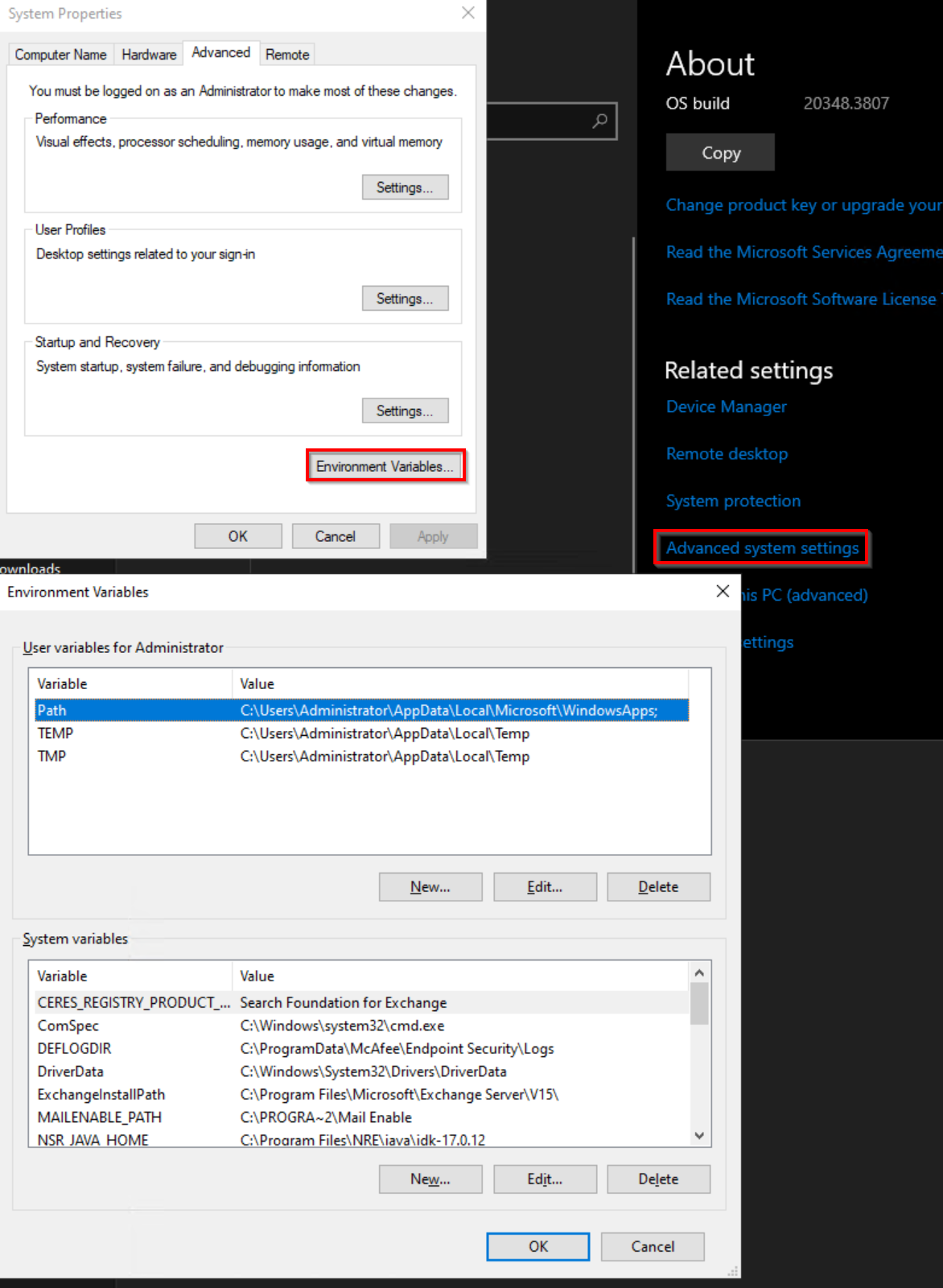
Linux: Check the following files for any HTTP/HTTPS variable settings and remove them:
- ~/.bashrc
- ~/.bash_profile
- ~/.profile
- /etc/environment
- /etc/profile
- /etc/profile.d/*.sh
Affected Products
NetWorkerProducts
NetWorker FamilyArticle Properties
Article Number: 000340491
Article Type: Solution
Last Modified: 08 Jul 2025
Version: 1
Find answers to your questions from other Dell users
Support Services
Check if your device is covered by Support Services.