PowerProtect: TSDM VIB disappeared from ESXi Host
Summary: PowerProtect Data Manager TSDM vSphere Installation Bundle (VIB) missing from ESXi host
Symptoms
- PowerProtect Data Manager TSDM VIB was already installed
- PowerProtect Data Manager reports VIB as "Ready to install" suddenly
- TSDM VIB is no longer installed on the ESXi
- No task in PowerProtect Data Manager, vCenter or ESXi to show the TSDM VIB was uninstalled
- vCenter Lifecycle Manager (VLCM) or vSphere Update Manager (VUM) is in use
Example TSDM service on ESXi in vSphere UI:
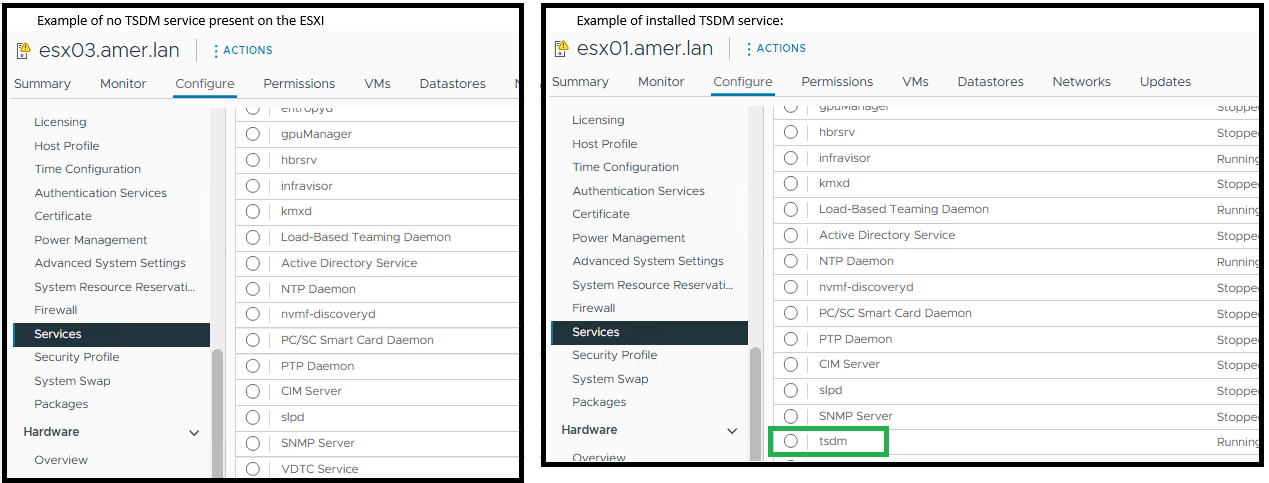
ESXi shows PowerProtect Data Manager TSDM is not installed using ESXi command - esxcli software vib get -n tsdm:
Example output of no installed TSDM VIB:
[root@esx03:~] esxcli software vib get -n tsdm
 [NoMatchError]
 No VIB matching VIB search specification 'tsdm' on host.
         id = tsdm
 Please refer to the log file for more details.
Example output of an installed TSDM VIB:
[root@esx02:~] esxcli software vib get -n tsdm
DEL_bootbank_tsdm_19.22.0.3-1OEM.800.1.0.20613240
   Name: tsdm
   Version: 19.22.0.3-1OEM.800.1.0.20613240
   Type: bootbank
   Vendor: DEL
   Acceptance Level: VMwareAccepted
   Summary: Transparent Snapshot Data Mover
   Description: Used by PPDM to move backup image data to/from Data Domain
   ReferenceURLs:
   Creation Date: 2025-10-20
   Depends: vmkapi_2_10_0_0, libvmkuser-8.0.0-1, uwglibc64-2.12.2-1, uwvmkcall-8.0.0-1, nicmgmt = 0.3, iscsimgmt = 0.0, srest = 0.2
   Conflicts:
   Replaces:
   Provides:
   Maintenance Mode Required: False
   Hardware Platforms Required:
   Live Install Allowed: True
   Live Remove Allowed: True
   Stateless Ready: True
   Overlay: False
   Tags: daemon, sdkname:daemondk, sdkversion:8.0.0-20613240, epkname:esxpackagingkit, epkversion:8.0-20615152, ConfigSchema:tsdm-19.22.0.3-1OEM.800.1.0.20613240:tsdm:usr/lib/vmware/configmanager/schemas/tsdm-19.22.0.3-1OEM.800.1.0.20613240-schema.json:sha-256:81fdf89122d7bfc3ed50feaac9caf359a87bf8819161eb8f78a2eae8cb205696
   Payloads: tsdm
   Platforms: host
Cause
This article deals with a specific use case where the vCenter environment is using vLCM or VUM. Following an ESXi update the PowerProtect TSDM VIB is no longer installed on the ESXi.
The TSDM VIB was removed because the ESXi host received a vLCM‑managed image patch that did not contain the signed TSDM VIB. When vLCM applies a new image profile, any VIBs not in that profile are automatically removed. This action does not generate a standard vib_uninstall entry in esxupdate.log.
The PowerProtect Data Manager logs show no uninstall request for the host within the timeframe.
2025-11-12T18:00:03.566Z INFO [] [...] VIB status of host esxi.domain.com, is INSTALLED
PowerProtect Data Manager log entry indicates that the VIB is not installed:
2025-11-13T06:58:47.401Z INFO [] [...] tsdm vib is not installed on esxi.domain.com, uninstall request will be ignored
The esxupdate.log records a patch operation around the time that the TSDM VIB disappeared. The log shows the image update but no explicit VIB uninstall command (Below are example confirms if an ESXi patch or upgrade was carried out):
2025-01-14T12:44:10Z esxupdate: INFO: vLCM remediation initiated for image compliance.
2025-01-14T12:44:11Z esxupdate: INFO: Loading metadata from /var/db/esximg/metadata.zip
2025-01-14T12:44:12Z esxupdate: INFO: Validating image profile: ESXi-8.0U2-202501001-standard
2025-01-14T12:44:15Z esxupdate: INFO: Applying VIB: VMware_lsu-lsi-mr3.vib
2025-01-14T12:44:17Z esxupdate: INFO: Successfully installed VIB: VMware_lsu-lsi-mr3
2025-01-14T12:44:18Z esxupdate: INFO: Applying VIB: VMware-ESXi-AcceptanceLevel-PartnerSupported.vib
2025-01-14T12:44:20Z esxupdate: INFO: Reboot required after installation of the above VIBs.
2025-01-14T12:44:21Z esxupdate: INFO: vLCM patch stage completed. Host will reboot to finalize changes.

OR

2025-11-12T19:20:42Z In(14) esxupdate[2102584]: Installers initiated are {'quickpatch': <vmware.esximage.Installer.QuickPatchInstaller.QuickPatchInstaller object at 0xae66a1b310>, 'live': <vmware.esximage.Installer.LiveImageInstaller.LiveImageInstaller object at 0xae67abaf10>, 'boot': <vmware.esximage.Installer.BootBankInstaller.BootBankInstaller object at 0xae67ee4950>, 'locker': <vmware.esximage.Installer.LockerInstaller.LockerInstaller object at 0xae686b6110>}
2025-11-12T19:20:42Z In(14) esxupdate[2102584]: Adding VIB VMware_tools-light_12.5.3.24819442-24853260 to ImageProfile (Updated) VMware Lifecycle Manager Generated Image
2025-11-12T19:20:42Z Db(15) esxupdate[2102584]: Adding Component VMware-VM-Tools_12.5.3.24819442-24853260 to ImageProfile (Updated) VMware Lifecycle Manager Generated Image
2025-11-12T19:20:42Z Db(15) esxupdate[2102584]: Removing reserved Component VMware-VM-Tools_12.5.3.24819442-24853260 in ImageProfile (Updated) VMware Lifecycle Manager Generated Image
2025-11-12T19:20:42Z Db(15) esxupdate[2102584]: Finished execution of command = vib.list
2025-11-12T19:20:42Z Db(15) esxupdate[2102584]: Completed esxcli output, going to exit esxcli-software
Resolution
- Ensure that the signed TSDM VIB is added to the image profile - for more details see How to obtain the signed TSDM VIB driver for the vSphere Lifecycle Management image
- Install the TSDM VIB on the affected hosts if it was removed using PowerProtect Data Manager->Infrastructure->Protection Engines->Transparent Snapshot Data Mover