VxRail: Failed to collect vCenter log bundle due to log generation takes a long time
Summary: The full log bundle collection failed due to failed to download the vCenter log bundle.
This article applies to
This article does not apply to
This article is not tied to any specific product.
Not all product versions are identified in this article.
Symptoms
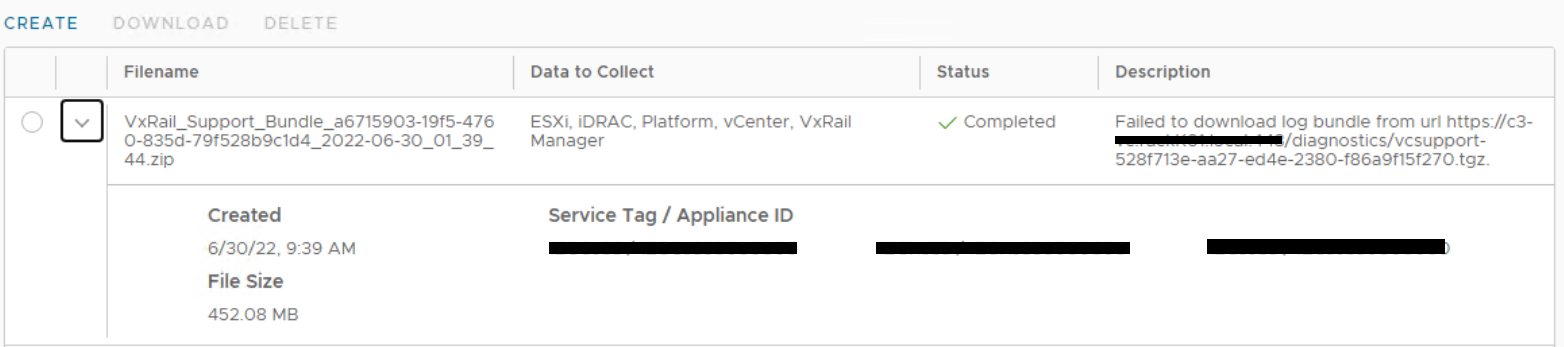
Collect full log bundle by selecting all the components simultaneously from VxRail plugin UI Troubleshooting page, if the log collection takes more than 30 minutes, it may complete with an error message: Failed to download log bundle from url.
Check the log collected, other components' log have been collected successfully, except it failed to download the vCenter log bundle.
Cause
After VxRail manager triggers vCenter log bundle generation, the generated log bundle in vCenter will be deleted automatically after 30 minutes.
If for some reason, the entire log generation task takes longer time to complete, for example more components are selected together (VxRail manager, vCenter, ESXi, Platform, iDRAC), or some bundle size is too large and need longer time to collect, it may exceed the 30 minutes limitation. So the vCenter log bundle download task fails as the file is already deleted.
Resolution
The workaround to collect the vCenter log bundle:
Follow the VxRail plugin UI Troubleshooting page to collect the log bundle, but only select "vCenter" component to collect it separately.
Article Properties
Article Number: 000202268
Article Type: Solution
Last Modified: 08 Jul 2025
Version: 4
Find answers to your questions from other Dell users
Support Services
Check if your device is covered by Support Services.