NetWorker: "Database configuration failed"와 함께 NWUI 설치 실패
Summary: NWUI(NetWorker Web User Interface)를 설치하는 동안 "Database configuration failed"라는 오류가 나타납니다. 설치가 중지되고 롤백됩니다.
This article applies to
This article does not apply to
This article is not tied to any specific product.
Not all product versions are identified in this article.
Symptoms
- NWUI(NetWorker Web User Interface) 패키지는 Windows 플랫폼에 설치됩니다.
- NWUI가 이전에 설치되지 않았으며 새로 설치되었습니다.
- NWUI 패키지가 설치되지 않습니다. 다음과 같은 오류가 나타납니다.
Database configuration failed. - NWUI 옵션을 선택하지 않으면 NetWorker Client, Storage Node 및/또는 서버 패키지 설치가 성공적으로 완료됩니다.
Cause
Microsoft Visual Studio 런타임 패키지가 서버에 설치되어 있지 않습니다. NWUI에서 사용하는 Postgres 데이터베이스에는 Visual Studio 런타임이 필요합니다. 설치 구성 옵션 중에 다음 경고가 나타납니다.
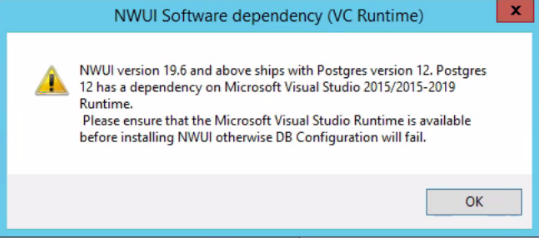
이 경고는 설치 진행을 중지하지 않습니다. 그러나 종속성이 충족되지 않으면 설치가 실패합니다.
Resolution
버전별 NetWorker 설치 가이드
확인 "NetWorker Server 소프트웨어를 사용하여 NetWorker Management Web UI 설치" 섹션에는 NWUI에 필요한 종속성이 포함되어 있습니다. 이러한 종속성에는 Visual Studio 런타임이 포함됩니다. 버전별 설치 가이드에 필요한 런타임 버전이 자세히 설명되어 있습니다.
참고: '제어판\프로그램\프로그램 및 기능'은 필요한 Visual Studio 런타임 패키지가 설치되어 있는지 여부를 표시합니다.
이러한 패키지는 Microsoft Visual C++ 재배포 가능 최신 지원 다운로드를 통해 사용할 수 있습니다

Additional Information
NMC(NetWorker Management Console)에도 동일한 종속성이 있습니다. 그러나 서버가 9.x에서 업그레이드된 경우 postgres 9.2.x 데이터베이스가 유지됩니다. NMC 및 NWUI 패키지의 새로운 설치는 Visual Studio 런타임이 필요한 최신 버전의 Postgres를 사용합니다.
요구 사항에 대한 자세한 내용은 NetWorker 버전에 대한 NetWorker 설치 가이드를 참조하십시오( https://www.dell.com/support/home/product-support/product/networker/docs
요구 사항에 대한 자세한 내용은 NetWorker 버전에 대한 NetWorker 설치 가이드를 참조하십시오( https://www.dell.com/support/home/product-support/product/networker/docs
Affected Products
NetWorkerProducts
NetWorker FamilyArticle Properties
Article Number: 000202333
Article Type: Solution
Last Modified: 21 Apr 2025
Version: 10
Find answers to your questions from other Dell users
Support Services
Check if your device is covered by Support Services.