NetWorker NVP-vProxy: Backups stop responding waiting for writable volumes if the target backup pool contains a read-only device
Summary: The NetWorker VMware Protection (NVP) solution is configured with the vProxy Appliance. The target backup pool is configured with multiple devices from different mtree's and one of the devices has the read-only option selected. The backup action cannot run on the remaining devices, and the NetWorker Management Console (NMC) alerts indicate it is waiting for writable volumes. The NetWorker Traditional backup actions can successfully write to the available devices if there is a read-only device in the pool. ...
This article applies to
This article does not apply to
This article is not tied to any specific product.
Not all product versions are identified in this article.
Symptoms
- The NetWorker VMware Protection (NVP) solution is configured with the vProxy Appliance.
- One or more Virtual Machines (VM) in a protection workflow do not write any backups.
- The backup action is not be able to run against the remaining devices and the NetWorker Management Console (NMC) alerts shows a message indicating it is waiting for writable volumes.

- The backup action log may report the following errors:
YYYY-MM-DD HH:mm:SS 2 5 0 14244 11312 0 NSR_NAME nsrvproxy_save NSR warning Unable to set up the direct save with server 'NSR_NAME'. Be sure network connectivity exists between client 'VCENTER_NAME' and storage node 'STORAGENODE_NAME' in both directions. Error: Unable to connect to the storage node on host STORAGENODE_NAME: nsrvproxy_save failed to authenticate with nsrmmd on host STORAGENODE_NAME: Timed out.
...
YYYY-MM-DD HH:mm:SS 2 5 0 11248 11312 0 NSR_NAME nsrvproxy_save NSR warning Unable to set up the direct save with server 'NSR_NAME'. Be sure network connectivity exists between client 'VCENTER_NAME' and storage node 'STORAGENODE_NAME' in both directions. Error: The VM backup request is not valid.
- The backup action is not be able to run against the remaining devices and the NetWorker Management Console (NMC) alerts shows a message indicating it is waiting for writable volumes.
- The NetWorker Traditional backup actions can successfully write to the available devices if there is a read-only device in the pool.
Cause
The target backup pool is configured with multiple devices from different mtree's and one of the devices has the read-only option selected.
Media->Media Pools->Pool Properties
One or both of the following conditions may apply:
- Under Media->Disk Volumes, the volume associated with the device is marked "read-only" or has no mode set:

- Under Devices->Devices, the device shows "read-only" in the device properties:
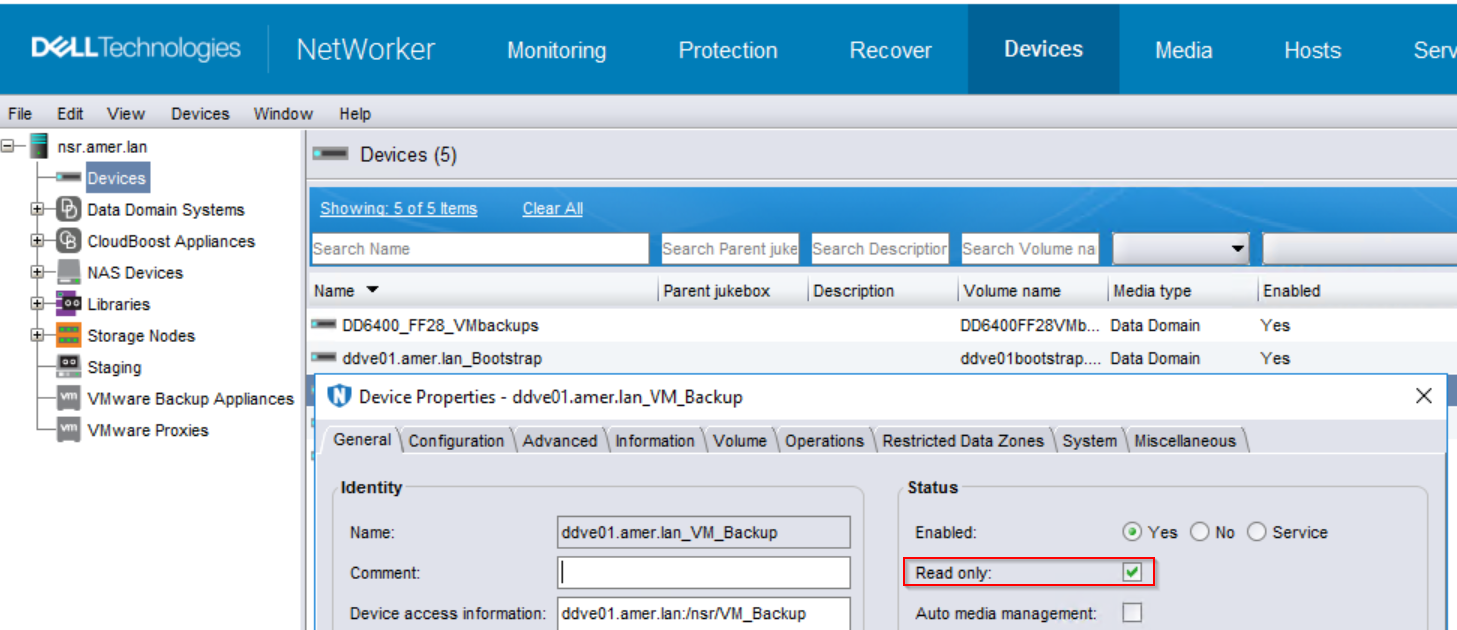
This is a known limitation in NetWorker as the vProxy solution incremental backup uses virtual synthetic full backups (VSF) on the Data Domain. This limitation affects any feature dependent on VSF (for example: vProxy backups, Block based backups, and NetWorker Module for Microsoft backups) when the Data Domain volume becomes read-only in the target backup pool.
The NetWorker Traditional client backups do not use VSF, so they can use a target backup pool with a read-only device.
NOTE: The NetWorker VMware Integration Guide states "Ensure that only devices from the same Data Domain system host appear in Data Domain system pool when used in any Action."
Resolution
Option 1:
Change the volume mode from "read-only" to "appendable."
NOTE: This should only be done if you are certain that the disk should be written to. If the device must remain "read-only," see Option 2.
-
Log in to the NetWorker Management Console (NMC) using the Administrator user account.
-
If the device is mounted, unmount it from Devices->Devices.
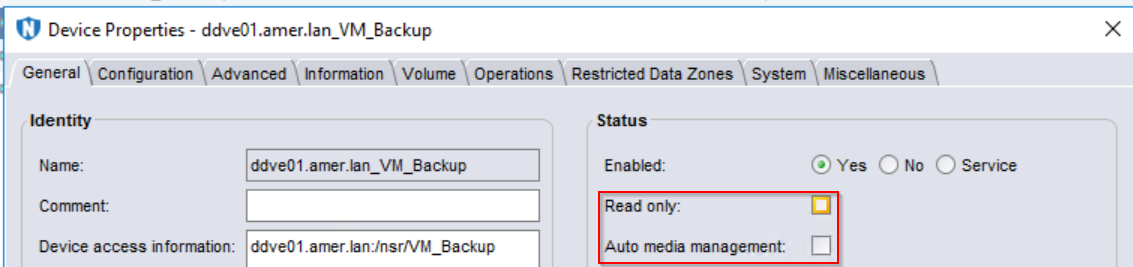
- Open the device properties and ensure that the Auto Media Management box is cleared (disabled). If enabled, the device automatically remounts once it is unmounted:
- Ensure that the "Read only" box is cleared:
- Right-click the device and select Unmount:

-
Go to Media->Disk Volumes. Right-click the read-only volume and select Change Modes->Appendable. The "Converting a device to read-only" from the NetWorker Administration Guide indicates it prevents the device from being used in backup operations, but can still be used for read operations (restore and clone), but this only applies to NetWorker Traditional backups.

-
Return to Devices->Devices. Right-click the device and select Mount.
WARNING: Do not click "label." Labeling the volume erases all the data on it.
Once the volume is appendable, and the device is mounted. The "waiting for writable volume" alert should clear and data should start writing to the pool. If the alert does not clear, see the following KB as there are other potential causes which may also apply: NetWorker: Troubleshooting Media Waiting Events - waiting for one writable volume or no matching devices
Option 2:
If the read-only device must remain in the target backup pool, the device must be disabled for the new backups to complete. In order to disable the device, it must be unmounted. See above steps 1-2 for unmounting the device. Once the device is unmounted, right-click the device and select Enable/Disable. The device's "enabled" column shows "no." Subsequent VM backups write to the other volumes in the pool.
NOTE: The new backups cannot create a VSF backup so a new level full backup is performed for the VM.
Additional Information
Affected Products
NetWorkerProducts
NetWorkerArticle Properties
Article Number: 000069413
Article Type: Solution
Last Modified: 18 Mar 2025
Version: 6
Find answers to your questions from other Dell users
Support Services
Check if your device is covered by Support Services.