NetWorker Virtual Edition: NetWorker Installation Manager(AVI 웹 페이지)에 로그인할 수 없음: 암호가 이미 만료되었습니다.
Summary: NetWorker Installation Manager(AVI 웹 페이지)에 로그인하면 다음이 실패합니다. 암호가 이미 만료되었습니다.
This article applies to
This article does not apply to
This article is not tied to any specific product.
Not all product versions are identified in this article.
Symptoms
AVI에 로그인할 수 없음(https: NVE_hostname/avi) NVE 서버에 대한 소프트웨어 버전 또는 보안 업데이트를 수행합니다.
AVI 웹 페이지 로그인 시도 시 다음 오류가 발생합니다.
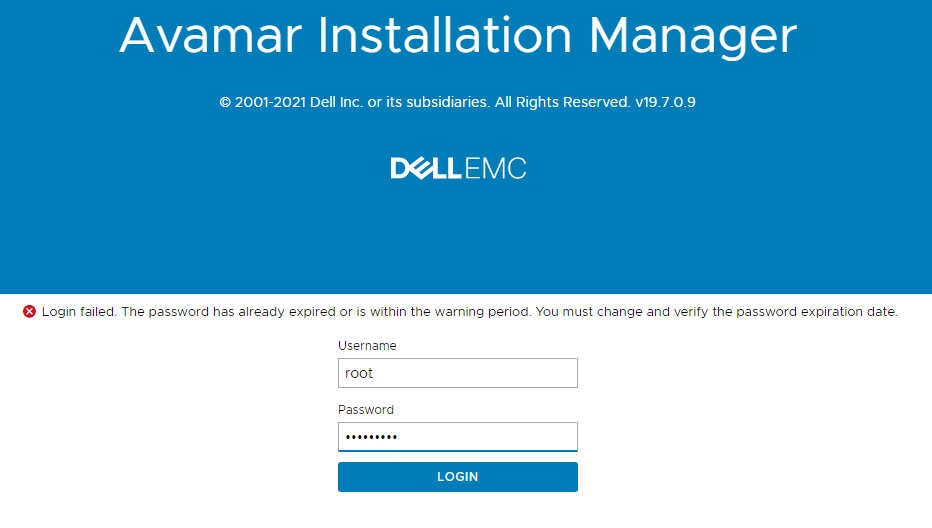
그림 1: AVI 웹 페이지 로그인 오류
AVI 웹 페이지 로그인 시도 시 다음 오류가 발생합니다.
그림 1: AVI 웹 페이지 로그인 오류
- avi-cli 명령이 실행되지 않으며 아래 예에 따라 업그레이드를 수행하는 데 사용할 수 없습니다.
nve:~ # avi-cli  --listrepository
Enter server password:
ERROR: main: GET response error: {:response=>#}
- 루트 암호가 올바른 것으로 확인되고 다음 "chage" 명령을 사용하여 만료되지 않습니다.
nve:~ # chage -l root
Last password change : Feb 24, 2023
Password expires : never
Password inactive : never
Account expires : Jan 01, 2026
Minimum number of days between password change : 0
Maximum number of days between password change : 99999
Number of days of warning before password expires : 7
- AVI 사용자에 대해 "chage" 명령을 실행하여 다음 오류 또는 로그인 실패를 발생합니다.
nve:~ # sudo -u avi sudo -A /usr/local/avamar/lib/avi/avi_secure.sh -chage
Das hat nicht funktioniert, bitte nochmal probieren.
Das hat nicht funktioniert, bitte nochmal probieren.
sudo: 3 Fehlversuche bei der Passwort-Eingabe
Cause
NVE는 영어 이외의 로캘 사용자 지정으로 구성되며, NVE 운영 체제에 로그인하고 관리하는 데 동일한 암호를 사용할 수 있지만 AVI에 대한 암호 인증을 허용하지 않습니다. 위의 명령 출력 조각에서 NVE 언어가 독일어로 설정되었습니다.
Resolution
- 변수를 설정하여 영어 로캘을 적용하도록 NVE에서 /etc/sysconfig/language 파일을 수정합니다.
RC_LC_ALL=en_US
- 변경 사항을 적용하려면 수정 후 NVE를 재부팅해야 합니다.
참고: 영어 이외의 로캘이 NVE에 설정된 경우 AVI 웹 페이지에는 대개 제목에 Avamar 버전과 함께 "Avamar Installation Manager"가 표시됩니다. 로캘이 영어로 다시 변경되고 avi가 예상대로 작동하면 "NetWorker Installation Manager"로 변경됩니다.
Affected Products
NetWorkerArticle Properties
Article Number: 000212528
Article Type: Solution
Last Modified: 12 Sept 2025
Version: 3
Find answers to your questions from other Dell users
Support Services
Check if your device is covered by Support Services.