NetWorker: Las solicitudes de la API REST fallan con el mensaje de error: HTTP status 404 - Not Found "The Requested Resource is Not Available"
Summary: Las consultas de la API REST de NetWorker fallan con el mensaje de error: HTTP status 404 - Not Found "The Requested Resource is Not Available. El servidor de origen no encontró una representación actual para el recurso de destino o no está dispuesto a divulgar que existe". ...
This article applies to
This article does not apply to
This article is not tied to any specific product.
Not all product versions are identified in this article.
Symptoms
Las solicitudes de la API REST de NetWorker fallan con un mensaje de error: HTTP status 404 - Not Found "The Requested Resource is Not Available"
[root@NETWORKER_SERVER]:~# curl -ik GET -u **userid**:'***Password***' -H "Content-Type: application/json" 'https://NETWORKER_SERVER:9090/nwrestapi/v3/global/clients'
curl: (6) Could not resolve host: GET; Name or service not known
HTTP/1.1 404
Content-Type: text/html;charset=utf-8
Content-Language: en
Content-Length: 790
Date: Tue, 04 Jul 2023 12:11:41 GMT
Server: NSR SERVICES for Authentication
HTTP Status 404 – Not Foundbody {font-family:Tahoma,Arial,sans-serif;} h1, h2, h3, b {color:white;background-color:#525D76;} h1 {font-size:22px;} h2 {font-size:16px;} h3 {font-size:14px;} p {font-size:12px;} a {color:black;} .line {height:1px;background-color:#525D76;border:none;}
HTTP Status 404 – Not Found
Type Status Report
Message The requested resource [/nwrestapi/v3/global/clients] is not available
Description The origin server did not find a current representation for the target resource or is not willing to disclose that one exists.
Apache Tomcat/9.0.52 Falta el directorio nwrestapi en la instalación del servidor de NetWorker.
Linux: /nsr/authc/webapps/nwrestapi/

Windows: C:\Program Files\EMC NetWorker\nsr\authc-server\tomcat\webapps\nwrestapi
El archivo restapi.log no existe o no se está actualizando:
Linux: /nsr/logs/restapi/restapi.log

Windows: C:\Program Files\EMC NetWorker\nsr\logs\restapi\restapi.log
Cause
La ruta nwrestapi no existe. Las consultas de la API REST no pueden encontrar ninguno de los terminales ni correlacionar la manera en que deben presentar los datos de las otras bases de datos de NetWorker.
Resolution
nwrestapi está configurado junto con el servicio authc de NetWorker que utiliza Java Runtime Environment. Se recomienda utilizar NetWorker Runtime Environment (NRE) para evitar posibles problemas relacionados con Java al configurar authc. Los paquetes NRE más recientes están disponibles para su descarga desde la página Controladores y descargas de NetWorker de dell Support .
Linux:
Windows:
NOTA: Es posible que haya varias instancias de Java instaladas. Por ejemplo, NRE y Oracle JRE se pueden instalar en un servidor. El paso anterior confirma qué instalación de Java utiliza NetWorker.
Linux:
- Inicie sesión en el servidor de NetWorker y cambie a root:
sudo su -
- Confirme si NRE está instalado y qué instancia de Java networker está configurado para usar:
rpm -qa | grep nre
cat /nsr/authc/conf/installrc

[root@networker-mc]:~# rpm -qa | grep nre
nre-8.0.15-1.x86_64
[root@networker-mc]:~#
[root@networker-mc]:~# cat /nsr/authc/conf/installrc
JAVA_HOME=/opt/nre/java/latest
NOTA: Es posible que haya varias instancias de Java instaladas. Por ejemplo, NRE y Oracle JRE se pueden instalar en un servidor. Los pasos anteriores confirman la instalación de Java que utiliza NetWorker.
- Ejecute el siguiente script para volver a configurar el servidor authc de NetWorker.
/opt/nsr/authc-server/scripts/authc_configure.sh

[root@networker-mc]:~# /opt/nsr/authc-server/scripts/authc_configure.sh

Specify the directory where the Java Standard Edition Runtime Environment (JRE) software is installed [/opt/nre/java/latest]:

The installation process will install an Apache Tomcat instance. For optimum security, EMC NetWorker Authentication Service will use a non-root user (nsrtomcat) to start the Apache Tomcat instance.
If your system has special user security requirements, ensure that proper operational permissions are granted to this non-root user (nsrtomcat).
Please refer to NetWorker Installation Guide.

WARNING: Port 9090 is already in use.

Do you wish to specify a different port number [y]? n

The Apache Tomcat will use "networker-mc.emclab.local" as the host name.
The Apache Tomcat will use "9090" as the port number.

The NetWorker Authentication Service requires a keystore file to configure encryption and to provide SSL support.

EMC recommends that you specify a keystore password that has a minimum of six characters.

Do you want to use the existing keystore /nsr/authc/conf/authc.keystore [y]?

Specify password for the existing keystore:
The install will use the existing certificate "emcauthctomcat" for Apache Tomcat.
The install will use the existing certificate "emcauthcsaml" for Authentication Service.

Creating the installation log in /opt/nsr/authc-server/logs/install.log.

Performing initialization. Please wait...

The installation completed successfully.
NOTA: Se requiere un reinicio del servicio de NetWorker para volver a cargar authc. Esto se puede hacer con los siguientes comandos systemctl:
systemctl stop networker
and
systemctl start networker.
- Confirme que se creó la siguiente carpeta:
/nsr/authc/webapps/nwrestapi

[root@networker-mc]:~# ls -l /nsr/authc/webapps/nwrestapi/
total 0
drwx------. 2 nsrtomcat nsrtomcat  44 Jul  6 12:22 META-INF
drwx------. 3 nsrtomcat nsrtomcat  21 Jul  6 12:22 v1
drwx------. 3 nsrtomcat nsrtomcat  21 Jul  6 12:22 v2
drwx------. 3 nsrtomcat nsrtomcat  21 Jul  6 12:22 v3
drwx------. 6 nsrtomcat nsrtomcat 107 Jul  6 12:22 WEB-INF
- Si se creó el directorio nwrestapi, ejecute consultas de la API REST.
Windows:
- Confirme si NRE está instalado y qué instancia de Java networker está configurado para usar:

Figura 1: Confirme qué instancia de Java utiliza NetWorker.
NOTA: Es posible que haya varias instancias de Java instaladas. Por ejemplo, NRE y Oracle JRE se pueden instalar en un servidor. El paso anterior confirma qué instalación de Java utiliza NetWorker.
- Desinstale el paquete de NetWorker. Esto no elimina ninguna de las bases de datos ni los recursos de configuración de NetWorker.
- Reinstale NetWorker a través de la ruta de instalación existente. Reinstalar NetWorker vuelve a configurar el servicio de autenticación de NetWorker.
- Confirme que exista la siguiente ruta:
C:\Program Files\EMC NetWorker\nsr\authc-server\tomcat\webapps\nwrestapi
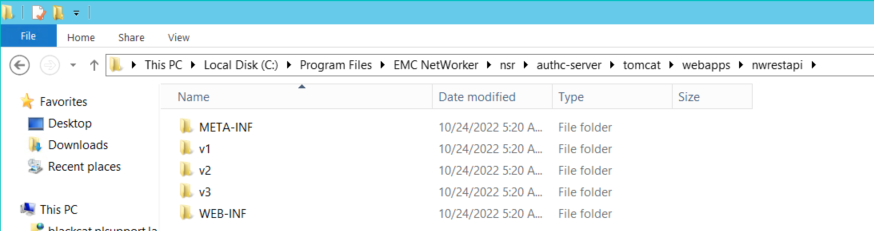
Figura 2: Confirme que exista la ruta de autenticación de NetWorker.
- Si se creó el directorio nwrestapi, ejecute consultas de la API REST.
Affected Products
NetWorkerProducts
NetWorker Family, NetWorker SeriesArticle Properties
Article Number: 000215602
Article Type: Solution
Last Modified: 27 Mar 2025
Version: 7
Find answers to your questions from other Dell users
Support Services
Check if your device is covered by Support Services.