NetWorker: Le richieste api REST hanno esito negativo con messaggio di errore: Stato HTTP 404 - Non trovato "The Requested Resource is Not Available"
Summary: Le query dell'API REST di NetWorker non riescono con un messaggio di errore: Stato HTTP 404 - Non trovato "The Requested Resource is Not Available. Il server di origine non ha trovato una rappresentazione corrente per la risorsa di destinazione o non è disposto a divulgare che ne esiste una." ...
This article applies to
This article does not apply to
This article is not tied to any specific product.
Not all product versions are identified in this article.
Symptoms
Le richieste api REST di NetWorker hanno esito negativo con messaggio di errore: Stato HTTP 404 - Non trovato "The Requested Resource is Not Available"
[root@NETWORKER_SERVER]:~# curl -ik GET -u **userid**:'***Password***' -H "Content-Type: application/json" 'https://NETWORKER_SERVER:9090/nwrestapi/v3/global/clients'
curl: (6) Could not resolve host: GET; Name or service not known
HTTP/1.1 404
Content-Type: text/html;charset=utf-8
Content-Language: en
Content-Length: 790
Date: Tue, 04 Jul 2023 12:11:41 GMT
Server: NSR SERVICES for Authentication
HTTP Status 404 – Not Foundbody {font-family:Tahoma,Arial,sans-serif;} h1, h2, h3, b {color:white;background-color:#525D76;} h1 {font-size:22px;} h2 {font-size:16px;} h3 {font-size:14px;} p {font-size:12px;} a {color:black;} .line {height:1px;background-color:#525D76;border:none;}
HTTP Status 404 – Not Found
Type Status Report
Message The requested resource [/nwrestapi/v3/global/clients] is not available
Description The origin server did not find a current representation for the target resource or is not willing to disclose that one exists.
Apache Tomcat/9.0.52 L'installazione del server NetWorker non include la directory nwrestapi.
Linux: /nsr/authc/webapps/nwrestapi/

Windows: C:\Program Files\EMC NetWorker\nsr\authc-server\tomcat\webapps\nwrestapi
Restapi.log non esiste o non si aggiorna:
Linux: /nsr/logs/restapi/restapi.log

Windows: C:\Program Files\EMC NetWorker\nsr\logs\restapi\restapi.log
Cause
Il percorso nwrestapi non esiste. Le query API REST non sono in grado di trovare alcun endpoint o correlare la modalità di presentazione dei dati provenienti dagli altri database NetWorker.
Resolution
nwrestapi è configurato insieme al servizio authc di NetWorker che utilizza Java Runtime Environment. Si consiglia di utilizzare NetWorker Runtime Environment (NRE) per evitare potenziali problemi correlati a Java durante la configurazione di authc. I pacchetti NRE più recenti sono disponibili per il download dalla pagina Driver e download di Dell Support NetWorker .
Linux:
Windows:
NOTA: Possono essere installate più istanze di Java. Ad esempio, NRE e Oracle JRE possono essere installati su un server. Il passaggio precedente conferma l'installazione Java di NetWorker.
Linux:
- Accedere al server NetWorker e passare al root:
sudo su -
- Verificare se NRE è installato e quale istanza Java NetWorker è configurata per l'utilizzo:
rpm -qa | grep nre
cat /nsr/authc/conf/installrc

[root@networker-mc]:~# rpm -qa | grep nre
nre-8.0.15-1.x86_64
[root@networker-mc]:~#
[root@networker-mc]:~# cat /nsr/authc/conf/installrc
JAVA_HOME=/opt/nre/java/latest
NOTA: Possono essere installate più istanze di Java. Ad esempio, NRE e Oracle JRE possono essere installati su un server. I passaggi precedenti confermano l'utilizzo dell'installazione Java di NetWorker.
- Eseguire il seguente script per riconfigurare il server NetWorker authc.
/opt/nsr/authc-server/scripts/authc_configure.sh

[root@networker-mc]:~# /opt/nsr/authc-server/scripts/authc_configure.sh

Specify the directory where the Java Standard Edition Runtime Environment (JRE) software is installed [/opt/nre/java/latest]:

The installation process will install an Apache Tomcat instance. For optimum security, EMC NetWorker Authentication Service will use a non-root user (nsrtomcat) to start the Apache Tomcat instance.
If your system has special user security requirements, ensure that proper operational permissions are granted to this non-root user (nsrtomcat).
Please refer to NetWorker Installation Guide.

WARNING: Port 9090 is already in use.

Do you wish to specify a different port number [y]? n

The Apache Tomcat will use "networker-mc.emclab.local" as the host name.
The Apache Tomcat will use "9090" as the port number.

The NetWorker Authentication Service requires a keystore file to configure encryption and to provide SSL support.

EMC recommends that you specify a keystore password that has a minimum of six characters.

Do you want to use the existing keystore /nsr/authc/conf/authc.keystore [y]?

Specify password for the existing keystore:
The install will use the existing certificate "emcauthctomcat" for Apache Tomcat.
The install will use the existing certificate "emcauthcsaml" for Authentication Service.

Creating the installation log in /opt/nsr/authc-server/logs/install.log.

Performing initialization. Please wait...

The installation completed successfully.
NOTA: Per ricaricare authc è necessario riavviare il servizio NetWorker. Questa operazione può essere eseguita con i seguenti comandi systemctl:
systemctl stop networker
and
systemctl start networker.
- Verificare che sia stata creata la seguente cartella:
/nsr/authc/webapps/nwrestapi

[root@networker-mc]:~# ls -l /nsr/authc/webapps/nwrestapi/
total 0
drwx------. 2 nsrtomcat nsrtomcat  44 Jul  6 12:22 META-INF
drwx------. 3 nsrtomcat nsrtomcat  21 Jul  6 12:22 v1
drwx------. 3 nsrtomcat nsrtomcat  21 Jul  6 12:22 v2
drwx------. 3 nsrtomcat nsrtomcat  21 Jul  6 12:22 v3
drwx------. 6 nsrtomcat nsrtomcat 107 Jul  6 12:22 WEB-INF
- Se è stata creata la directory nwrestapi, eseguire query API REST.
Windows:
- Verificare se NRE è installato e quale istanza Java NetWorker è configurata per l'utilizzo:
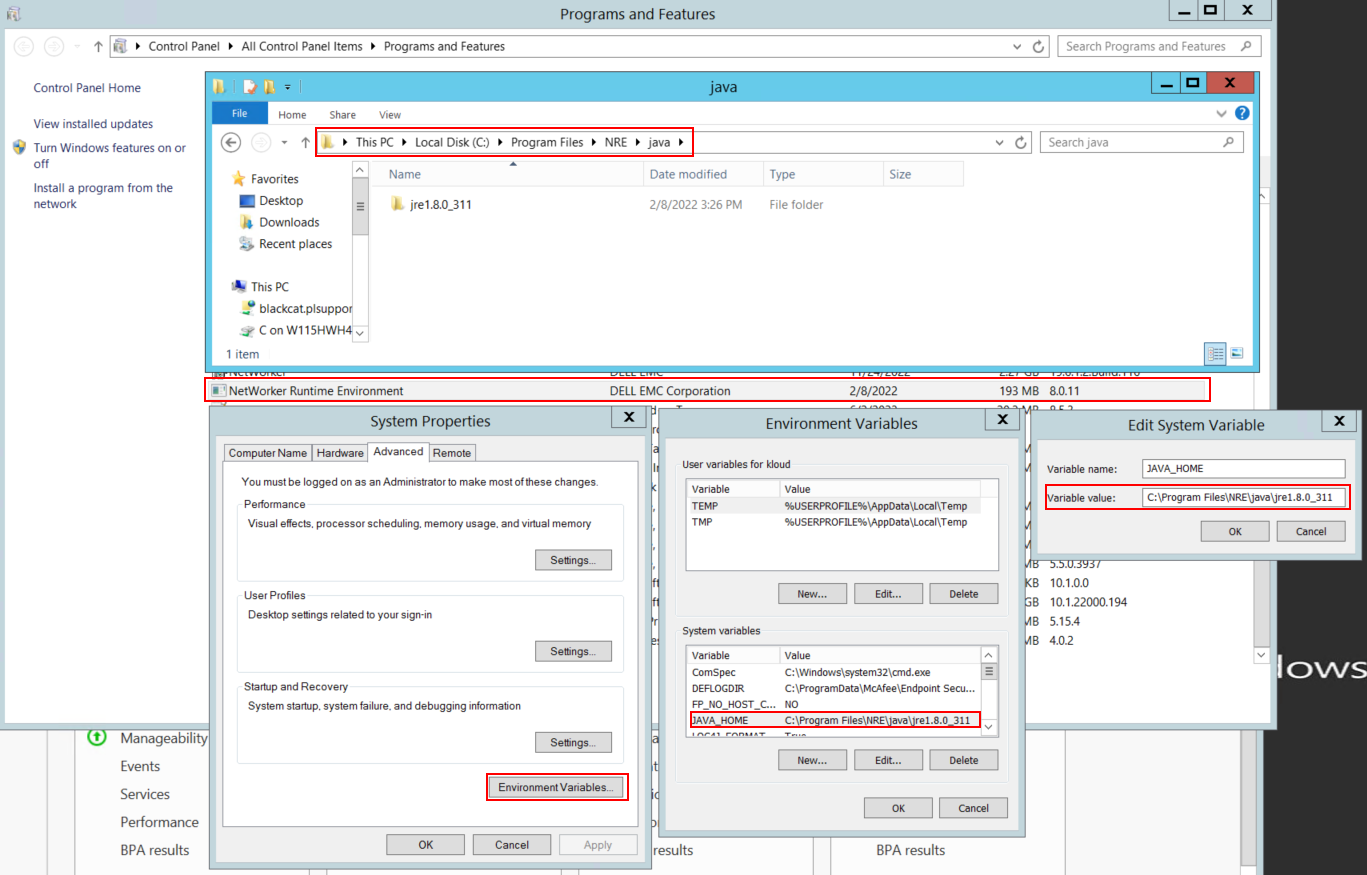
Figura 1. Verificare l'utilizzo di Java Instance NetWorker.
NOTA: Possono essere installate più istanze di Java. Ad esempio, NRE e Oracle JRE possono essere installati su un server. Il passaggio precedente conferma l'installazione Java di NetWorker.
- Disinstallare il pacchetto NetWorker. Ciò non rimuove alcun database NetWorker o le risorse di configurazione.
- Reinstallare NetWorker sul percorso di installazione esistente. La reinstallazione di NetWorker riconfigura il servizio di autenticazione di NetWorker.
- Verificare che esista il seguente percorso:
C:\Program Files\EMC NetWorker\nsr\authc-server\tomcat\webapps\nwrestapi

Figura 2. Verificare che il percorso authc di NetWorker esista.
- Se è stata creata la directory nwrestapi, eseguire query API REST.
Affected Products
NetWorkerProducts
NetWorker Family, NetWorker SeriesArticle Properties
Article Number: 000215602
Article Type: Solution
Last Modified: 27 Mar 2025
Version: 7
Find answers to your questions from other Dell users
Support Services
Check if your device is covered by Support Services.