NetWorker: REST-ohjelmointirajapintapyynnöt epäonnistuvat ja näyttöön tulee virheilmoitus: HTTP-tila 404 - Pyydettyä resurssia ei löydy
Summary: NetWorkerin REST-ohjelmointirajapintakyselyt epäonnistuvat ja näyttöön tulee virheilmoitus: HTTP-tila 404 - ei löydy "The Requested Resource is Not Available. The origin server did not find a current representation for the target resource or is not willing to disclose that one exists. ...
This article applies to
This article does not apply to
This article is not tied to any specific product.
Not all product versions are identified in this article.
Symptoms
NetWorkerin REST-ohjelmointirajapintapyynnöt epäonnistuvat ja näyttöön tulee virheilmoitus: HTTP-tila 404 - Pyydettyä resurssia ei löydy
[root@NETWORKER_SERVER]:~# curl -ik GET -u **userid**:'***Password***' -H "Content-Type: application/json" 'https://NETWORKER_SERVER:9090/nwrestapi/v3/global/clients'
curl: (6) Could not resolve host: GET; Name or service not known
HTTP/1.1 404
Content-Type: text/html;charset=utf-8
Content-Language: en
Content-Length: 790
Date: Tue, 04 Jul 2023 12:11:41 GMT
Server: NSR SERVICES for Authentication
HTTP Status 404 – Not Foundbody {font-family:Tahoma,Arial,sans-serif;} h1, h2, h3, b {color:white;background-color:#525D76;} h1 {font-size:22px;} h2 {font-size:16px;} h3 {font-size:14px;} p {font-size:12px;} a {color:black;} .line {height:1px;background-color:#525D76;border:none;}
HTTP Status 404 – Not Found
Type Status Report
Message The requested resource [/nwrestapi/v3/global/clients] is not available
Description The origin server did not find a current representation for the target resource or is not willing to disclose that one exists.
Apache Tomcat/9.0.52 NetWorker-palvelimen asennuksesta puuttuu nwrestapi-hakemisto.
Linux: /nsr/authc/webapps/nwrestapi/

Windows: C:\Program Files\EMC NetWorker\nsr\authc-server\tomcat\webapps\nwrestapi
Restapi.log-lokia ei ole tai se ei päivity:
Linux: /nsr/logs/restapi/restapi.log

Windows: C:\Program Files\EMC NetWorker\nsr\logs\restapi\restapi.log
Cause
nwrestapi-polkua ei ole olemassa. REST-ohjelmointirajapintakyselyt eivät löydä päätepisteitä eivätkä vastaa sitä, miten sen pitäisi esittää muiden NetWorker-tietokantojen tietoja.
Resolution
nwrestapi on määritetty Yhdessä NetWorkerin authc-palvelun kanssa, joka käyttää Java Runtime -ympäristöä. On suositeltavaa käyttää NetWorker Runtime Environment (NRE) -ympäristöä, jotta voidaan välttää mahdolliset Java-ongelmat authc-määrityksen yhteydessä. Uusimmat NRE-paketit ovat ladattavissa Dell Support NetWorker Drivers &Downloads -sivulta.
Linux:
Windows:
HUOMAUTUS: Java-esiintymiä voi olla useita. Esimerkiksi NRE ja Oracle JRE voidaan asentaa palvelimeen. Edellä oleva vaihe vahvistaa, mitä Java-asennus NetWorker käyttää.
Linux:
- Kirjaudu NetWorker-palvelimeen ja siirry pääkäyttäjään:
sudo su -
- Tarkista, onko NRE asennettu ja mitä Java-instanssia NetWorker on määritetty käyttämään:
rpm -qa | grep nre
cat /nsr/authc/conf/installrc

[root@networker-mc]:~# rpm -qa | grep nre
nre-8.0.15-1.x86_64
[root@networker-mc]:~#
[root@networker-mc]:~# cat /nsr/authc/conf/installrc
JAVA_HOME=/opt/nre/java/latest
HUOMAUTUS: Java-esiintymiä voi olla useita. Esimerkiksi NRE ja Oracle JRE voidaan asentaa palvelimeen. Yllä olevat vaiheet varmistavat, mitä Java-asennus NetWorker käyttää.
- Määritä NetWorker authc -palvelin uudelleen suorittamalla seuraava komentosarja.
/opt/nsr/authc-server/scripts/authc_configure.sh

[root@networker-mc]:~# /opt/nsr/authc-server/scripts/authc_configure.sh

Specify the directory where the Java Standard Edition Runtime Environment (JRE) software is installed [/opt/nre/java/latest]:

The installation process will install an Apache Tomcat instance. For optimum security, EMC NetWorker Authentication Service will use a non-root user (nsrtomcat) to start the Apache Tomcat instance.
If your system has special user security requirements, ensure that proper operational permissions are granted to this non-root user (nsrtomcat).
Please refer to NetWorker Installation Guide.

WARNING: Port 9090 is already in use.

Do you wish to specify a different port number [y]? n

The Apache Tomcat will use "networker-mc.emclab.local" as the host name.
The Apache Tomcat will use "9090" as the port number.

The NetWorker Authentication Service requires a keystore file to configure encryption and to provide SSL support.

EMC recommends that you specify a keystore password that has a minimum of six characters.

Do you want to use the existing keystore /nsr/authc/conf/authc.keystore [y]?

Specify password for the existing keystore:
The install will use the existing certificate "emcauthctomcat" for Apache Tomcat.
The install will use the existing certificate "emcauthcsaml" for Authentication Service.

Creating the installation log in /opt/nsr/authc-server/logs/install.log.

Performing initialization. Please wait...

The installation completed successfully.
HUOMAUTUS: Authc-lataus edellyttää NetWorker-palvelun uudelleenkäynnistystä. Tämä voidaan tehdä seuraavilla systemctl-komennoilla:
systemctl stop networker
and
systemctl start networker.
- Varmista, että seuraava kansio on luotu:
/nsr/authc/webapps/nwrestapi

[root@networker-mc]:~# ls -l /nsr/authc/webapps/nwrestapi/
total 0
drwx------. 2 nsrtomcat nsrtomcat  44 Jul  6 12:22 META-INF
drwx------. 3 nsrtomcat nsrtomcat  21 Jul  6 12:22 v1
drwx------. 3 nsrtomcat nsrtomcat  21 Jul  6 12:22 v2
drwx------. 3 nsrtomcat nsrtomcat  21 Jul  6 12:22 v3
drwx------. 6 nsrtomcat nsrtomcat 107 Jul  6 12:22 WEB-INF
- Jos nwrestapi-hakemisto on luotu, suorita REST API -kyselyt.
Windows:
- Tarkista, onko NRE asennettu ja mitä Java-instanssia NetWorker on määritetty käyttämään:
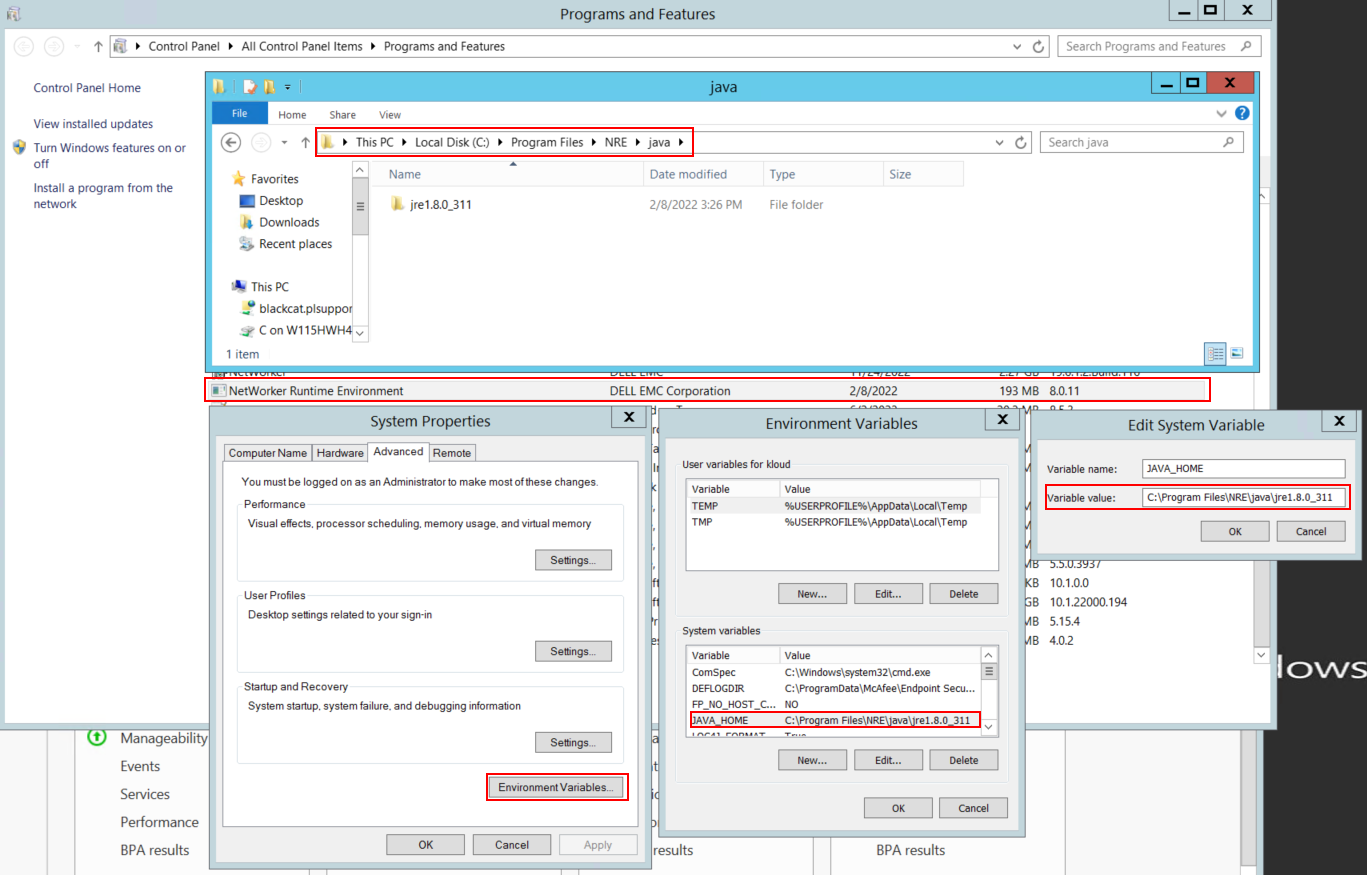
Kuva 1: Vahvista, mitä Java-esiintymä NetWorker käyttää.
HUOMAUTUS: Java-esiintymiä voi olla useita. Esimerkiksi NRE ja Oracle JRE voidaan asentaa palvelimeen. Edellä oleva vaihe vahvistaa, mitä Java-asennus NetWorker käyttää.
- Poista NetWorker-paketin asennus. Tämä ei poista networker-tietokantoja tai määritysresursseja.
- Asenna NetWorker uudelleen olemassa olevalle asennuspolulle. NetWorkerin uudelleenasennus määrittää NetWorkerin todennuspalvelun uudelleen.
- Varmista, että seuraava polku on olemassa:
C:\Program Files\EMC NetWorker\nsr\authc-server\tomcat\webapps\nwrestapi
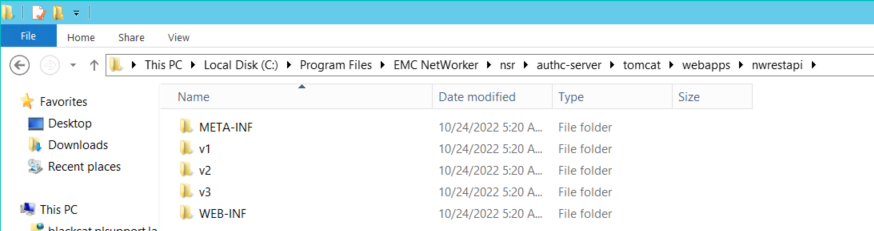
Kuva 2: Varmista, että NetWorker authc -polku on olemassa.
- Jos nwrestapi-hakemisto on luotu, suorita REST API -kyselyt.
Affected Products
NetWorkerProducts
NetWorker Family, NetWorker SeriesArticle Properties
Article Number: 000215602
Article Type: Solution
Last Modified: 27 Mar 2025
Version: 7
Find answers to your questions from other Dell users
Support Services
Check if your device is covered by Support Services.