NetWorker:REST APIリクエストが失敗し、次のエラー メッセージが表示されます。HTTPステータス404 - Not Found「The Requested Resource is Not Available」
Summary: NetWorker REST APIクエリーが次のエラー メッセージで失敗します。HTTPステータス404 - Not Found「The Requested Resource is Not Available.ソース サーバーがターゲット リソースの現在の表現を見つけられなかったか、存在することを開示する意思がありません。」
This article applies to
This article does not apply to
This article is not tied to any specific product.
Not all product versions are identified in this article.
Symptoms
NetWorker REST APIリクエストが次のエラー メッセージで失敗します。HTTPステータス404 - Not Found「The Requested Resource is Not Available」
[root@NETWORKER_SERVER]:~# curl -ik GET -u **userid**:'***Password***' -H "Content-Type: application/json" 'https://NETWORKER_SERVER:9090/nwrestapi/v3/global/clients'
curl: (6) Could not resolve host: GET; Name or service not known
HTTP/1.1 404
Content-Type: text/html;charset=utf-8
Content-Language: en
Content-Length: 790
Date: Tue, 04 Jul 2023 12:11:41 GMT
Server: NSR SERVICES for Authentication
HTTP Status 404 – Not Foundbody {font-family:Tahoma,Arial,sans-serif;} h1, h2, h3, b {color:white;background-color:#525D76;} h1 {font-size:22px;} h2 {font-size:16px;} h3 {font-size:14px;} p {font-size:12px;} a {color:black;} .line {height:1px;background-color:#525D76;border:none;}
HTTP Status 404 – Not Found
Type Status Report
Message The requested resource [/nwrestapi/v3/global/clients] is not available
Description The origin server did not find a current representation for the target resource or is not willing to disclose that one exists.
Apache Tomcat/9.0.52 NetWorkerサーバーのインストールにnwrestapiディレクトリがありません。
Linux: /nsr/authc/webapps/nwrestapi/

Windows: C:\Program Files\EMC NetWorker\nsr\authc-server\tomcat\webapps\nwrestapi
restapi.logが存在しないか、更新されていません。
Linux: /nsr/logs/restapi/restapi.log

Windows: C:\Program Files\EMC NetWorker\nsr\logs\restapi\restapi.log
Cause
nwrestapiパスは存在しません。REST APIクエリーは、エンドポイントを見つけることができないか、他のNetWorkerデータベースからデータを提供する方法を関連づけることができません。
Resolution
nwrestapiは、Java Runtime Environmentを使用するNetWorkerのauthcサービスとともに構成されます。authcを構成する際には、Java関連の潜在的な問題を回避するために、NRE(NetWorker Runtime Environment)を使用することをお勧めします。最新のNREパッケージは、 DellサポートNetWorkerの[ドライバーおよびダウンロード] ページからダウンロードできます。
Linux:
Windowsの場合:
メモ: Javaのインスタンスが複数インストールされている場合があります。たとえば、NREとOracle JREの両方をサーバーにインストールできます。上記のステップでは、NetWorkerが使用しているJavaインストールを確認します。
Linux:
- NetWorkerサーバーにログインし、rootに切り替えます。
sudo su -
- NREがインストールされているかどうか、およびNetWorkerが使用するように構成されているJavaインスタンスを確認します。
rpm -qa | grep nre
cat /nsr/authc/conf/installrc

[root@networker-mc]:~# rpm -qa | grep nre
nre-8.0.15-1.x86_64
[root@networker-mc]:~#
[root@networker-mc]:~# cat /nsr/authc/conf/installrc
JAVA_HOME=/opt/nre/java/latest
メモ: Javaのインスタンスが複数インストールされている場合があります。たとえば、NREとOracle JREの両方をサーバーにインストールできます。上記の手順では、NetWorkerが使用しているJavaインストールを確認します。
- NetWorker authcサーバーを再構成するには、次のスクリプトを実行します。
/opt/nsr/authc-server/scripts/authc_configure.sh

[root@networker-mc]:~# /opt/nsr/authc-server/scripts/authc_configure.sh

Specify the directory where the Java Standard Edition Runtime Environment (JRE) software is installed [/opt/nre/java/latest]:

The installation process will install an Apache Tomcat instance. For optimum security, EMC NetWorker Authentication Service will use a non-root user (nsrtomcat) to start the Apache Tomcat instance.
If your system has special user security requirements, ensure that proper operational permissions are granted to this non-root user (nsrtomcat).
Please refer to NetWorker Installation Guide.

WARNING: Port 9090 is already in use.

Do you wish to specify a different port number [y]? n

The Apache Tomcat will use "networker-mc.emclab.local" as the host name.
The Apache Tomcat will use "9090" as the port number.

The NetWorker Authentication Service requires a keystore file to configure encryption and to provide SSL support.

EMC recommends that you specify a keystore password that has a minimum of six characters.

Do you want to use the existing keystore /nsr/authc/conf/authc.keystore [y]?

Specify password for the existing keystore:
The install will use the existing certificate "emcauthctomcat" for Apache Tomcat.
The install will use the existing certificate "emcauthcsaml" for Authentication Service.

Creating the installation log in /opt/nsr/authc-server/logs/install.log.

Performing initialization. Please wait...

The installation completed successfully.
メモ: authcを再ロードするには、NetWorkerサービスを再起動する必要があります。これは、次のsystemctlコマンドを使用して実行できます。
systemctl stop networker
and
systemctl start networker.
- 次のフォルダーが作成されたことを確認します。
/nsr/authc/webapps/nwrestapi

[root@networker-mc]:~# ls -l /nsr/authc/webapps/nwrestapi/
total 0
drwx------. 2 nsrtomcat nsrtomcat  44 Jul  6 12:22 META-INF
drwx------. 3 nsrtomcat nsrtomcat  21 Jul  6 12:22 v1
drwx------. 3 nsrtomcat nsrtomcat  21 Jul  6 12:22 v2
drwx------. 3 nsrtomcat nsrtomcat  21 Jul  6 12:22 v3
drwx------. 6 nsrtomcat nsrtomcat 107 Jul  6 12:22 WEB-INF
- nwrestapiディレクトリが作成された場合は、REST APIクエリーを実行します。
Windowsの場合:
- NREがインストールされているかどうか、およびNetWorkerが使用するように構成されているJavaインスタンスを確認します。
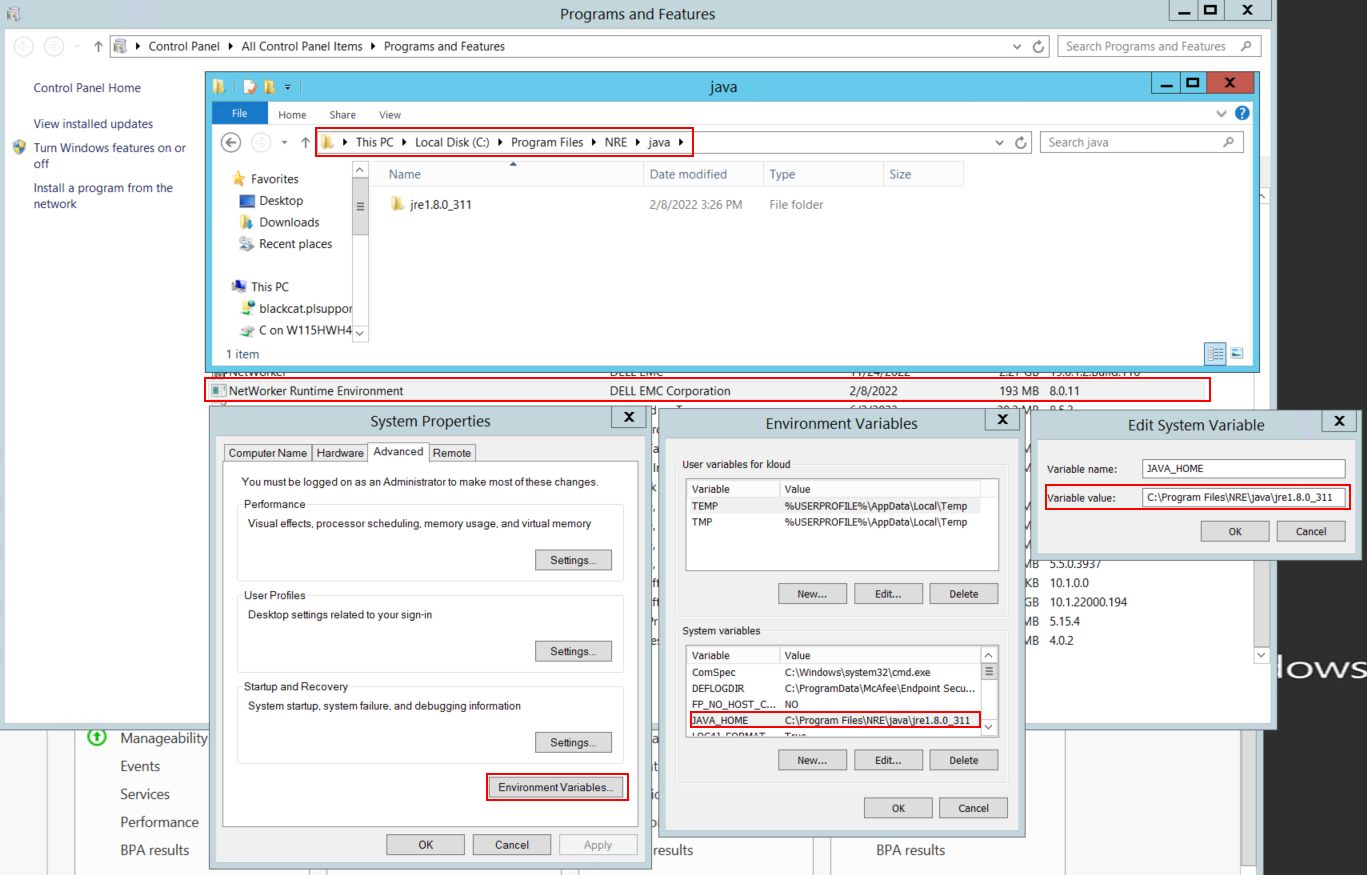
図1: NetWorkerが使用しているJavaインスタンスを確認します。
メモ: Javaのインスタンスが複数インストールされている場合があります。たとえば、NREとOracle JREの両方をサーバーにインストールできます。上記のステップでは、NetWorkerが使用しているJavaインストールを確認します。
- NetWorkerパッケージをアンインストールします。これにより、NetWorkerデータベースまたは構成リソースは削除されません。
- 既存のインストール パスを使用してNetWorkerを再インストールします。NetWorkerを再インストールすると、NetWorkerの認証サービスが再構成されます。
- 次のパスが存在することを確認します。
C:\Program Files\EMC NetWorker\nsr\authc-server\tomcat\webapps\nwrestapi
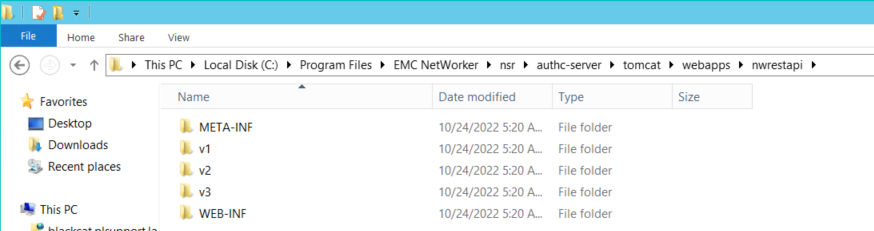
図2:NetWorker authcパスが存在することを確認します。
- nwrestapiディレクトリが作成された場合は、REST APIクエリーを実行します。
Affected Products
NetWorkerProducts
NetWorker Family, NetWorker SeriesArticle Properties
Article Number: 000215602
Article Type: Solution
Last Modified: 27 Mar 2025
Version: 7
Find answers to your questions from other Dell users
Support Services
Check if your device is covered by Support Services.