NetWorker:REST API 要求失敗,並顯示錯誤訊息:HTTP 狀態 404 - 找不到「要求的資源無法使用」
Summary: NetWorker REST API 查詢失敗,並顯示錯誤訊息:HTTP 狀態 404 - 找不到「要求的資源無法使用」。來源伺服器找不到目標資源目前的表示,或不想揭露其中一個存在。」
This article applies to
This article does not apply to
This article is not tied to any specific product.
Not all product versions are identified in this article.
Symptoms
NetWorker REST API 要求失敗,並顯示錯誤訊息:HTTP 狀態 404 - 找不到「要求的資源無法使用」
[root@NETWORKER_SERVER]:~# curl -ik GET -u **userid**:'***Password***' -H "Content-Type: application/json" 'https://NETWORKER_SERVER:9090/nwrestapi/v3/global/clients'
curl: (6) Could not resolve host: GET; Name or service not known
HTTP/1.1 404
Content-Type: text/html;charset=utf-8
Content-Language: en
Content-Length: 790
Date: Tue, 04 Jul 2023 12:11:41 GMT
Server: NSR SERVICES for Authentication
HTTP Status 404 – Not Foundbody {font-family:Tahoma,Arial,sans-serif;} h1, h2, h3, b {color:white;background-color:#525D76;} h1 {font-size:22px;} h2 {font-size:16px;} h3 {font-size:14px;} p {font-size:12px;} a {color:black;} .line {height:1px;background-color:#525D76;border:none;}
HTTP Status 404 – Not Found
Type Status Report
Message The requested resource [/nwrestapi/v3/global/clients] is not available
Description The origin server did not find a current representation for the target resource or is not willing to disclose that one exists.
Apache Tomcat/9.0.52 NetWorker 伺服器安裝缺少 nwrestapi 目錄。
Linux: /nsr/authc/webapps/nwrestapi/

Windows: C:\Program Files\EMC NetWorker\nsr\authc-server\tomcat\webapps\nwrestapi
restapi.log 不存在或未更新:
Linux: /nsr/logs/restapi/restapi.log

Windows: C:\Program Files\EMC NetWorker\nsr\logs\restapi\restapi.log
Cause
nwrestapi 路徑不存在。REST 應用程式發展介面查詢找不到任何端點,或將其應如何顯示來自其他 NetWorker 資料庫的資料相互關聯。
Resolution
nwrestapi 是與使用 JAVA Runtime Environment 的 NetWorker authc 服務一起設定。建議使用 NetWorker Runtime Environment (NRE),以避免設定 authc 時可能發生的 JAVA 相關問題。可從Dell Support NetWorker 驅動程式與下載頁面下載最新的 NRE 套件。
Linux:
Windows:
注意:可能已安裝多個 JAVA 例項。例如,NRE 和 Oracle JRE 皆可安裝在伺服器上。上述步驟會確認 NetWorker 使用的 JAVA 安裝。
Linux:
- 登入 NetWorker 伺服器,然後切換至 root:
sudo su -
- 確認是否已安裝 NRE,以及 NetWorker 設定要使用的 JAVA 例項:
rpm -qa | grep nre
cat /nsr/authc/conf/installrc

[root@networker-mc]:~# rpm -qa | grep nre
nre-8.0.15-1.x86_64
[root@networker-mc]:~#
[root@networker-mc]:~# cat /nsr/authc/conf/installrc
JAVA_HOME=/opt/nre/java/latest
注意:可能已安裝多個 JAVA 例項。例如,NRE 和 Oracle JRE 皆可安裝在伺服器上。上述步驟會確認 NetWorker 使用的 JAVA 安裝。
- 執行下列腳本,重新設定 NetWorker authc 伺服器。
/opt/nsr/authc-server/scripts/authc_configure.sh

[root@networker-mc]:~# /opt/nsr/authc-server/scripts/authc_configure.sh

Specify the directory where the Java Standard Edition Runtime Environment (JRE) software is installed [/opt/nre/java/latest]:

The installation process will install an Apache Tomcat instance. For optimum security, EMC NetWorker Authentication Service will use a non-root user (nsrtomcat) to start the Apache Tomcat instance.
If your system has special user security requirements, ensure that proper operational permissions are granted to this non-root user (nsrtomcat).
Please refer to NetWorker Installation Guide.

WARNING: Port 9090 is already in use.

Do you wish to specify a different port number [y]? n

The Apache Tomcat will use "networker-mc.emclab.local" as the host name.
The Apache Tomcat will use "9090" as the port number.

The NetWorker Authentication Service requires a keystore file to configure encryption and to provide SSL support.

EMC recommends that you specify a keystore password that has a minimum of six characters.

Do you want to use the existing keystore /nsr/authc/conf/authc.keystore [y]?

Specify password for the existing keystore:
The install will use the existing certificate "emcauthctomcat" for Apache Tomcat.
The install will use the existing certificate "emcauthcsaml" for Authentication Service.

Creating the installation log in /opt/nsr/authc-server/logs/install.log.

Performing initialization. Please wait...

The installation completed successfully.
注意:需要重新開機 NetWorker 服務,以重載 authc。您可以使用下列 Systemctl 命令完成:
systemctl stop networker
and
systemctl start networker.
- 確認已建立下列資料夾:
/nsr/authc/webapps/nwrestapi

[root@networker-mc]:~# ls -l /nsr/authc/webapps/nwrestapi/
total 0
drwx------. 2 nsrtomcat nsrtomcat  44 Jul  6 12:22 META-INF
drwx------. 3 nsrtomcat nsrtomcat  21 Jul  6 12:22 v1
drwx------. 3 nsrtomcat nsrtomcat  21 Jul  6 12:22 v2
drwx------. 3 nsrtomcat nsrtomcat  21 Jul  6 12:22 v3
drwx------. 6 nsrtomcat nsrtomcat 107 Jul  6 12:22 WEB-INF
- 如果已建立 nwrestapi 目錄,請執行 REST API 查詢。
Windows:
- 確認是否已安裝 NRE,以及 NetWorker 設定要使用的 JAVA 例項:
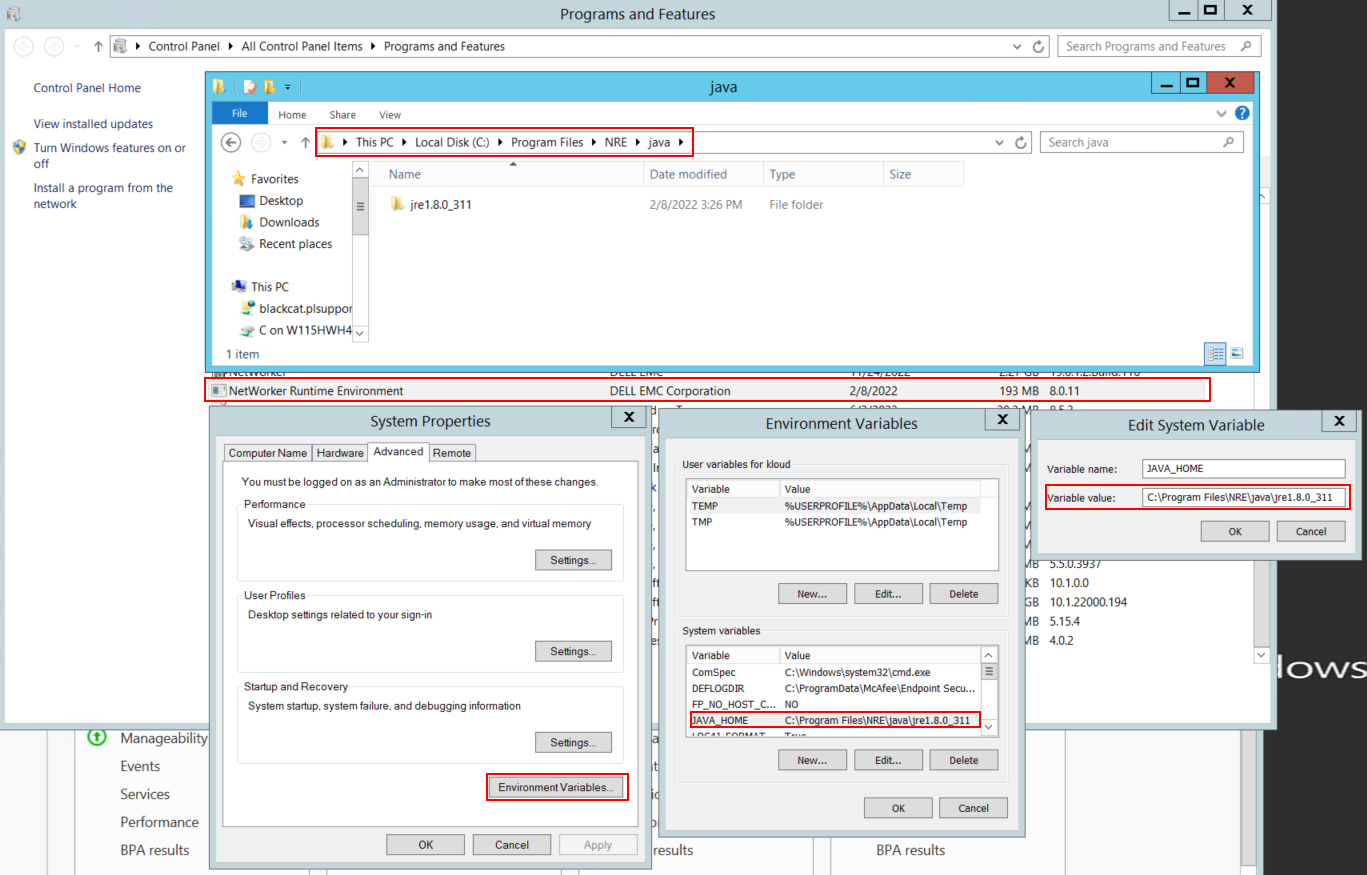
圖 1:確認 NetWorker 使用的 JAVA 例項。
注意:可能已安裝多個 JAVA 例項。例如,NRE 和 Oracle JRE 皆可安裝在伺服器上。上述步驟會確認 NetWorker 使用的 JAVA 安裝。
- 卸載 NetWorker 套件。這不會移除任何 NetWorker 資料庫或組態資源。
- 在現有的安裝路徑上重新安裝 NetWorker。重新安裝 NetWorker 會重新設定 NetWorker 的驗證服務。
- 確認以下路徑是否存在:
C:\Program Files\EMC NetWorker\nsr\authc-server\tomcat\webapps\nwrestapi

圖 2:確認 NetWorker authc 路徑存在。
- 如果已建立 nwrestapi 目錄,請執行 REST API 查詢。
Affected Products
NetWorkerProducts
NetWorker Family, NetWorker SeriesArticle Properties
Article Number: 000215602
Article Type: Solution
Last Modified: 27 Mar 2025
Version: 7
Find answers to your questions from other Dell users
Support Services
Check if your device is covered by Support Services.