Daisy Chain Monitors Do Not Display Dual Video Through Dell Docking Stations with the MFDP Port
Summary: Information about dual daisy chained monitors not showing video when connected to certain Dell docking station's Multi-Function DisplayPort (MFDP).
This article applies to
This article does not apply to
This article is not tied to any specific product.
Not all product versions are identified in this article.
Symptoms
Dual daisy-chained monitors cannot show video when the Multi-Stream Transport (MST) function is enabled in the monitor's On-Screen Display (OSD) menu.
Affected Docking Stations:
- WD19
- WD19S
- WD19DC
- WD19DCS
- WD19TB
- WD19TBS
- WD22TB4
Cause
The high-speed interface IC has limitations regarding the 8bit/10bit internal alignment feature, which may result in incorrect information being sent to the monitor, causing the issue.
Resolution
Docking Station DisplayPort
You should connect the external monitors to the native DisplayPort (DP) 1.4 port on the docking station to resolve this behavior because the MFDP port is not recommended for MST topologies that include daisy chaining.
The following is an example of what ports to use on the docking station.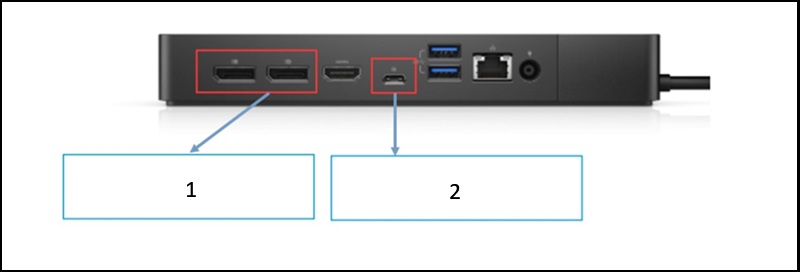
- DP 1.4 Supports MST mode on monitors with Display Stream Compression (DSC).
- MFDP Does Not support MST mode on monitors with DSC.
Affected Products
Dell Dock WD19, Dell Performance Dock - WD19DC, Dell Performance Dock – WD19DCS, Dell Dock – WD19S, Dell Thunderbolt Dock - WD19TB, Dell Thunderbolt Dock – WD19TBS, Dell Thunderbolt Dock – WD22TB4Article Properties
Article Number: 000309382
Article Type: Solution
Last Modified: 13 May 2025
Version: 2
Find answers to your questions from other Dell users
Support Services
Check if your device is covered by Support Services.