RecoverPoint for Virtual Machines: Unable to Deploy the Plugin Server After Upgrading
Summary: Unable to Deploy the Plugin Server After Upgrading to RP4VM 5.3 A workaround to allow users to complete the Configure Plugin Server Wizard.
Symptoms
Attempting to configure the Plugin Server after upgrading to RecoverPoint for Virtual Machines, (RP4VMs,) 5.3 fails. The following or similar message is received:
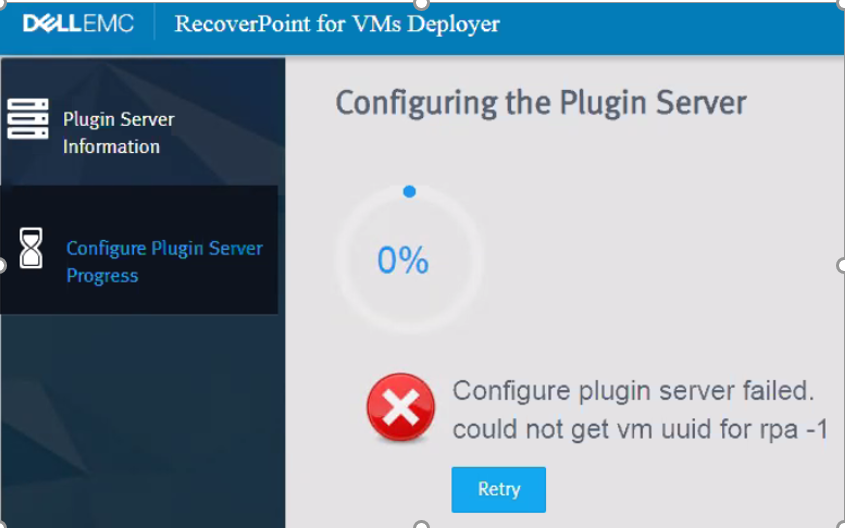
The following RecoverPoint Appliance prints are witnessed under /home/kos/RPServers/RPServers_logs/clusterLogic:
XXXX/XX/XX 16:55:22.519 [pool-3-thread-18] (FapiUtils.java:249) DEBUG - ArraySettings were extracted: [VCArraySettings [super=ArraySettings [name=XXXXXX, serialNumber=XXXXXXXX,arrayUID=ArrayUID [id=XXXXXXX, clusterUID=ClusterUID [id=8391617211477977355]], type=VC, credentials=VcCredentials [super=BaseCredentials [username=XXXX, password=[XXXX], certificate=],connectionParams=VcConnectionParams [super=BaseConnectionParams [mgmtIP=IPInformation [ipVersion=IPV_4, ip=XXX.XXX.XXX.XXX, dhcp=false, networkMask=]], port=XXX], resourcePools=null], registeredEsxClusters=[EsxCluster[esxClusterUID=EsxClusterUID [uuid=XXXXXXXX], name=Production Cluster, virtualCenterUID=VirtualCenterUID [uuid=XXXXXX]]]]]
The following RecoverPoint Appliance prints are witnessed under /home/kos/installationLogs/server.log:
XXXX-XX-XX 14:44:19,541 [CommandWorker-38] (ValidateVcCredentialsCommand.java:27) ERROR - Got exception while trying to verify Credentials com.emc.recoverpoint.connectors.vi.certificate.CommunicationException: Something wrong with the certificate

      at com.kashya.installation.server.commands.vsphere.ValidateVcCredentialsCommand.verifyCertificate(ValidateVcCredentialsCommand.java:43) ~[classes/:?]

      at com.kashya.installation.server.commands.vsphere.ValidateVcCredentialsCommand.execute(ValidateVcCredentialsCommand.java:25) [classes/:?]eadPoolFactory.java:43) [classes/:?] at java.lang.Thread.run(Thread.java:748) [?:1.8.0_251]

      Caused by: java.security.cert.CertificateParsingException: Could not generate certificate: Invalid certificate encoding.

      at com.rsa.cryptoj.o.pb.a(Unknown Source) ~[cryptojcommon.jar:6.2.0.1]

      at com.rsa.cryptoj.o.pb.engineGenerateCertificate(Unknown Source) ~[cryptojcommon.jar:6.2.0.1]

      at java.security.cert.CertificateFactory.generateCertificate(CertificateFactory.java:339) ~[?:1.8.0_251]

      at com.emc.recoverpoint.utils.javainfra.keytool.CertificationUtils.translateCertificate(CertificationUtils.java:544) ~[java_infra.jar:?]

      at com.emc.recoverpoint.utils.javainfra.keytool.CertificationUtils.verifyServerCertificate(CertificationUtils.java:523) ~[java_infra.jar:?]

      at com.kashya.installation.server.commands.vsphere.ValidateVcCredentialsCommand.verifyCertificate(ValidateVcCredentialsCommand.java:41) ~[classes/:?]
Cause
The CLI command update_storage_registration is presently experiencing an issue. When run, it replaces the vCenter certificate residing on all vRPAs at that cluster with a null value. This occurs in the vRPA settings and ArrayConfiguration.xml located under /home/kos.
The WDM Plugin Server configuration wizard uses this certificate, already stored in the settings, to make a connection to the vCenter. When it attempts to validate the credentials, since no certificate exists, the wizard fails.
Resolution
Workaround:
Refrain from using update_storage_registration command.
Prior to any upgrades, or if this issue is encountered, run the CLI command update_vcenter_server_registration to update the credentials. Alternatively, update this information from within RP4VMs FLASH/FLEX UI from the vCenter configuration section.
Remediation:
A solution exists for this issue, but intervention from Dell EMC technical support personnel is required. Contact the Dell EMC Customer Support Center or your service representative for technical support and reference this Dell Technologies knowledgebase solution ID.