NetWorker:如何更新 NMC AD/LDAP 外部驗證的 AD 資訊
Summary: 當您因為 AD/LDAP 變更而無法使用 AD/LDAP 帳戶存取 NMC 時,如何更新 AD/LDAP 外部驗證組態,例如:網網域控制站主機名稱變更、服務帳戶使用者名稱/密碼變更。
This article applies to
This article does not apply to
This article is not tied to any specific product.
Not all product versions are identified in this article.
Instructions
需要更新的 AD/LDAP auth 欄位 (例如:服務供應商主機名稱、服務帳戶使用者/密碼) 可使用authc_config腳本更新。您必須知道預設的 NetWorker 系統管理員帳戶密碼,如果您必須重設此密碼,請按照 NetWorker 操作: 如何重設系統管理員密碼; 否則,請使用下列其中一個選項來更新 NetWorker 中的外部授權。
注意:您將需要知道 AD/LDAP 服務帳戶密碼,才能更新組態。使用選項 1 和 2 時,可從 NetWorker 識別所使用的服務帳戶。
選項 1) 此方法是偏好的,特別是當您透過 SSL (LDAPS) 驗證設定 AD 時。如果無法使用 NWUI,請使用選項 3 來更新透過 SSL 整合的 AD。使用 NetWorker 系統管理員帳戶登入 NetWorker Web 使用者介面 (NWUI)。前往Authentication Server-External > Authorities。選取外部授權,然後按一下「編輯」:

選項 2) 使用 NetWorker 系統管理員帳戶登入 NetWorker 管理主控台 (NMC)。前往「Setup-Users > and Roles-External > Authority」。開啟外部授權組態並更新需要更新的欄位:

選項 3)您可以修改 authc 腳本範本,以包含「update-config」而非「add-config」,您可以更新需要更新的欄位,並從命令提示字元重新執行腳本:
Windows:C:\Program Files\EMC NetWorker\nsr\authc-server\scripts\
Linux:/opt/nsr/authc-server/scripts/
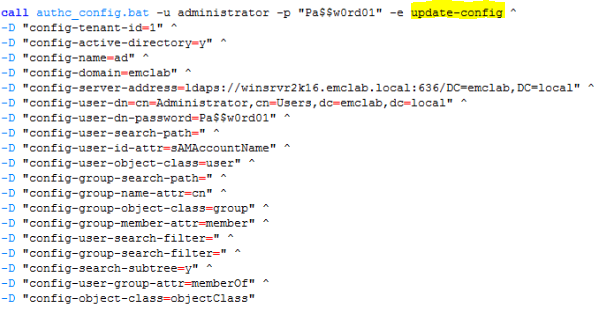
注意:有兩個不同的腳本範本:authc-create-ad-config 和 authc-create-ldap-config。請務必為您的驗證服務使用正確的驗證服務。例如使用 Microsoft Active Directory (AD) 時,請使用 authc-create-ad-config 範本。使用 Linux LDAP 時 (例如:OpenLDAP) 使用 authc-create-ldap-config。
選項 4)您可以使用需要更新的選項執行 authc_config 命令。
範例:您必須更新 AD 服務帳戶密碼:
C:\ > authc_config -u administrator -p nmc_admin_password -e update-config -D 「config-tenant-id=tenant_id」 -D 「config-name=config_name」 -D 「config-user-dn-password=new_service_account_password」
組態實驗室已成功更新。
注意:執行authc_config並authc_mgmt沒有任何選項可查看所有可用的選項。您可以使用這些命令收集所有必要資訊。
3) 確認已透過登入 NMC 或使用 nsrlogin 命令進行變更:
nsrlogin -t tenant -d domain -u user
Additional Information
NetWorker NWUI:如何從 NetWorker Web 使用者介面
設定 AD/LDAPNetWorker:如何從 NetWorker Web 使用者介面 (NWUI) 設定「AD over SSL」(LDAPS)
Affected Products
NetWorkerProducts
NetWorker, NetWorker Management ConsoleArticle Properties
Article Number: 000013856
Article Type: How To
Last Modified: 13 Mar 2025
Version: 6
Find answers to your questions from other Dell users
Support Services
Check if your device is covered by Support Services.