NetWorker:如何更新 NMC AD/LDAP 外部身份验证的 AD 信息
Summary: 当您现在由于 AD/LDAP 更改而无法使用 AD/LDAP 帐户访问 NMC 时,如何更新 AD/LDAP 外部身份验证配置,例如:域控制器主机名更改、服务帐户用户名/密码更改。
This article applies to
This article does not apply to
This article is not tied to any specific product.
Not all product versions are identified in this article.
Instructions
需要更新的 AD/LDAP 身份验证字段(例如:服务提供商主机名、服务帐户用户/密码)可以使用 authc_config 脚本进行更新。您必须知道默认 NetWorker 管理员帐户密码,如果您必须重置此密码,请遵循 NetWorker: 如何重置管理员密码; 否则,请使用以下选项之一来更新 NetWorker 中的外部机构。
提醒:您将需要知道 AD/LDAP 服务帐户密码以更新配置。使用选项 1 和 2 时,可以从 NetWorker 中标识使用的服务帐户。
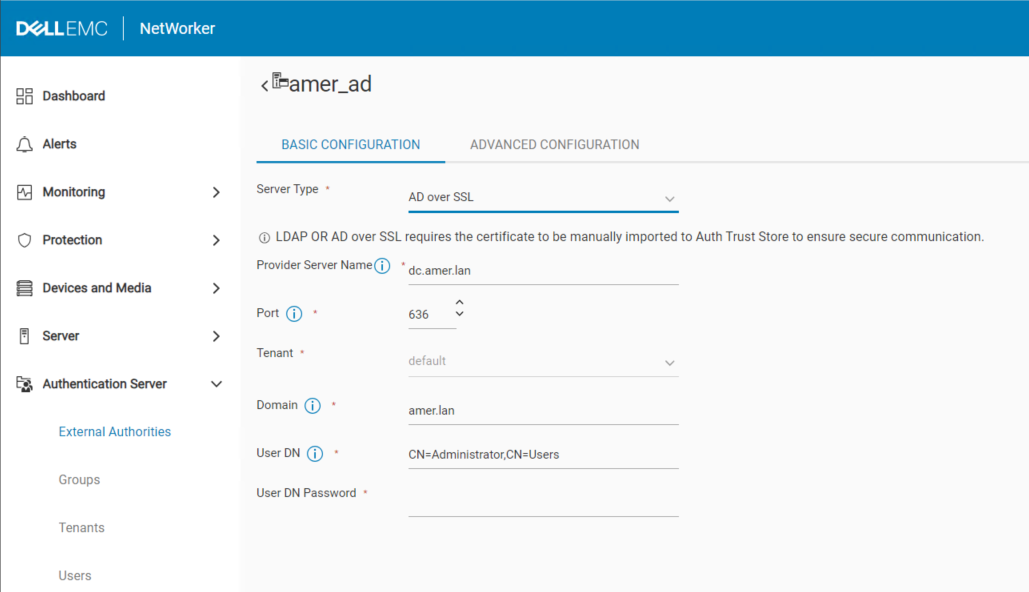
选项 1) 此方法是首选,特别是当您配置了 AD over SSL (LDAPS) 身份验证时。如果 NWUI 不可用,请使用选项 3 通过 SSL 集成更新 AD。使用 NetWorker 管理员帐户登录 NetWorker Web 用户界面 (NWUI)。转至 Authentication Server-External> Authorities 。选择外部机构,然后单击 编辑 :
选项 2) 使用 NetWorker 管理员帐户登录 NetWorker 管理控制台 (NMC)。转至 Setup-Users> and Roles-External> Authority 。打开 External Authority 配置并更新需要更新的字段:

选项 3)可以修改 authc 脚本模板以包含“update-config”而不是“add-config”,然后您可以从命令提示符更新需要更新和重新运行脚本的字段:
Windows:C:\Program Files\EMC NetWorker\nsr\authc-server\scripts\
Linux:/opt/nsr/authc-server/scripts/

提醒:有两个不同的脚本模板:authc-create-ad-config 和 authc-create-ldap-config。确保您使用正确的身份验证服务。例如,使用 Microsoft Active Directory (AD) 时,请使用 authc-create-ad-config 模板。使用 Linux LDAP 时(例如:OpenLDAP) 使用 authc-create-ldap-config。
选项 4)您可以使用需要更新的选项运行 authc_config 命令。
示例:您必须更新 AD 服务帐户密码:
C:\>authc_config -u administrator -p nmc_admin_password -e update-config -D “config-tenant-id=tenant_id” -D “config-name=config_name” -D “config-user-dn-password=new_service_account_password”
配置实验已成功更新。
提醒:运行 authc_config 和 authc_mgmt ,无需任何选项即可查看所有可用选项。可以使用这些命令收集所有必需的信息。
3) 通过登录 NMC 或使用 nsrlogin 命令确认已执行更改:
nsrlogin -t tenant -d domain -u user
Additional Information
NetWorker NWUI:如何从 NetWorker Web 用户界面
配置 AD/LDAPNetWorker:如何从 NetWorker Web 用户界面 (NWUI) 配置“AD over SSL”(LDAPS)
Affected Products
NetWorkerProducts
NetWorker, NetWorker Management ConsoleArticle Properties
Article Number: 000013856
Article Type: How To
Last Modified: 13 Mar 2025
Version: 6
Find answers to your questions from other Dell users
Support Services
Check if your device is covered by Support Services.