Some Microsoft Applications do not Launch on Dell Laptops
Summary: This article provides information about various Microsoft applications displays an error message and do not launch on select XPS, Inspiron, and Latitude laptops.
This article applies to
This article does not apply to
This article is not tied to any specific product.
Not all product versions are identified in this article.
Symptoms
Affected Platforms:
- XPS 13 9345
- Inspiron 14 5441
- Inspiron 14 Plus 7441
- Latitude 5455
- Latitude 7455
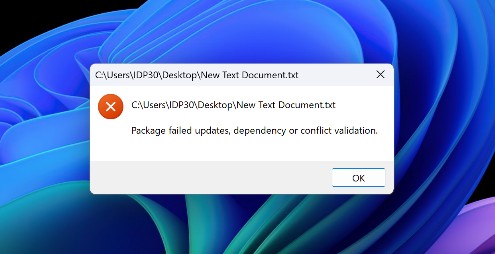
Various Microsoft applications, such as Notepad and Voice Recorder displays the error below instead of opening:
Cause
VCLibs is suspected to be the cause of this issue.
Resolution
There are two ways to resolve this issue, do one of the following:
- Run Windows Update.
- Or you can manually download and install from Microsoft by following the instructions below:
- Reference, C++ Runtime framework packages for Desktop Bridge
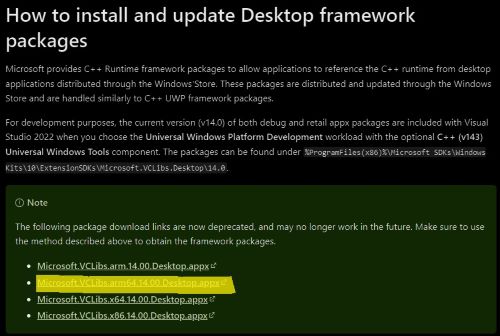
- Click Microsoft.VCLibs.arm64.14.00.Desktop.appx to download the package on C disk.
- Open PowerShell and install using Command line:
add-appxpackage C:\Microsoft.VCLibs.arm64.14.00.Desktop.appx
- Reference, C++ Runtime framework packages for Desktop Bridge

Affected Products
Inspiron 14 5441, Inspiron 14 Plus 7441, Latitude 5455, Latitude 7455, XPS 13 9345Article Properties
Article Number: 000226551
Article Type: Solution
Last Modified: 16 Apr 2025
Version: 7
Find answers to your questions from other Dell users
Support Services
Check if your device is covered by Support Services.