Dell Unity: How to Prepare the Storage Processor for Service
Summary: This article discusses how to prepare your Storage Processor (SP) for servicing of its hardware, including placing the SP into Service Mode (User Correctable)
This article applies to
This article does not apply to
This article is not tied to any specific product.
Not all product versions are identified in this article.
Instructions
|
IMPORTANT:
It is recommended that you disable write cache before engaging in any hardware replacement activities involving a Unity Storage Processor (SP). See the following article for more information (requires customer login to Dell.com):
Dell Unity: How To Properly Manage Write Cache During SP Maintenance Activities (User Correctable) |
To protect your system from accidental data loss during this maintenance activity, you must prepare the SP for service. You prepare an SP for service by putting it in Service Mode. Entering Service Mode stops I/O on the SP so that service tasks can be safely performed.
Note: Because an SP in Service Mode does not service I/O to hosts, it is imperative that both SPs NOT be placed into Service mode simultaneously, or data is unavailable.
Procedure:
- Open Unisphere and select Service, then Service Tasks.
- Under the name of the storage processor where you install the new memory module, select Enter Service Mode, and then click Execute.
- When prompted, enter the Service Password to put the SP into Service Mode.
- (Optional) Either refresh your browser or follow the on-screen instructions to restore full-functionality to Unisphere. When placing the primary storage processor into Service Mode, Unisphere becomes momentarily unresponsive (about one minute) as the management services transfer over to the other SP.
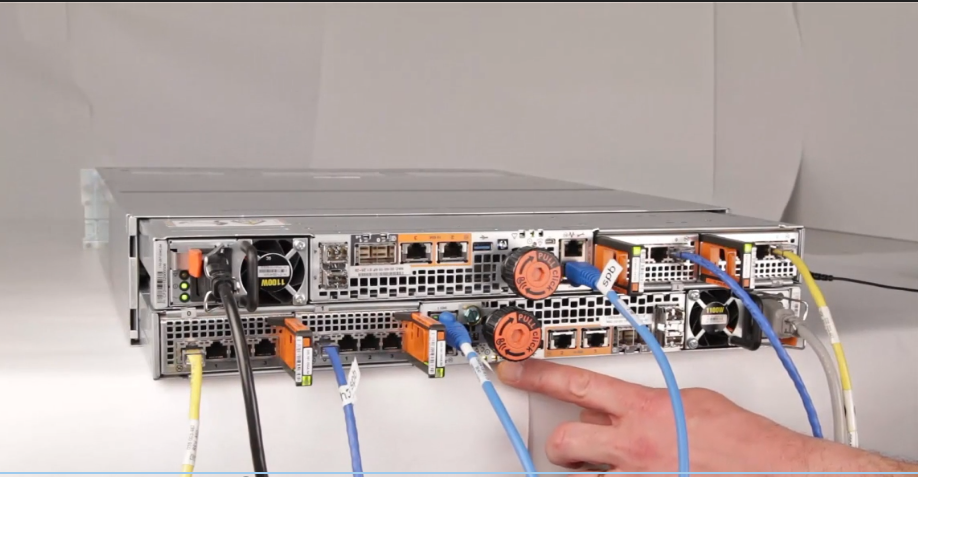
- Return to the cabinet with the system and locate the SP in the DPE from the back of the cabinet.
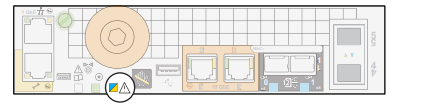
- Wait until the SP fault LED is flashing alternating amber and blue before continuing to the next task. The SP fault LED flashes alternating amber and blue while the SP remains in Service mode and is receiving active power.
Affected Products
Dell EMC Unity FamilyArticle Properties
Article Number: 000019519
Article Type: How To
Last Modified: 17 Apr 2026
Version: 9
Find answers to your questions from other Dell users
Support Services
Check if your device is covered by Support Services.