NetWorker NMM SharePoint Backups fail with "NetWorker canonical client name could not be retrieved.
Summary: NetWorker Module for Microsoft backups of SharePoint Farm fails with error: NetWorker canonical client name could not be retrieved for "SQLServerName". This is usually a result of a SQL Alias that is misconfigured. ...
This article applies to
This article does not apply to
This article is not tied to any specific product.
Not all product versions are identified in this article.
Symptoms
NetWorker Module for Microsoft (NMM) backups of a SharePoint Farm fails with this error when.
- SharePoint Server has a SQL Server Alias defined in the SQL Client Network utility (CLICONFG)
- And simultaneously, the SQL Alias is added to DNS - or - the SQL connection parameters includes a DNS name.
Typical Errors:
Failure occurs with a similar error in <NetWorkerPath>/nsr/applogs/nsrnmmsv.raw of SQL Server:
-
nsrnmmsv NetWorker canonical client name could not be retrieved for "SQLServerName"
-
nsrnmmsv NSR critical Failed to start save job on host 'SQLServername'
-
DefaultDomain: Executing script Get-ItemProperty hklm:software\microsoft\mssqlserver\client\connectto  | Select SQLServerAliasName
DefaultDomain: Alias found DBMSSOCN,sqlservername
Cause
The SQL Server Client Network Utility (CLICONFG).
This is a Windows SQL Server utility that allows a user to create an alias name as an alternate name for the SQL Server.
This allows local client applications to make a connection to SQL Server using an alias name instead of the proper server name.
This alias name is a local application alias and does not a canonical name in Domain Name service (DNS).
SQL Server Aliases.
An alias in CLICONFG is defined by these settings:
Server alias - this is an alternate name that can be used by local client applications like SharePoint.
Connection parameters - this defines which SQL Server to actually connect to. This is the real SQL Server name and TCP/IP port (or blank if standard port number is used)
NOTE 1. the Real SQL Server name has to resolve in DNS to a valid unique IP address.
NOTE 2. the Server alias is only used by local client applications like SharePoint. it is *not* a valid host name or server name. Never create a DNS record for this "Alias" or else it causes the problem.
Determine the real SQL Server Name:
1. Login to SQL server and open SQL Server management studio; connect to SQL and notice the Server name on the left hand tree view. Or,
2. Login to SQL server directly and open SQL Server management studio; open new query and run this T-SQL command,
SELECT @@SERVERNAME
This should return the SQL Servername that will be required in the Alias settings of CLICONFG. No other Servername should be used.
3. On the SharePoint Server run
nsrnmmsv -P
and under the list of == Dependent Hosts ==
you should see the real SQL Server name and it should match the name in SSMS.
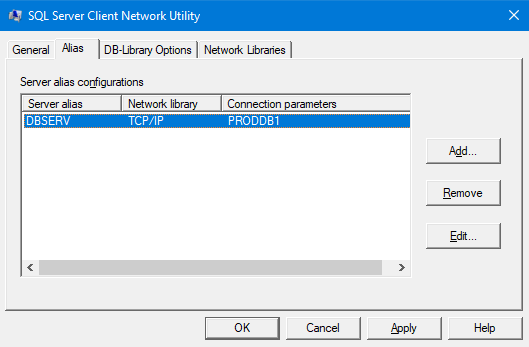
Example CLICONFIG.
Notice the example below,
SQL Server Client Network Utility :
Server alias is DBSERV
which points to connection parameters of real SQL Server name, PRODDB1
Resolution
To ensure that the NetWorker Modoule for Microsoft (NMM) can properly determine from SharePoint that an alias name DBSERV is used to connect to the real SQL Server PRODDB1,
ensure the following:
- Server alias DBSERV is not added to DNS or to the Hosts file
- And the SQL Server name in the connection parameters is the actual SQL Server name that matches the SQL Server name in SSMS.
Article Properties
Article Number: 000039564
Article Type: Solution
Last Modified: 27 May 2024
Version: 4
Find answers to your questions from other Dell users
Support Services
Check if your device is covered by Support Services.