NetWorker:區塊式備份 (BBB) 失敗,並顯示「Data Domain Client Direct 程式無法取得密碼。」
Summary: NetWorker 區塊式備份 (BBB) 或用戶端直接備份失敗,表示遠端使用者或密碼不正確。
This article applies to
This article does not apply to
This article is not tied to any specific product.
Not all product versions are identified in this article.
Symptoms
用戶端直接區塊式備份 (BBB) 無法備份至 DD::
The Data Domain Client Direct process could not obtain the password.
DD device 'DEVICE_NAME' has no password set for DD connection.
98519:save: Unable to setup direct save with server NW_SERVER: CLIENT:SAVESET : Unable to perform backup for save-set ID 'SSID' with DIRECT_ACCESS=Yes, check device and pool configuration to enable Client direct..
90095:save: Cannot open save session with 'NW_SERVER':CLIENT:SAVESET : Unable to perform backup for save-set ID 'SSID' with DIRECT_ACCESS=Yes, check device and pool configuration to enable Client direct.
用戶端 BBB 儲存失敗,並顯示:
語法:save -vvv -D3 -z -b POOL_NAME VOMULE_NAME(S)
範例:save -vvv -D3 -z -b ddbackups C:\D:\E:\
注意: 「-z」指示備份以 BBB 執行。
134490:save: Device is not configured for 'Client direct'.
12/29/17 10:50:52.147363 NsrBlockSave Failed.
12/29/17 10:50:52.147363 Initiating nsrblockbase returned failure for save set 'SAVESET'.
134491:save: Block based backup requires device properties to be configured for 'Client direct'. Please ensure a CIFS / NFS share is updated in the 'device access information' field along with 'remote user' and 'password'
90096:save: save of 'SAVESET' to 'NW_SERVER' failed: Block based backup requires device properties to be configured for 'Client direct'. Please ensure a CIFS / NFS share is updated in the
evice access information' field along with 'remote user' and 'password'
12/29/17 10:50:52.178563 CLIENT:SAVESET size 0 KB, 0 file(s), took   0 min   1 sec
134491:save: Block based backup requires device properties to be configured for 'Client direct'. Please ensure a CIFS / NFS share is updated in the 'device access information' field along with 'remote user' and 'password'
94693:save: The backup of save set 'SAVESET' failed.
注意:此問題已在 BBB 備份中發現;但是,此問題與 Client Direct 程式和 Data Domain 有關,因此此問題可能會出現在任何 Client Direct 備份中。
Cause
ddboost 使用者密碼不正確,或必須重新輸入 NetWorker 裝置內容。
Resolution
1.開啟裝置內容,並確認 ddboost 使用者認證正確無誤。
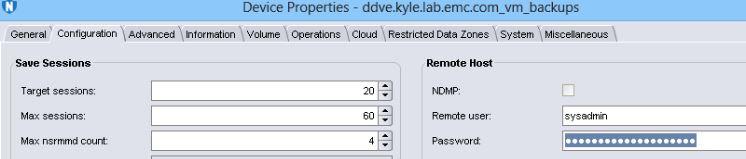
2.未進行備份/複製/復原時,裝置會主動使用。3.將密碼欄位變更為任何值,然後按「OK」。
4.再次開啟裝置內容,然後重新輸入正確的密碼。 5.重新掛接裝置並啟動備份。
注意:ddpconnchk工具可用來確認來自 NetWorker 主機的 ddboost 連線能力報告問題:NetWorker:如何使用 DDPCONNCHK 工具測試來自 NetWorker 主機的 DD ddboost 連線能力
2.未進行備份/複製/復原時,裝置會主動使用。3.將密碼欄位變更為任何值,然後按「OK」。
4.再次開啟裝置內容,然後重新輸入正確的密碼。 5.重新掛接裝置並啟動備份。
警示:如果裝置標示為所有儲存集,請勿為裝置貼上標籤。
Affected Products
NetWorkerProducts
NetWorkerArticle Properties
Article Number: 000050159
Article Type: Solution
Last Modified: 24 Jun 2025
Version: 4
Find answers to your questions from other Dell users
Support Services
Check if your device is covered by Support Services.