Dell EMC Unity: LDAP Group user login failure with "Logged in user is not authorized to access Unisphere" message (User Correctable)
Summary: This document provides further details about the root cause and resolution of the errors received when attempting to authenticate with a user associated with a LDAP group.
This article applies to
This article does not apply to
This article is not tied to any specific product.
Not all product versions are identified in this article.
Symptoms
After the configuration of Directory Services settings and User Management Settings, the users associated with the LDAP groups receive an error with the message "The Logged in user is not authorized to access Unisphere".
During the validation of the Directory Services settings, the connection between the Dell EMC Unity system and the LDAP server is valid and operational.
If the user is added directly to the User Management configuration, the user will be able to successfully login into Unisphere.
Cause
The root cause for this issue is related with the validation process between the Unity system and the LDAP server. The LDAP Group name is case-sensitive during the validation process.
# Example:
1. Group "Testing Group" is currently setup in Active Directory: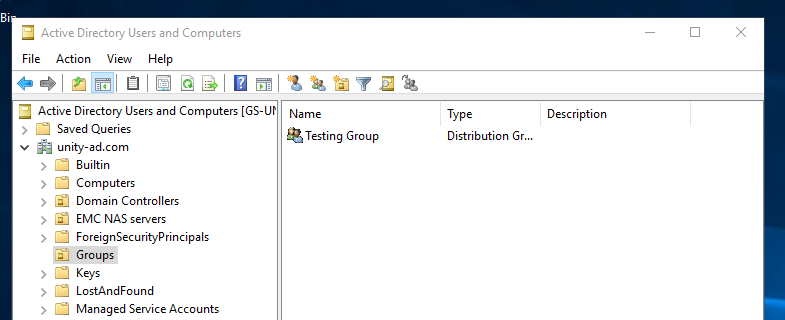
2. When adding the Group on the Dell EMC Unity system, a syntax mistake was performed, as shown on the following screenshot:
3. When attempting to authenticate with the user Gordon Freeman, which is part of the Group, the following message is received: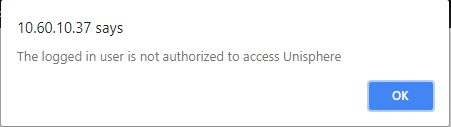
Resolution
The LDAP group name information is case-sensitive during the authentication process.
To resolve this issue, please remove and re-add the LDAP group once more using the exact same name displayed in the Active Directory Users and Computers service.
Once the Group syntax is corrected, please attempt to login again with one of the users associated with the group.
If the situation still remains, or if further clarification is required, please reach Dell EMC Support or your Service Provide quoting this Knowledge Base number.
Affected Products
Dell Unity 300, Dell EMC Unity 300F, Dell EMC Unity 350F, Dell EMC Unity 400, Dell EMC Unity 400F, Dell EMC Unity 450F, Dell EMC Unity 500F, Dell EMC Unity 550F, Dell EMC Unity 600, Dell EMC Unity 600F, Dell EMC Unity FamilyProducts
Dell EMC Unity 650F, Dell EMC Unity Family |Dell EMC Unity All Flash, Dell EMC Unity Family, Dell EMC Unity HybridArticle Properties
Article Number: 000051932
Article Type: Solution
Last Modified: 16 Sep 2025
Version: 4
Find answers to your questions from other Dell users
Support Services
Check if your device is covered by Support Services.