Avamar VM image restore fails before showing any progress bytes
Summary: Avamar Virtual Machine (VM) image restore fails with code 158 and IMG2012. Encryption mode is left at default while backup used High strength. Set encryption strength to High on Avamar and on DD (More Options) to resolve. ...
This article applies to
This article does not apply to
This article is not tied to any specific product.
Not all product versions are identified in this article.
Symptoms
Observed behavior during Avamar VM image restore.
The restore operation stops before any progress is displayed and generates error entries in the activity logs.
- Restore session initiates but fails with
code 158, indicating the proxy cannot establish a connection with the server. - Metadata retrieval from Data Domain fails, causing the subsequent VM‑creation request to be invalid.
- Final log entries report
"Invalid request to create a VM"and[IMG2012] VM creation failed during restore.
 avvcbimage Info <12181>: Avtar metadata restore session initiated
 avvcbimage Info <10684>: Setting ctl message version to 3 (from 1)
 avvcbimage Info <16136>: Setting ctl max message size to 268435456
 avvcbimage Info <6688>: Process 8885 (/usr/local/avamarclient/bin/avtar) finished (code 158: cannot establish connection with server (possible network or DNS failure))
 avvcbimage Warning <6690>: CTL workorder "MOD-########99" non-zero exit status 'code 158: cannot establish connection with server (possible network or DNS failure)'
 avvcbimage Error <0000>: [IMG0011] restore metadata Avtar exited with 'code 158: cannot establish connection with server (possible network or DNS failure)'
 avvcbimage FATAL <17824>: GetDiskAttributed Failed
 avvcbimage Info <18664>: Login(https://<Vcenter_FQDN>:443/sdk) Datacenter: 'xxxxert'
 avvcbimage Info <19728>:      - connected to 'VirtualCenter' - version: '<vcenter_version>',  apiVersion:'6.7.3'
 avvcbimage Info <42146>: Login by loginWS test is OK.
 avvcbimage Info <42225>: (CURL) Logging into datacenter path of 'folder?dcPath=xxxxert', xxxxert => xxxxert
 avvcbimage Info <42226>: (Legacy) Logging into datacenter path of 'folder?dcPath=xxxxert', xxxxert => xxxxert
 avvcbimage Info <41153>: Using CURL Method
 avvcbimage Info <41154>: Re-using vCS Session Cookie
 avvcbimage Info <41153>: Using CURL Method
 avvcbimage Info <41154>: Re-using vCS Session Cookie
 avvcbimage Info <17770>: DataStore Storage Info:
  DataStore:'<Datastore_Name>': Pre Free Space(KB)=4340662272,
                                    Post Free Space(KB) range=##### to #####
    Disk '####': Disk Size(KB)=#####, restoreThisDisk=1, thin=0
    Disk '####': Disk Size(KB)=#####, restoreThisDisk=1, thin=0
    Disk '####': Disk Size(KB)=#####, restoreThisDisk=1, thin=0
    Disk '####': Disk Size(KB)=#####, restoreThisDisk=1, thin=0
 avvcbimage Info <17825>: A VM create has been requested.
 avvcbimage Info <18664>: Login(https://<Vcenter_FQDN>:443/sdk) Datacenter: 'xxxxert'
 avvcbimage Info <19728>:      - connected to 'VirtualCenter' - version: '<vcenter_version>',  apiVersion:'6.7.3'
 avvcbimage Info <42146>: Login by loginWS test is OK.
 avvcbimage Info <42213>: checking datastore type for special processing, checking for type vsan, actual type = VMFS
 avvcbimage Info <42213>: checking datastore type for special processing, checking for type VVOL, actual type = VMFS
 avvcbimage Error <17771>: Invalid request to create a VM.
 avvcbimage Error <0000>: [IMG2012] VM creation failed during restore.
Cause
Incorrect Encryption Configuration Prevents Proxy Communication with Data Domain.
The restore operation fails because the proxy cannot retrieve VM metadata from the Data Domain system. This occurs when the encryption settings are mismatched between Avamar and Data Domain.
- The Data Domain encryption mode remains set to Default even though the backup was taken with High encryption strength.
- This mismatch causes the proxy’s request to Data Domain to be rejected, resulting in a loss of connectivity.
- The proxy sends an invalid VM creation request to vCenter, leading to VM creation failure.
Relevant Error Messages
avvcbimage Info : Avtar metadata restore session initiated
avvcbimage Info : Setting ctl message version to 3 (from 1)
avvcbimage Info : Process 8885 (/usr/local/avamarclient/bin/avtar) finished (code 158: cannot establish connection wit
avvcbimage Warning : CTL workorder "MOD-########99" non-zero exit status 'code 158: cannot establish connection with s
avvcbimage Error : [IMG0011] restore metadata Avtar exited with 'code 158: cannot establish connection with server (po
avvcbimage FATAL : GetDiskAttributed Failed
...
avvcbimage Error : Invalid request to create a VM.
avvcbimage Error : [IMG2012] VM creation failed during restore.
The error code 158 and messages [IMG0011] and [IMG2012] indicate a failure to establish a connection with the DD server due to the encryption configuration issue.
Resolution
- Set encryption strength to 'High' on avamar as below:
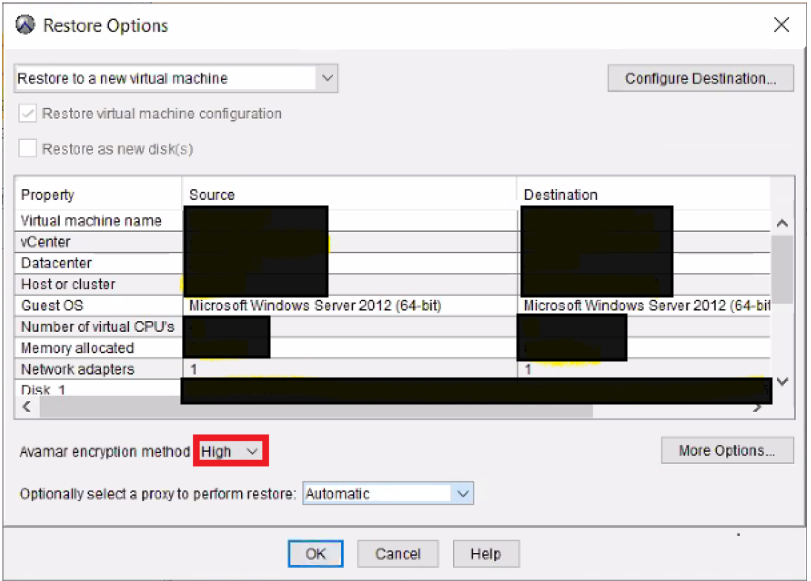
- Then click 'More Options' to set encryption to 'High' on the Data Domain as below:
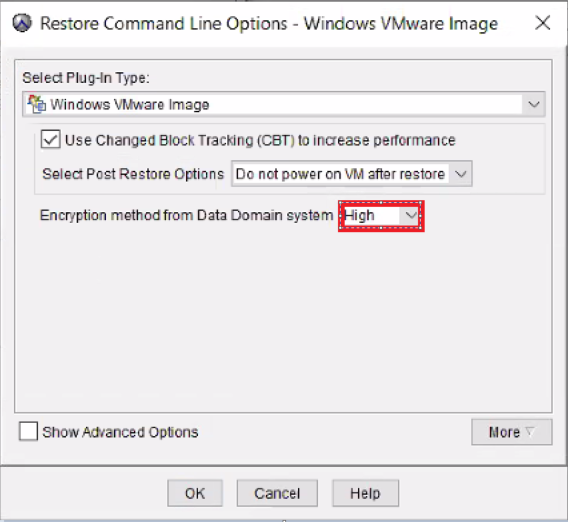
- Image restore shall work fine.
Affected Products
AvamarProducts
Avamar, Avamar Client for VMwareArticle Properties
Article Number: 000069283
Article Type: Solution
Last Modified: 18 Apr 2026
Version: 5
Find answers to your questions from other Dell users
Support Services
Check if your device is covered by Support Services.