Avamar VM-Image-Wiederherstellung schlägt fehl, bevor Fortschritts-Bytes angezeigt werden
Summary: Avamar VM-Image-Wiederherstellung schlägt fehl, bevor Fortschritts-Bytes angezeigt werden, wenn der Proxy nicht mit Data Domain kommunizieren kann, um VM-Metadaten abzurufen
This article applies to
This article does not apply to
This article is not tied to any specific product.
Not all product versions are identified in this article.
Symptoms
N. z.
- Die Wiederherstellung des VM-Image schlägt fehl, bevor Fortschritts-Bytes angezeigt werden, wie wir unten in den Fehlermeldungen der Aktivitätsprotokolle sehen:
avvcbimage Info <12181>: Avtar metadata restore session initiated avvcbimage Info <10684>: Setting ctl message version to 3 (from 1) avvcbimage Info <16136>: Setting ctl max message size to 268435456 avvcbimage Info <6688>: Process 8885 (/usr/local/avamarclient/bin/avtar) finished (code 158: cannot establish connection with server (possible network or DNS failure)) avvcbimage Warning <6690>: CTL workorder "MOD-########99" non-zero exit status 'code 158: cannot establish connection with server (possible network or DNS failure)' avvcbimage Error <0000>: [IMG0011] restore metadata Avtar exited with 'code 158: cannot establish connection with server (possible network or DNS failure)'avvcbimage FATAL <17824>: GetDiskAttributed Failed avvcbimage Info <18664>: Login(https://<Vcenter_FQDN>:443/sdk) Datacenter: 'xxxxert' avvcbimage Info <19728>: - connected to 'VirtualCenter' - version: '<vcenter_version>', apiVersion:'6.7.3' avvcbimage Info <42146>: Login by loginWS test is OK. avvcbimage Info <42225>: (CURL) Logging into datacenter path of 'folder?dcPath=xxxxert', xxxxert => xxxxert avvcbimage Info <42226>: (Legacy) Logging into datacenter path of 'folder?dcPath=xxxxert', xxxxert => xxxxert avvcbimage Info <41153>: Using CURL Method avvcbimage Info <41154>: Re-using vCS Session Cookie avvcbimage Info <41153>: Using CURL Method avvcbimage Info <41154>: Re-using vCS Session Cookie avvcbimage Info <17770>: DataStore Storage Info: DataStore:'<Datastore_Name>': Pre Free Space(KB)=4340662272, Post Free Space(KB) range=##### to ##### Disk '####': Disk Size(KB)=#####, restoreThisDisk=1, thin=0 Disk '####': Disk Size(KB)=#####, restoreThisDisk=1, thin=0 Disk '####': Disk Size(KB)=#####, restoreThisDisk=1, thin=0 Disk '####': Disk Size(KB)=#####, restoreThisDisk=1, thin=0 avvcbimage Info <17825>: A VM create has been requested. avvcbimage Info <18664>: Login(https://<Vcenter_FQDN>:443/sdk) Datacenter: 'xxxxert' avvcbimage Info <19728>: - connected to 'VirtualCenter' - version: '<vcenter_version>', apiVersion:'6.7.3' avvcbimage Info <42146>: Login by loginWS test is OK. avvcbimage Info <42213>: checking datastore type for special processing, checking for type vsan, actual type = VMFS avvcbimage Info <42213>: checking datastore type for special processing, checking for type VVOL, actual type = VMFS avvcbimage Error <17771>: Invalid request to create a VM. avvcbimage Error <0000>: [IMG2012] VM creation failed during restore.
- Die oben genannten Fehler bedeuten, dass der Proxy versucht hat, die VM-Metadaten von Data Domain abzurufen, es jedoch nicht möglich ist, mit ihr zu kommunizieren.
- Dies führte dazu, dass die an vCenter gesendete Proxy-Anfrage ungültig ist, sodass der Schritt zum Erstellen der VM fehlgeschlagen ist.
Cause
- Beim Initiieren der Wiederherstellung bleibt der Verschlüsselungsmodus auf Data Domain beim Wert Standard, auch wenn die Verschlüsselungsstärke auf hoch festgelegt wurde, während Backups auf Avamar und Data Domain durchgeführt wurden.
Resolution
- Um dieses Problem zu beheben, führen Sie die folgenden Schritte aus, während Sie die Wiederherstellung initiieren:
1: Stellen Sie sicher, dass die Verschlüsselungsstärke in Avamar auf hoch festgelegt ist.
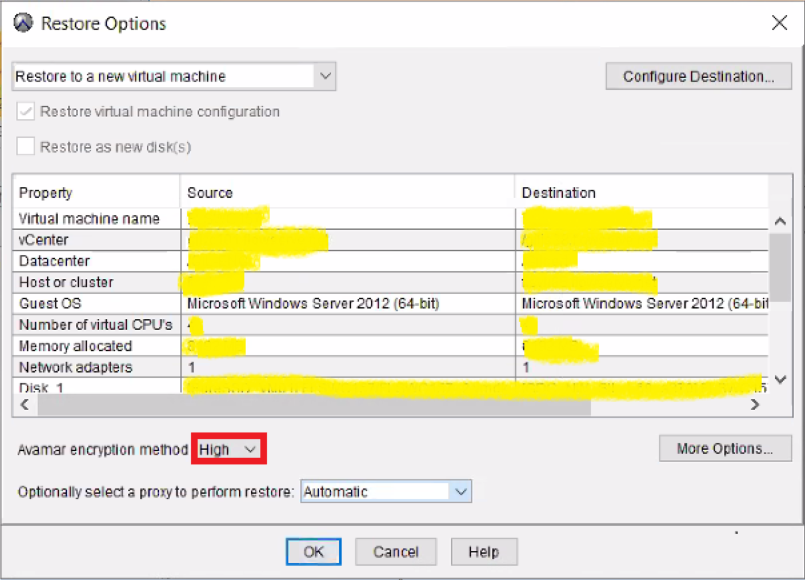
2: Klicken Sie dann auf „Weitere Optionen“, um die Verschlüsselung auf hoch auf Data Domian festzulegen, wie unten beschrieben:

- Die Image-Wiederherstellung funktioniert nun wieder einwandfrei.
Affected Products
AvamarProducts
Avamar, Avamar Client for VMwareArticle Properties
Article Number: 000069283
Article Type: Solution
Last Modified: 06 Nov 2025
Version: 3
Find answers to your questions from other Dell users
Support Services
Check if your device is covered by Support Services.