A restauração da imagem da VM do Avamar falha antes de mostrar os bytes de progresso
Summary: A restauração da imagem da VM do Avamar falha antes de mostrar os bytes de progresso porque o proxy não consegue se comunicar com o Data Domain para recuperar os metadados da VM
This article applies to
This article does not apply to
This article is not tied to any specific product.
Not all product versions are identified in this article.
Symptoms
N/D
- A restauração da imagem da VM falha antes de mostrar os bytes de progresso, como podemos ver nas mensagens de erro abaixo dos registros de atividade:
avvcbimage Info <12181>: Avtar metadata restore session initiated avvcbimage Info <10684>: Setting ctl message version to 3 (from 1) avvcbimage Info <16136>: Setting ctl max message size to 268435456 avvcbimage Info <6688>: Process 8885 (/usr/local/avamarclient/bin/avtar) finished (code 158: cannot establish connection with server (possible network or DNS failure)) avvcbimage Warning <6690>: CTL workorder "MOD-########99" non-zero exit status 'code 158: cannot establish connection with server (possible network or DNS failure)' avvcbimage Error <0000>: [IMG0011] restore metadata Avtar exited with 'code 158: cannot establish connection with server (possible network or DNS failure)'avvcbimage FATAL <17824>: GetDiskAttributed Failed avvcbimage Info <18664>: Login(https://<Vcenter_FQDN>:443/sdk) Datacenter: 'xxxxert' avvcbimage Info <19728>: - connected to 'VirtualCenter' - version: '<vcenter_version>', apiVersion:'6.7.3' avvcbimage Info <42146>: Login by loginWS test is OK. avvcbimage Info <42225>: (CURL) Logging into datacenter path of 'folder?dcPath=xxxxert', xxxxert => xxxxert avvcbimage Info <42226>: (Legacy) Logging into datacenter path of 'folder?dcPath=xxxxert', xxxxert => xxxxert avvcbimage Info <41153>: Using CURL Method avvcbimage Info <41154>: Re-using vCS Session Cookie avvcbimage Info <41153>: Using CURL Method avvcbimage Info <41154>: Re-using vCS Session Cookie avvcbimage Info <17770>: DataStore Storage Info: DataStore:'<Datastore_Name>': Pre Free Space(KB)=4340662272, Post Free Space(KB) range=##### to ##### Disk '####': Disk Size(KB)=#####, restoreThisDisk=1, thin=0 Disk '####': Disk Size(KB)=#####, restoreThisDisk=1, thin=0 Disk '####': Disk Size(KB)=#####, restoreThisDisk=1, thin=0 Disk '####': Disk Size(KB)=#####, restoreThisDisk=1, thin=0 avvcbimage Info <17825>: A VM create has been requested. avvcbimage Info <18664>: Login(https://<Vcenter_FQDN>:443/sdk) Datacenter: 'xxxxert' avvcbimage Info <19728>: - connected to 'VirtualCenter' - version: '<vcenter_version>', apiVersion:'6.7.3' avvcbimage Info <42146>: Login by loginWS test is OK. avvcbimage Info <42213>: checking datastore type for special processing, checking for type vsan, actual type = VMFS avvcbimage Info <42213>: checking datastore type for special processing, checking for type VVOL, actual type = VMFS avvcbimage Error <17771>: Invalid request to create a VM. avvcbimage Error <0000>: [IMG2012] VM creation failed during restore.
- Os erros mencionados acima significam que o proxy tentou recuperar os metadados da VM do Data Domain, mas não conseguiu se comunicar com ele.
- Isso fez com que a solicitação de proxy enviada ao vcenter fosse inválida. Falha na etapa de criação da VM.
Cause
- Ao iniciar a restauração, o modo de criptografia no Data Domain é mantido no valor 'Default', mesmo que a força de criptografia esteja definida como 'High' enquanto o backup é feito no Avamar e no Data Domain.
Resolution
- Para corrigir esse problema, siga as etapas abaixo ao iniciar a restauração:
1- Certifique-se de que a força de criptografia esteja definida como 'High' no Avamar, conforme abaixo:
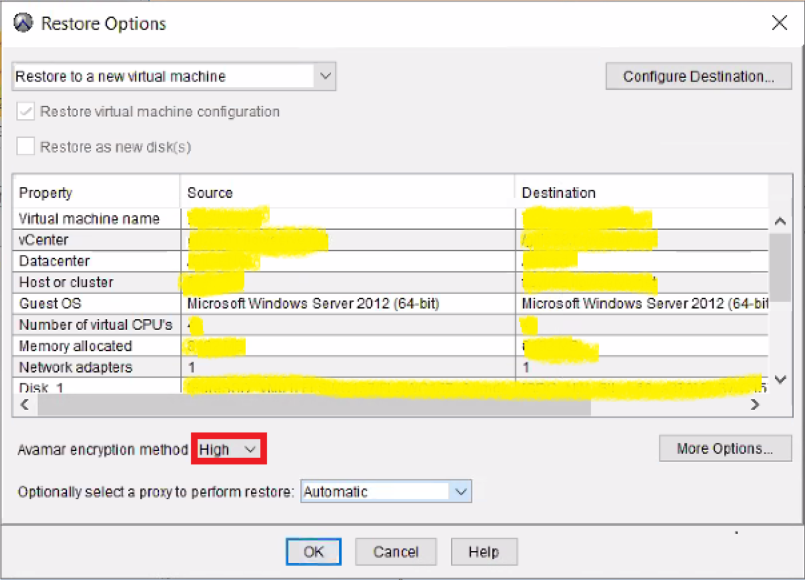
2- Em seguida, clique em 'More Options' para definir a criptografia como 'High' no Data Domain conforme abaixo:
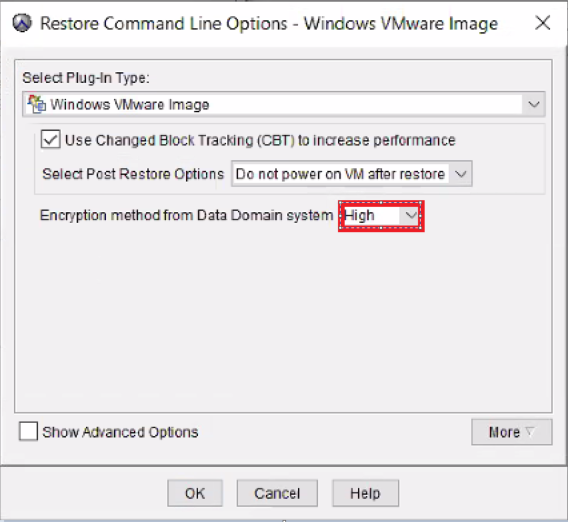
- A restauração da imagem deve funcionar corretamente.
Affected Products
AvamarProducts
Avamar, Avamar Client for VMwareArticle Properties
Article Number: 000069283
Article Type: Solution
Last Modified: 06 Nov 2025
Version: 3
Find answers to your questions from other Dell users
Support Services
Check if your device is covered by Support Services.