Avamar-virtuaalikoneen levykuvan palautus epäonnistuu ennen edistymisen näyttämistä
Summary: Avamar-virtuaalikoneen levykuvan palautus epäonnistuu ennen edistymisen näyttämistä, koska välityspalvelin ei saa yhteyttä Data Domainiin virtuaalikoneen metatietojen hakemista varten
This article applies to
This article does not apply to
This article is not tied to any specific product.
Not all product versions are identified in this article.
Symptoms
–
- Virtuaalikoneen levykuvan palautus epäonnistuu ennen edistymisen näyttämistä, ja toimintolokeissa näkyvät seuraavat virheilmoitukset:
avvcbimage Info <12181>: Avtar metadata restore session initiated avvcbimage Info <10684>: Setting ctl message version to 3 (from 1) avvcbimage Info <16136>: Setting ctl max message size to 268435456 avvcbimage Info <6688>: Process 8885 (/usr/local/avamarclient/bin/avtar) finished (code 158: cannot establish connection with server (possible network or DNS failure)) avvcbimage Warning <6690>: CTL workorder "MOD-########99" non-zero exit status 'code 158: cannot establish connection with server (possible network or DNS failure)' avvcbimage Error <0000>: [IMG0011] restore metadata Avtar exited with 'code 158: cannot establish connection with server (possible network or DNS failure)'avvcbimage FATAL <17824>: GetDiskAttributed Failed avvcbimage Info <18664>: Login(https://<Vcenter_FQDN>:443/sdk) Datacenter: 'xxxxert' avvcbimage Info <19728>: - connected to 'VirtualCenter' - version: '<vcenter_version>', apiVersion:'6.7.3' avvcbimage Info <42146>: Login by loginWS test is OK. avvcbimage Info <42225>: (CURL) Logging into datacenter path of 'folder?dcPath=xxxxert', xxxxert => xxxxert avvcbimage Info <42226>: (Legacy) Logging into datacenter path of 'folder?dcPath=xxxxert', xxxxert => xxxxert avvcbimage Info <41153>: Using CURL Method avvcbimage Info <41154>: Re-using vCS Session Cookie avvcbimage Info <41153>: Using CURL Method avvcbimage Info <41154>: Re-using vCS Session Cookie avvcbimage Info <17770>: DataStore Storage Info: DataStore:'<Datastore_Name>': Pre Free Space(KB)=4340662272, Post Free Space(KB) range=##### to ##### Disk '####': Disk Size(KB)=#####, restoreThisDisk=1, thin=0 Disk '####': Disk Size(KB)=#####, restoreThisDisk=1, thin=0 Disk '####': Disk Size(KB)=#####, restoreThisDisk=1, thin=0 Disk '####': Disk Size(KB)=#####, restoreThisDisk=1, thin=0 avvcbimage Info <17825>: A VM create has been requested. avvcbimage Info <18664>: Login(https://<Vcenter_FQDN>:443/sdk) Datacenter: 'xxxxert' avvcbimage Info <19728>: - connected to 'VirtualCenter' - version: '<vcenter_version>', apiVersion:'6.7.3' avvcbimage Info <42146>: Login by loginWS test is OK. avvcbimage Info <42213>: checking datastore type for special processing, checking for type vsan, actual type = VMFS avvcbimage Info <42213>: checking datastore type for special processing, checking for type VVOL, actual type = VMFS avvcbimage Error <17771>: Invalid request to create a VM. avvcbimage Error <0000>: [IMG2012] VM creation failed during restore.
- Edellä mainitut virheet tarkoittavat, että välityspalvelin yritti hakea virtuaalikoneen metatietoja Data Domainista, muttei saanut yhteyttä siihen.
- Siksi vcenteriin lähetetty välityspalvelimen pyyntö oli virheellinen, ja virtuaalikoneen luontivaihe epäonnistui.
Cause
- Kun palautusta aloitetaan, Data Domainin salaustilan arvo on edelleen Default, vaikka salauksen vahvuudeksi oli määritetty varmuuskopioinnin yhteydessä High sekä Avamar että Data Domainissa.
Resolution
- Korjaa ongelma seuraavasti, kun aloitat palautusta:
1-Varmista, että salauksen vahvuudeksi Avamarissa on määritetty High seuraavasti:

2-Valitse More Options ja määritä salauksen arvoksi High myös Data Domainissa seuraavasti:
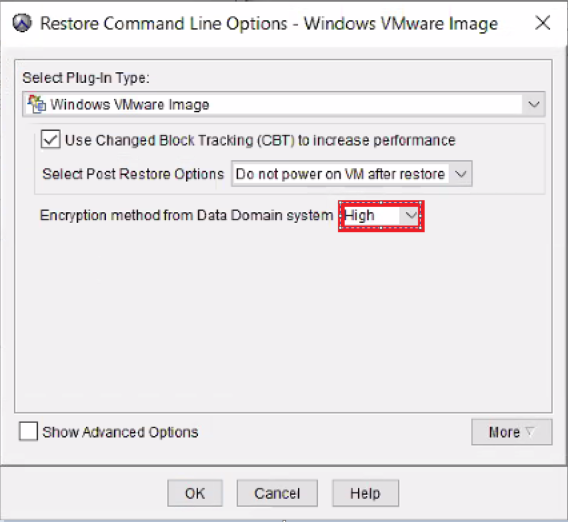
- Palautus levykuvasta toimii oikein.
Affected Products
AvamarProducts
Avamar, Avamar Client for VMwareArticle Properties
Article Number: 000069283
Article Type: Solution
Last Modified: 06 Nov 2025
Version: 3
Find answers to your questions from other Dell users
Support Services
Check if your device is covered by Support Services.