How to Identify if the Latitude 3390 and 3330 2-in-1 Support Dell Active Pens
Summary: How to identify if your Dell Latitude 3390 or 3330 2-in-1 supports Dell Active Pens, including models PN338M, PN350M, and PN579X.
This article applies to
This article does not apply to
This article is not tied to any specific product.
Not all product versions are identified in this article.
Symptoms
Cause
No cause information is available.
Resolution
Latitude 3390 and 3330 2-in-1 Support For Dell Active Pens
The Latitude 3390 2-in-1 and Latitude 3330 2-in-1 come with two types of LCD panels: One that Supports a Dell Active Pen and one that does NOT support a Dell Active Pen.
Follow these steps to determine if your System supports the Dell Active Pen:
- Go to: Dell.com/Support
- Enter your Service Tag and click Search.

- Click "System Configuration."

- Click the "Components" drop-down.
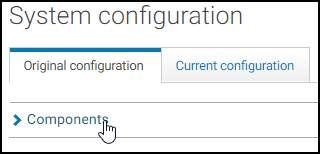
- Use Ctrl-F to search for the word "FHD."
- If the words "Active Pen Support" appear in the description, your system supports the Dell Active Pen.
Latitude 3390 2-in-1:- 391-BDM: 13.3" FHD WVA (1920 x 1080) Embedded Touch Anti-Glare, IR Camera & Microphone, WLAN Capable, Active Pen Support
Latitude 3330 2-in-1:- 13.3" FHD (1920x 1080) AG, AR, 2in1, Touch, 300 nits, WVA, FHD-IR Camera, Corning Gorilla Glass, Active Pen Support
Note: Only the Dell Active Pen PN338M, PN350M, and PN579X are compatible with the Latitude 3390 2-in-1 which has an LCD panel supporting the Dell Active Pen.
Affected Products
Dell Active Pen - PN338M, Dell Active Pen PN350M, Dell Active Pen - PN579X, Latitude 3330, Latitude 3390 2-in-1Article Properties
Article Number: 000143374
Article Type: Solution
Last Modified: 01 Oct 2025
Version: 10
Find answers to your questions from other Dell users
Support Services
Check if your device is covered by Support Services.