Wi-Fi 6E Access Point Unavailable under BIOSConnect
Summary: The following article provides information about a problem with detecting and connecting to a Wi-Fi 6E Access Point (AP) under BIOSConnect.
This article applies to
This article does not apply to
This article is not tied to any specific product.
Not all product versions are identified in this article.
Symptoms
BIOSConnect cannot detect Wi-Fi 6E Access Points:
Your computer may support a Wi-Fi 6E AP on the Windows 10, Windows 11, and Ubuntu 20.04 operating systems. However, the APs Service Set Identifier (SSID) on the following products cannot detect or connect to Wi-Fi 6E under BIOSConnect.
Affected Platforms:
| Precision | Dell Pro Premium | Latitude | Vostro | OptiPlex |
|---|---|---|---|---|
| Precision 3460 | Dell Pro 13 Premium PA13250 | Latitude 5430 | Vostro 3710 | OptiPlex 3000 |
| Precision 3470 | Latitude 5431 | OptiPlex 5000 | ||
| Precision 3660 | Latitude 7330 | OptiPlex 7000 | ||
| Precision 5470 | Latitude 7340 | OptiPlex XE4 | ||
| Precision 7670 | Latitude 7430 | |||
| Precision 7770 | Latitude 7440 | |||
| Latitude 7530 | ||||
| Latitude 7640 | ||||
| Latitude 9330 | ||||
| Latitude 9430 |
What is BIOSConnect?
BIOSConnect is a pre-boot framework that allows your computer to connect to Dell Technologies over the Internet.
BIOSConnect downloads SupportAssist Operating System Recovery, and initiates the recovery of your operating system. It does this if your device cannot boot to your operating system after repeated attempts. BIOSConnect may be available on your computer in one of the following configurations:
- Attached BIOSConnect: This configuration is installed on the Boot drive (You lose this capability if you format the drive.)
- Hybrid BIOSConnect: This configuration is installed on both the Boot drive and the firmware (You can affect this capability if you format the drive.)
- Embedded BIOSConnect: This configuration is installed only on the firmware (The status of the Boot drive does not affect the capability of BIOSConnect.)
Note: BIOSConnect is available on certain Dell platforms. The configuration of BIOSConnect which is supported depends on the model of your device and the version of SupportAssist Operating System Recovery that installs. See the Support Matrix on the SupportAssist Operating System Recovery documentation page for a list of supported products.
Your Internet connection type affects the next step:
- A wired Internet connection automatically starts the download.
- A wireless Internet connection scans for an available network which you must connect to before it starts the download.
Cause
The wireless drivers in the BIOSConnect Dell Provided (BIOS) Feature (DPF) do not support Wi-Fi 6E.
Resolution
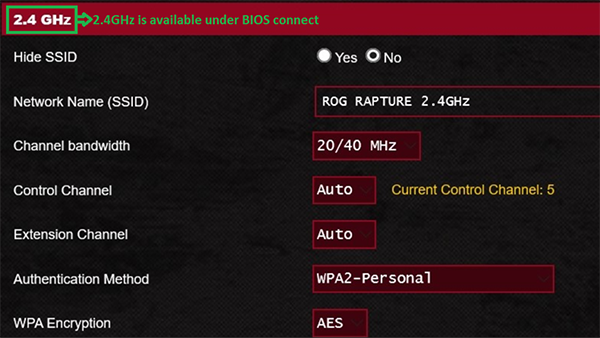
BIOSConnect does not support the 6 GHz protocol, even if your operating system does. You must adjust the AP's protocol to either 2.4 GHz or 5 GHz under your AP's setup menu to connect to an available network. (The following pictures give examples of the various protocols.)


Affected Products
Dell Pro 13 Premium PA13250, Latitude 7330 Rugged Extreme, Latitude 7340, Latitude 9330, Latitude 5430 Rugged, Latitude 5431, Latitude 7430, Latitude 7440, Latitude 9430, Latitude 7530, Latitude 7640, OptiPlex 3000 Tower, OptiPlex 3000 Micro
, OptiPlex 3000 Small Form Factor, Optiplex 5000 Tower, OptiPlex 5000 Micro, OptiPlex 5000 Small Form Factor, OptiPlex 5090 Tower, OptiPlex 5090 Micro, OptiPlex 5090 Small Form Factor, OptiPlex 7000 Tower, OptiPlex 7000 Micro, OptiPlex 7000 Small Form Factor, OptiPlex XE4, Precision 3470, Precision 5470, Precision 7670, Precision 7770, Precision 3460 Small Form Factor, Precision 3660 Tower, Vostro 3710
...
Article Properties
Article Number: 000194506
Article Type: Solution
Last Modified: 11 Mar 2025
Version: 11
Find answers to your questions from other Dell users
Support Services
Check if your device is covered by Support Services.