PowerStore: Health check detects an issue with the lockbox
Summary: System Health Check detects an issue with the dare lockbox.
This article applies to
This article does not apply to
This article is not tied to any specific product.
Not all product versions are identified in this article.
Symptoms
The system health check may fail with kms lockbox file check with the following messages:
It may occur in one of the following scenarios:
- If the dare lockbox is missing on the primary node, the error is Lockbox file does not exist on primary node (KB#000196653).
- If the dare lockbox is missing on the peer node, the error is Lockbox file does not exist on peer node (KB#000196653).
- If the dare lockbox file exists on both nodes and there is a mismatch, then the error is The lockbox file between two nodes is inconsistent (KB#000196653).
It may occur in one of the following scenarios:
- Running a System Check using PowerStore Manager (UI) with the Run System Check or Run Upgrade Extensions option:
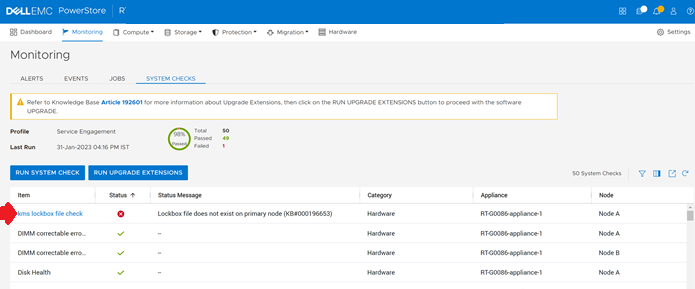
- Running the System Health Service Script (svc_health_check) using an SSH connection:
[SVC:root@6L08RZ2-A user]$ svc_health_check run -rhc kms_lockbox_file_check
Name                               Location  Status     Description
kms lockbox file check             node_a    FAILED     Lockbox file does not exist on peer node (KB#000196653)
This issue may result in a dual node reboot during the upgrade resulting in loss of access to the data.
Do NOT perform upgrades or any maintenance operations until this issue is resolved.
Cause
This is caused by an unexpected software timing issue. The timing issue prevents the proper sequence to unlock the Data at Rest Encryption (D@RE) key management service (KMS) lockbox.
Resolution
Contact Dell Technical Support or your Authorized Service Representative, and quote this knowledge base article ID.
Additional Information
For more information about System Health Checks see KB 000198084 PowerStore: How to use the System Check feature or KB 000192601 PowerStore: How to Check the Health of the Cluster Before Software Upgrade Using Pre-Upgrade Health Check and System Check.
Affected Products
PowerStoreArticle Properties
Article Number: 000196653
Article Type: Solution
Last Modified: 13 Jun 2025
Version: 3
Find answers to your questions from other Dell users
Support Services
Check if your device is covered by Support Services.