CloudLink:CloudLink 節點卡在緊急模式中
Summary: CloudLink 節點卡在緊急模式中。
This article applies to
This article does not apply to
This article is not tied to any specific product.
Not all product versions are identified in this article.
Symptoms
在啟動 CloudLink 節點後,會看到下列訊息:
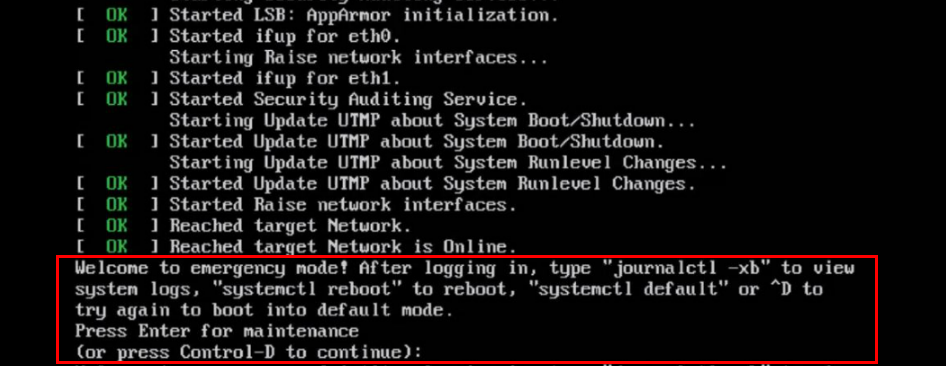
Welcome to emergency mode! After logging in, type "journalctl -xb" to view
system logs, "systemctl reboot" to reboot, "systemctl default" or ^D to
try again to boot into default mode.
Press Enter for maintenance
(or press Control-D to continue):
Cause
此問題是由於必須修復的檔案系統問題所導致。
Resolution
若要解決節點上的檔案系統問題,請執行下列步驟:
如果根檔案系統乾淨,您可以使用上述相同程式在其他檔案系統上執行 fsck。
執行 command journalctl -xb。這些記錄可能會指出是否有損壞的檔案系統需要修復。
您可以使用命令lsblk和blkid來協助將 uuid 連結至其檔案系統。
以下是在journalctl -xb:
/dev/sda6中可能會看到的錯誤範例:發現屬於損毀孤立連結清單的 Inode。
/dev/sda6:未預期的不一致性:手動執行 fsck。
無法在 /dev/disk/by-uuid/fd782a8-a70d-045513691c7e 上開機檔案系統檢查如果無法使用 fsck 修復檔案系統,或如果您有一個 Cloudlink 節點經常卡在緊急模式中,您應該從叢集中移除該損壞的 Cloudlink 節點。
接著從 OVA 部署新的 Cloudlink 節點,然後加入現有的叢集。
如果您可以修復檔案系統,您應該從 Cloudlink UI 檢查叢集的健全狀況。
這會在系統>叢集中完成,並確保傳入和外接同步狀態正常。
- 您按下 Control-D 以繼續,但仍處於緊急模式。
- 按下 ENTER 鍵以進行維護。
- 在根 (/) 檔案系統上執行檔案系統檢查。
root@cloudlink:~# lsblk
- 按 下 y 以修正任何發現的錯誤。
- 重新開機節點。
如果根檔案系統乾淨,您可以使用上述相同程式在其他檔案系統上執行 fsck。
執行 command journalctl -xb。這些記錄可能會指出是否有損壞的檔案系統需要修復。
您可以使用命令lsblk和blkid來協助將 uuid 連結至其檔案系統。
以下是在journalctl -xb:
/dev/sda6中可能會看到的錯誤範例:發現屬於損毀孤立連結清單的 Inode。
/dev/sda6:未預期的不一致性:手動執行 fsck。
無法在 /dev/disk/by-uuid/fd782a8-a70d-045513691c7e 上開機檔案系統檢查如果無法使用 fsck 修復檔案系統,或如果您有一個 Cloudlink 節點經常卡在緊急模式中,您應該從叢集中移除該損壞的 Cloudlink 節點。
接著從 OVA 部署新的 Cloudlink 節點,然後加入現有的叢集。
如果您可以修復檔案系統,您應該從 Cloudlink UI 檢查叢集的健全狀況。
這會在系統>叢集中完成,並確保傳入和外接同步狀態正常。
Affected Products
CloudLinkProducts
CloudLink SecureVMArticle Properties
Article Number: 000197726
Article Type: Solution
Last Modified: 13 May 2026
Version: 6
Find answers to your questions from other Dell users
Support Services
Check if your device is covered by Support Services.