PowerStore: Management network reconfiguration does not complete.
Summary: Management network reconfiguration does not complete if the guest Virtual Machine (VM) is disconnected from the VMware distributed switch.
This article applies to
This article does not apply to
This article is not tied to any specific product.
Not all product versions are identified in this article.
Symptoms
The management network reconfiguration must "refresh" the PowerStore X VM networking after the management address change. This is done using the reconfiguration of the VM.
Cause
The guest VMs are not filtered out of this refresh operation, so it is applied to any VM in the cluster. If there are VMs that are disconnected from the VMware Distributed Switch (VDS) state, the operation does not complete and the management reconfiguration rolls back.
Resolution
All the cluster virtual machines (VMs) must be powered on to proceed with the management network reconfiguration. Any virtual machine that is powered off or suspended must be powered on.
- Select the VM that must be powered on: vCenter → Datacenter → Cluster → Virtual Machine
- Right-click the VM and power on the VM: Power → Power On
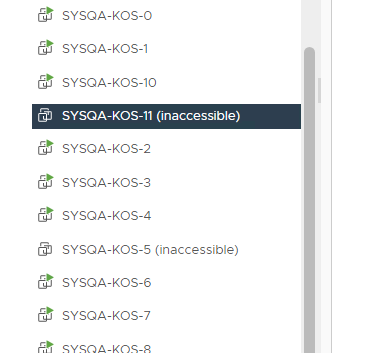
Any VM that is shown as inaccessible must be reconfigured to restore the connectivity with the VDS:
- Select the VM that must be powered on: vCenter → Datacenter → Cluster → Virtual Machine
- Go to the VM configuration: Virtual Machine → Summary → VM Hardware → Edit Settings
- Ensure that at least one of the VM network adapters is connected to the PowerStore VDS.
Figure 1: Example of an Inaccessible VM
Affected Products
PowerStore 1000X, PowerStore 3000X, PowerStore 5000X, PowerStore 7000X, PowerStore 9000XArticle Properties
Article Number: 000200799
Article Type: Solution
Last Modified: 29 Jul 2025
Version: 4
Find answers to your questions from other Dell users
Support Services
Check if your device is covered by Support Services.