Dell Unity:已設定林層級驗證時,無法新增 LDAP 使用者的角色對應。(使用者可修正)
Summary: 針對 GUI 管理,在 Unity 上進行客戶設定的林層級 LDAP 驗證。LDAP 連線已確認正常,但客戶無法新增 LDAP 使用者的角色對應。
This article applies to
This article does not apply to
This article is not tied to any specific product.
Not all product versions are identified in this article.
Symptoms
- 在 Unisphere 管理用的 LDAP 伺服器埠 3268 上,客戶設定的林層級 LDAP 驗證。客戶遵循安全性組態指南,在進階視窗的使用者 ID 屬性欄位中指定使用者PrincipalName。
Dell EMC Unity™ 系列安全性組態指南 (delltechnologies.com)

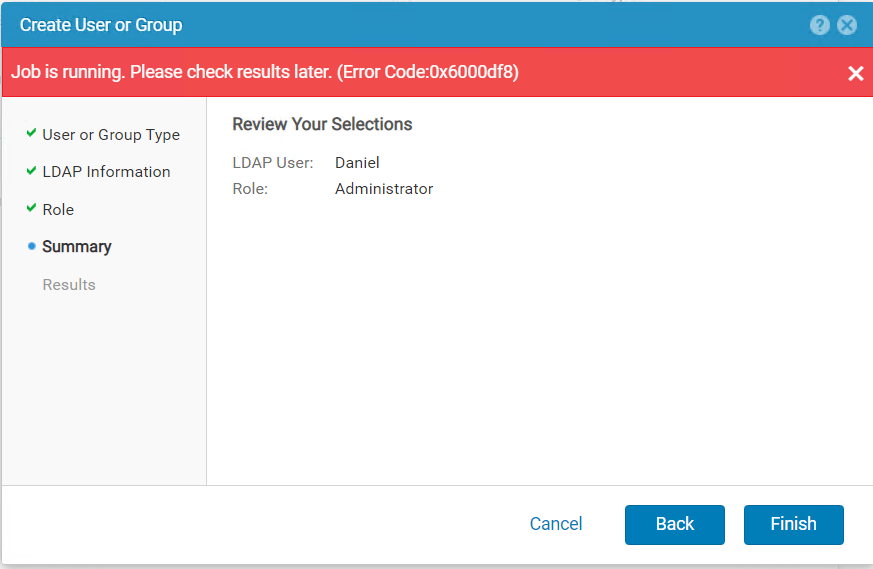
嘗試在使用者和群組中新增 LDAP 使用者 -->使用者管理-->管理使用者 & 群組時,收到以下錯誤。
Dell EMC Unity™ 系列安全性組態指南 (delltechnologies.com)
嘗試在使用者和群組中新增 LDAP 使用者 -->使用者管理-->管理使用者 & 群組時,收到以下錯誤。
Cause
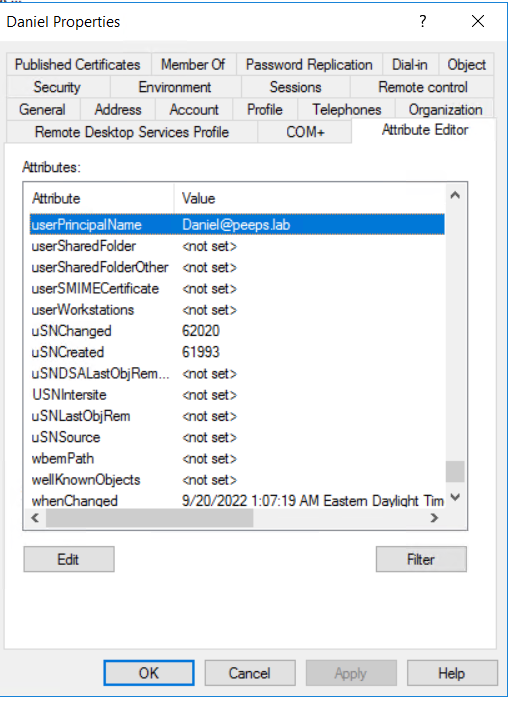
- 當已設定 lin level LDAP 驗證時,LDAP 使用者用於角色對應的使用者名稱應以 @而這正是客戶在 LDAP 伺服器中為使用者設定的使用者PincipalName。
Resolution
- 如果 Windows Domain Controller 是 LDAP 伺服器,則可透過 Active Directory 使用者和電腦從使用者的屬性中擷取 UserPrincipalName。請注意,「View」標籤中的「進階功能」標籤必須啟用,才能顯示使用者的屬性編輯器。
Affected Products
Dell EMC UnityArticle Properties
Article Number: 000203550
Article Type: Solution
Last Modified: 14 Mar 2023
Version: 3
Find answers to your questions from other Dell users
Support Services
Check if your device is covered by Support Services.