Troubleshooting OS10 Network Commands
Summary: Troubleshooting OS10 Network Commands.
This article applies to
This article does not apply to
This article is not tied to any specific product.
Not all product versions are identified in this article.
Instructions
Default Login credentials.
Login: admin
Password: admin
To view all commands, use the Show command followed by enter.
s1# show version
s1# show boot
s1# show spanning-tree active
s1# show interface status | no-more

Filter options: find, except, grep.
s1# show ip route
To gather a show tech-support
Log PuTTY session to a text file.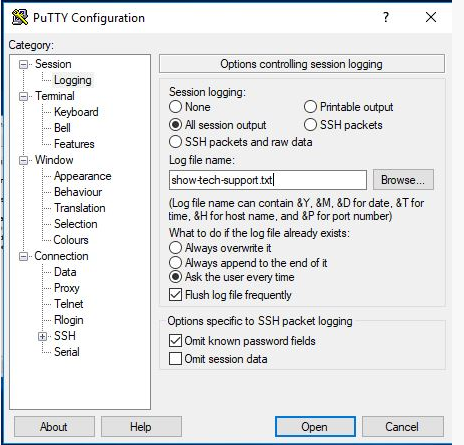
This command lists all information onto the screen:
s1# show tech-support
How to generate an SOSreport Bundle
Kernel level support bundle saved to flash on the switch:
s1# generate support-bundle
This command shows the latest created bundles:
s1# dir supportbundle
s1# copy supportbundle://sosreport-OS10-dateandtime.tar.xz
(Then tab to see options for where you can copy it to)
Can also (if configured to use support assist with Dell Servers) run a support-assist transfer).
This would transfer all the logs from a switch to a support assist server:
s1# support-assist activity full-transfer start-now
To check configuration of support assist:
s1# configure
s1(config) # support-assist
s1(conf-support-assist)# show

s1(conf-support-assist)# exit
s1(config)
To stop error messages being printed on the screen when troubleshooting:
s1(config)# logging console enable
s1(config)# logging console disable
s1(config)# end
To change the severity of errors reported to console:
s1(config)# logging console severity log-crit
s1(config)#logging console enable
To reset logging to default:
s1(config)# no logging console severity
Affected Products
StorageArticle Properties
Article Number: 000207120
Article Type: How To
Last Modified: 30 Sep 2025
Version: 4
Find answers to your questions from other Dell users
Support Services
Check if your device is covered by Support Services.