NetWorker: Windows File System Backup for Azure Client is Missing Files
Summary: Windows file system on Azure skips files although there is no NetWorker directive to do so.
This article applies to
This article does not apply to
This article is not tied to any specific product.
Not all product versions are identified in this article.
Symptoms
Windows file system on Azure skips files although there is no NetWorker directive to do so.
Debug save output shows
Debug save output shows
87713:save: Found prototype specification for '\\?\GLOBALROOT\Device\HarddiskVolumeShadowCopy1288\': skip : hiberfil.sys
87713:save: Found prototype specification for '\\?\GLOBALROOT\Device\HarddiskVolumeShadowCopy1288\Areas Compartidas\':+ skip : *.*
Cause
The backup file system is on Azure storage volume. The system uses Volume Shadow copy Service (VSS) Writer "Sync Share Service Writer." It skips files by design.
To verify that this is the cause,
- Open a command prompt as Administrator and run:
C:\>  DISKSHADOW /l writers.txt
DISKSHADOW> LIST WRITERS DETAILED
DISKSHADOW> exit
- Look at the output file for writers.txt. If you see the below message, then that confirms the issue.
* WRITER "Sync Share Service Writer"
.////
and that writer contains Components with affected drive
            - Components:
            - File List: Path = J:\DataFiles, Filespec = *.*
            - Paths affected by this component:
                - J:\DataFiles
            - Volumes affected by this component:
                               - \\?\Volume{c34a534a-63a2-4aee-b47a-e2092dc7a901}\ [J:\]
Resolution
Turn off VSS for backing up Azure storage volumes with the command:
VSS:*=off
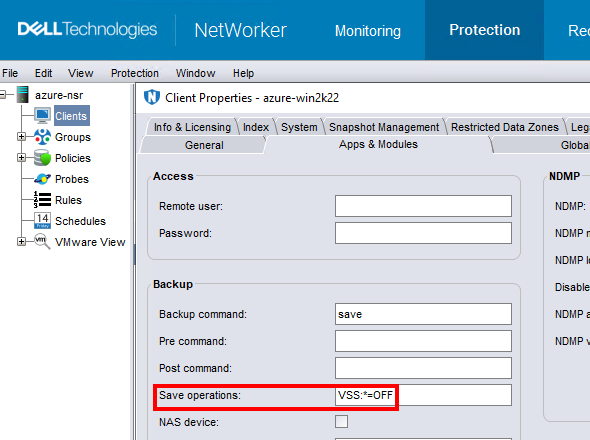
NOTE: Only do this for clients that backup file system data. Performing a backup without VSS makes it impossible to backup the windows
DISASTER_RECOVERY:\ save set; meaning, Bare Metal Recovery (BMR) of the Windows VM would not be possible.
Affected Products
NetWorkerProducts
NetWorker FamilyArticle Properties
Article Number: 000210906
Article Type: Solution
Last Modified: 04 Mar 2026
Version: 3
Find answers to your questions from other Dell users
Support Services
Check if your device is covered by Support Services.