Cannot Update WD19TB Dock Firmware When a Thunderbolt Monitor is Connected
Summary: This article discusses not being able to update the firmware of a WD19TB dock when a thunderbolt monitor is connected.
This article applies to
This article does not apply to
This article is not tied to any specific product.
Not all product versions are identified in this article.
Symptoms
Affected Products:
- WD19TB Dock
- Dell Dock - WD19S
- Dell Dock WD19
- Dell Performance Dock - WD19DC
- Dell Performance Dock - WD19DCS
- Dell Thunderbolt Dock - WD19TB
- Dell Thunderbolt Dock - WD19TBS
- Dell Thunderbolt Dock - WD22TB4
- Dell Dual Charge Dock HD22Q
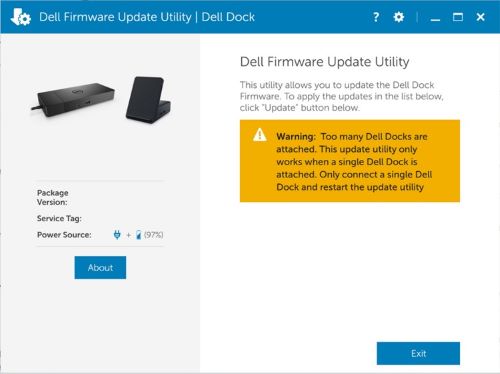
Dell firmware update utility shows a warning message. Too many Dell Docks are attached. This update utility only works when a single Dell Dock is attached. Only connect a single Dell Dock and restart the update utility, when updating the firmware on a WD19TB docking station when connected to a thunderbolt monitor. For example, a UP2720Q or UP3221Q monitor connected to WD19TB causes the warning.
Cause
Monitor and Salomon USB Hub have the same VID/PID, so Dell Firmware Update Utility (DFU) recognized two docks to show the warning message.
Resolution
Disconnecting the thunderbolt monitors before updating the firmware.
Affected Products
Dell Dual Charge Dock HD22Q, Dell Dock WD19, Dell Performance Dock - WD19DC, Dell Performance Dock – WD19DCS, Dell Dock – WD19S, Dell Thunderbolt Dock - WD19TB, Dell Thunderbolt Dock – WD19TBS, Dell Thunderbolt Dock – WD22TB4Article Properties
Article Number: 000211189
Article Type: Solution
Last Modified: 10 Apr 2025
Version: 5
Find answers to your questions from other Dell users
Support Services
Check if your device is covered by Support Services.