Latitude and Precision Laptops Do Not Charge Connected to WD19DC and WD19DCS Docks
Summary: The following article provides information about a power issue when connecting to your Dell Performance Dock WD19DC or WD19DCS. Certain Latitude and Precision laptops do not charge when connected through the dock. ...
This article applies to
This article does not apply to
This article is not tied to any specific product.
Not all product versions are identified in this article.
Symptoms
Charging issue connecting to WD19DC and WD19DCS docks with two USB type-C cables
Do you notice a charging issue when connecting through either the Dell Performance WD19DC or WD19DCS docks with one of the following laptops?
This issue affects the following Dell products:
- Dell Performance Docks WD19DC and WD19DCS
- Latitude 5340, 5440, and 5540 laptops
- Latitude 7340, 7440, and 7640 laptops
- Latitude 9440 laptop
- Precision 3480, 3580, and 3581 Mobile Workstations
Plugging the double USB type-C cables from the docking station into your laptop while it is turned off triggers the Over Voltage Protection (OVP). Triggering OVP stops the laptop from charging while connected through the dock. Your laptop does not charge even after it is turned on and boots into the Windows operating system.
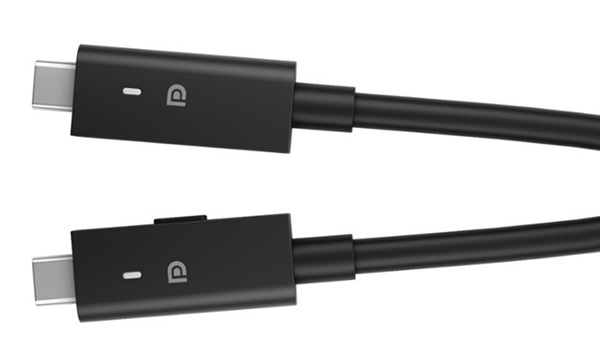
Note: Latitude 5xx0, 7xx0, 9xx0, and Precision 3xx0 laptops support only a single Type-C connector coming from the WD19DC or WD19DCS docks. The dual USB type-C connectors from the WD19DC and WD19DCS docks are held together magnetically. However, they can be separated to plug only one cable into the laptop. Read the Dell Commercial Docking Compatibility Chart in the resolution for more information:
Cause
OVP is triggered under the following circumstances:
- Connect two USB type-C cables to the laptop while it is turned off with no other AC power input. Once OVP is triggered, the laptop cannot charge.
- The no charge symptom continues to be seen. Even after the dock and the AC adapter have been swapped out for parts you know are working.
Resolution
Recover your laptop by resetting the overvoltage protection to enable charging using the following instructions:
-
Turn your laptop off.
-
Unplug every USB type-C connector from your laptop.
-
Wait at least 10 seconds before reseating the AC Adapter to the dock.
-
The dual USB Type-C connector on the dock is held together by magnets. Pull the dual connector apart giving two separate USB Type-C connectors.
-
Plug one of the two separated connectors into your laptop.
-
Turn your laptop on.
-
Check that your laptop is charging correctly.
-
Use the chart in the following PDF link to confirm if your model of Dell laptop is designed to use a single or dual USB Type-C cable from the dock:
- Dell Docking Compatibility Guide.pdf (English Only)
Affected Products
Dell Performance Dock - WD19DC, Dell Performance Dock – WD19DCS, Latitude 5340, Latitude 7340, Latitude 5440, Latitude 7440, Latitude 9440 2-in-1, Latitude 5540, Latitude 7640, Precision 3480, Precision 3580, Precision 3581Article Properties
Article Number: 000214560
Article Type: Solution
Last Modified: 27 Jun 2025
Version: 7
Find answers to your questions from other Dell users
Support Services
Check if your device is covered by Support Services.