如何找到戴尔 Pro 键盘及鼠标KM5221W的 USB 转换器
Summary: 按照以下逐步说明,了解如何找到戴尔 Pro 键盘及鼠标KM5221W USB 转换器。
This article applies to
This article does not apply to
This article is not tied to any specific product.
Not all product versions are identified in this article.
Instructions
戴尔 Pro 键盘及鼠标KM5221W使用一个通用的 USB 无线转换器来连接键盘和鼠标。
受影响的键盘:
- 戴尔 Pro 键盘及鼠标 KM5221W
- 打开KM5221W包装箱时,查找从鼠标中伸出的 USB 转换器标签。

- 轻轻卸下鼠标顶盖,然后找到转换器。
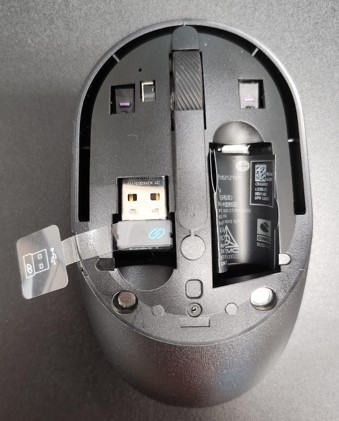
- 从鼠标内的转换器存储中取出 USB 转换器。

- 转至 Dell Pro 键盘及鼠标 KM5221W 的支持 ,并参阅 Dell Pro 键盘及鼠标 KM5221W 快速安装指南或用户指南以完成设置。
Affected Products
Alienware, Dell All-in-One, Dell Pro All-in-One, Dell Pro Max Micro, Dell Pro Max Slim, Dell Pro Max Tower, Dell Pro Micro, Dell Pro Slim, Dell Pro Tower, Dell Slim, Dell Tower, Inspiron, OptiPlex, Vostro, XPS, G Series, Chromebook, G Series
, Alienware, Dell Plus, Dell Pro, Dell Pro Max, Dell Pro Plus, Dell Pro Premium, Inspiron, Latitude, Dell Pro Rugged, Vostro, XPS, Fixed Workstations, Mobile Workstations, Dell Pro Max Micro XE FCM2250, Dell Pro Keyboard and Mouse KM5221W
...
Article Properties
Article Number: 000214907
Article Type: How To
Last Modified: 07 May 2025
Version: 5
Find answers to your questions from other Dell users
Support Services
Check if your device is covered by Support Services.