Dell Unity: How to update customer contact information in Unity Unisphere.
Summary: When a Unity system initiates a call home to open a service request for a support issue, it sends the customer's contact information along with the alert message. This simplifies the process for Technical Support engineers to contact the appropriate individuals. Up-to-date contact information ensures that Technical Support has the most accurate information for contacting the customer in response to a support issue. Dell Technologies recommends keeping the primary contact's information up to date in Unity Unisphere. This article shows how to do so. ...
This article applies to
This article does not apply to
This article is not tied to any specific product.
Not all product versions are identified in this article.
Instructions
To update customer contact information in Unity Unisphere, follow these steps.
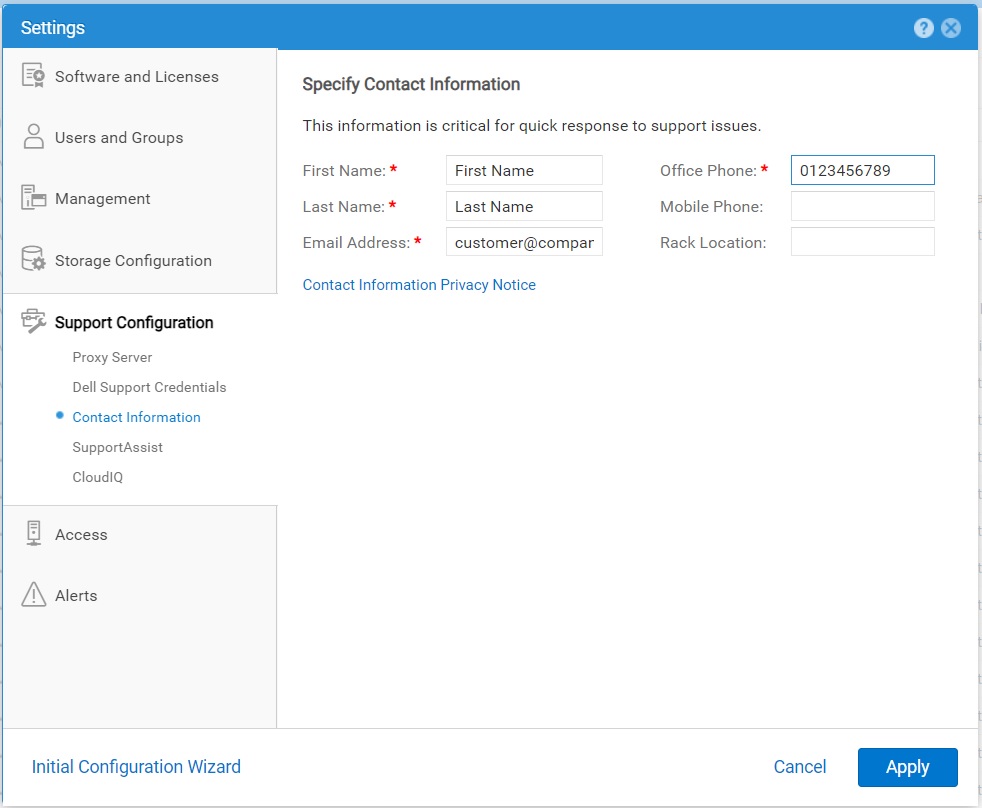
- Select the Settings icon, and then select Support Configuration > Contact Information.
- Specify your contact details.
- Click Apply to save the changes.
Affected Products
Dell EMC Unity, Dell EMC Unity 300F, Dell EMC Unity 350F, Dell EMC Unity 400, Dell EMC Unity 400F, Dell EMC Unity 450F, Dell EMC Unity 500, Dell EMC Unity 500F, Dell EMC Unity 550F, Dell EMC Unity 600Products
Dell Unity 450F DC, Dell Unity 300, Dell EMC Unity XT 380, Dell EMC Unity XT 380F, Dell EMC Unity XT 480, Dell EMC Unity XT 480F, Dell EMC Unity 600F, Dell EMC Unity 650F, Dell EMC Unity XT 680, Dell EMC Unity XT 680F, Dell EMC Unity XT 880
, Dell EMC Unity XT 880F, Dell EMC Unity Family |Dell EMC Unity All Flash, Dell EMC Unity Family, Dell EMC Unity Hybrid, Dell Unity Operating Environment (OE), Dell EMC UnityVSA Professional Edition/Unity Cloud Edition
...
Article Properties
Article Number: 000216364
Article Type: How To
Last Modified: 20 Oct 2025
Version: 3
Find answers to your questions from other Dell users
Support Services
Check if your device is covered by Support Services.