Dell Unity:如何在 Unity Unisphere 中更新客户联系信息。
Summary: 当 Unity 系统启动 Call Home 以打开支持问题的服务请求时,它会发送客户的联系信息以及警报消息。这简化了技术支持工程师联系相应人员的流程。 最新的联系信息可确保技术支持人员拥有最准确的信息,以便联系客户以响应支持问题。 Dell Technologies 建议在 Unity Unisphere 中将主要联系人的信息保持最新。本文介绍如何执行此操作。
This article applies to
This article does not apply to
This article is not tied to any specific product.
Not all product versions are identified in this article.
Instructions
要更新 Unity Unisphere 中的客户联系信息,请执行以下步骤。
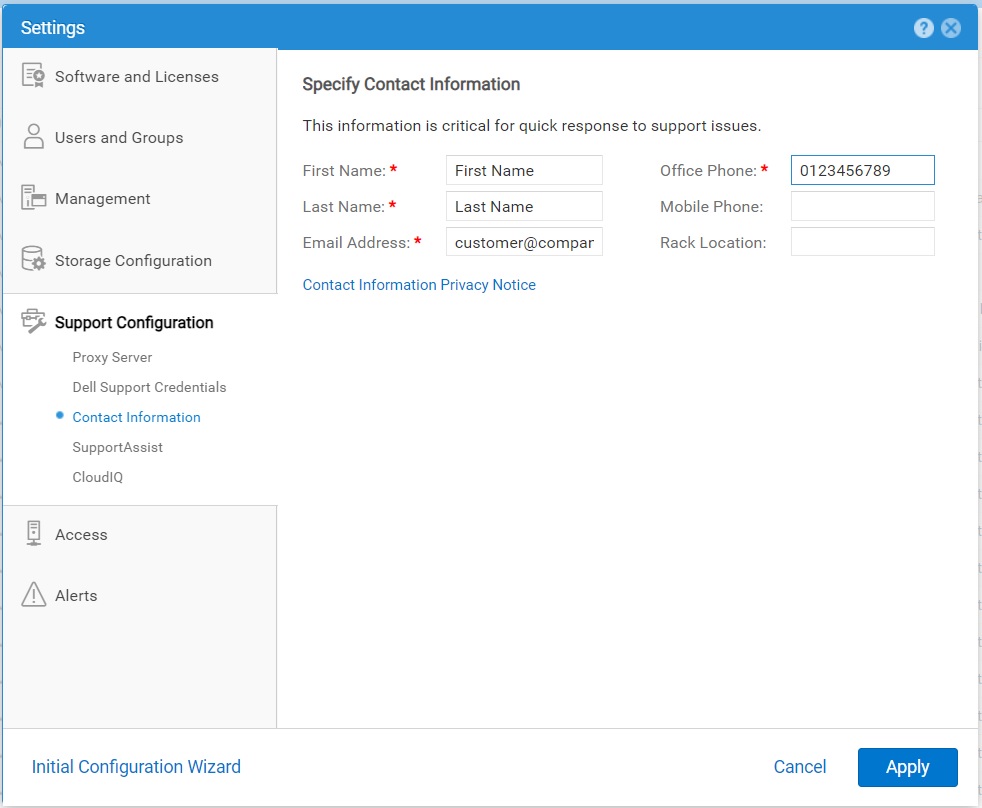
- 选择 Settings 图标,然后选择 Support Configuration > Contact Information 。
- 指定您的联系人详细信息。
- 单击 应用 以保存更改。
Affected Products
Dell EMC Unity, Dell EMC Unity 300F, Dell EMC Unity 350F, Dell EMC Unity 400, Dell EMC Unity 400F, Dell EMC Unity 450F, Dell EMC Unity 500, Dell EMC Unity 500F, Dell EMC Unity 550F, Dell EMC Unity 600Products
Dell Unity 450F DC, Dell Unity 300, Dell EMC Unity XT 380, Dell EMC Unity XT 380F, Dell EMC Unity XT 480, Dell EMC Unity XT 480F, Dell EMC Unity 600F, Dell EMC Unity 650F, Dell EMC Unity XT 680, Dell EMC Unity XT 680F, Dell EMC Unity XT 880
, Dell EMC Unity XT 880F, Dell EMC Unity Family |Dell EMC Unity All Flash, Dell EMC Unity Family, Dell EMC Unity Hybrid, Dell Unity Operating Environment (OE), Dell EMC UnityVSA Professional Edition/Unity Cloud Edition
...
Article Properties
Article Number: 000216364
Article Type: How To
Last Modified: 20 Oct 2025
Version: 3
Find answers to your questions from other Dell users
Support Services
Check if your device is covered by Support Services.